

AWS DevOps Agent and Azure SRE Agent — both GA since March 2026 — can find an incident’s root cause faster than any on-call engineer. But neither vendor lets them directly roll back a deploy, restart a pod, or scale production: between the agent’s diagnosis and the actual change, there’s almost always a human clicking a button. Here’s how to design that approval gate yourself, on top of an incident pipeline you already run, rather than waiting for a vendor to build it for you.
Table of contents
Open Table of contents
- What AI SRE agents already do
- Three levels of autonomy
- An approval gate on top of your existing on-call tool
- What to log for audit
- The line: what should never run without approval
- Comparison: without a gate vs. with a gate
- What you need to build a minimal approval gate
- How to verify it works
- Bottom line
What AI SRE agents already do
AWS DevOps Agent reached GA on March 31, 2026, and Azure SRE Agent on March 10, 2026 (InfoQ). Both share the same working model: the agent subscribes to alerts, correlates them with recent deploys, reads logs and traces, formulates a likely root cause, and proposes a specific action — but production changes in the “restart, rollback, scale” category still go through explicit human confirmation. PagerDuty is meanwhile building an MCP factory so several such agents from different vendors can plug into one incident pipeline through a shared protocol instead of a dozen bespoke integrations.
We already covered what an AI SRE agent actually is and where it breaks — what data it needs, what access it should never get. This post isn’t a repeat of that overview; it’s the next step: how to actually wire an approval gate into an on-call process you already run, whether the agent is your own or a vendor’s.
Three levels of autonomy
Before designing the gate, it helps to split “autonomy” into levels — because the whole guardrail architecture lives at the boundary between the second and the third.
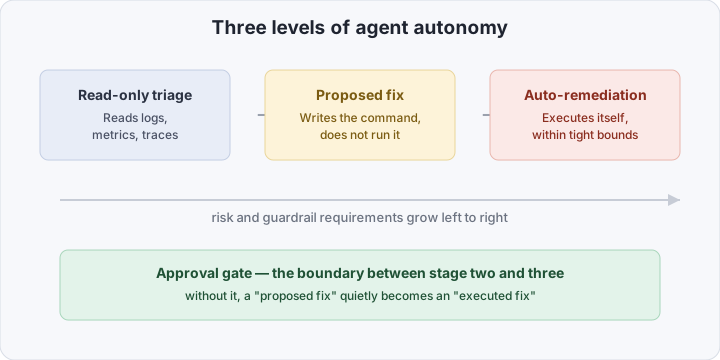
- Read-only triage. The agent reads metrics, logs, traces, and deploy history, builds a timeline, and forms a hypothesis about the cause. It needs no write access at all for this — only read-scoped tokens into the observability stack.
- Proposed fix. The agent names a specific action: “roll back
checkoutto revisiona1b2c3,” “bumpreplicasto 6,” “restart podpayments-7f9c” — with reasoning and a blast-radius estimate attached. The command is formulated, not executed. - Auto-remediation. The agent executes the proposed action itself, without pausing for confirmation — usually within narrow, pre-approved bounds (a specific namespace, a specific set of commands).
Most of the value AI SRE agents claim in 2026 is already captured in the first two levels: diagnosis that used to take 20–30 minutes of manual log-and-graph correlation compresses to seconds. The third level adds reaction speed, but it’s the one that requires real guardrail engineering — and the approval gate belongs exactly at the boundary between “proposed” and “executed.”
An approval gate on top of your existing on-call tool
The key architectural decision is not to build approval into the agent’s own code, but to push it into the tool the on-call engineer already works in — Slack, PagerDuty, Opsgenie. That way the approval gate inherits, for free, what those systems already have configured: RBAC, on-call schedules, and message history as a ready-made audit log.
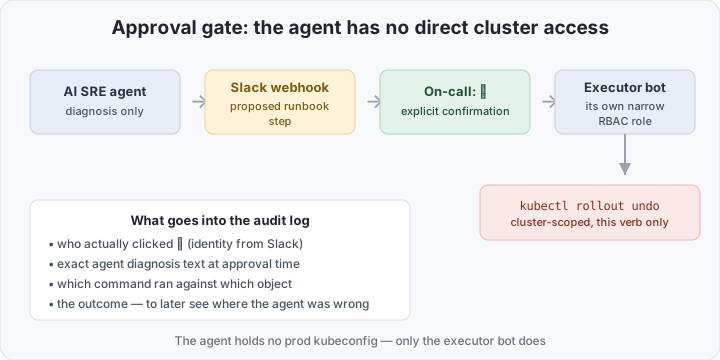
This drives a few concrete architectural requirements:
- The agent holds no production credentials. It publishes a structured proposal (which command, against which object, why, what blast radius) through a webhook into the incident channel — and that’s it. Execution is a separate component’s job.
- Approval is an explicit action, not free text. A ✅ reaction on a specific message, or a dedicated button in an interactive Slack block, unambiguously identifies who approved exactly what. A line like “yeah, go ahead and roll it back” in a general channel is useless as an audit record, legally and technically.
- The executor is a separate service with its own narrow role. It subscribes to approval events (Slack Events API, a PagerDuty webhook) and runs only the command set it has permissions for — regardless of what the agent “asked for.”
- A proposal has a lifespan. If the on-call engineer hasn’t reacted within 5–10 minutes, the proposal is stale and needs to be regenerated — cluster state may have already changed, and approving against old data is riskier than not approving at all.
What to log for audit
An approval gate without an audit trail is just a slower version of auto-remediation with an extra click. The whole construction’s value is being able to reconstruct the decision chain precisely after an incident:
- who approved it — identity from Slack/PagerDuty, not “the agent decided,” because a human formally made the call;
- the agent’s exact diagnosis text at approval time, captured immutably — if the real cause turns out to be different later, you have a snapshot of what the decision was based on;
- which command actually ran and against what — this can differ from what the agent proposed if the on-call engineer tweaked parameters before approving;
- the outcome — did it help, did the rollback itself need rolling back. Collect this signal separately and systematically: it’s the only way to notice that the agent’s diagnosis is consistently wrong for a particular class of incident, and recalibrate trust in it rather than trusting the model in general.
The line: what should never run without approval
Even if an agent shows consistently high diagnostic accuracy, some categories of action shouldn’t move to auto-remediation at all, regardless of approval history:
- data operations — deletion, schema migrations, anything irreversible;
- anything touching money — billing, spend limits, payment integrations;
- external traffic changes beyond already-approved bounds — DNS, backend weights on a load balancer, public ingress rules;
- secrets and IAM — granting or revoking access, key rotation.
What unites these categories: the cost of a wrong automatic action here isn’t “had to roll back a deploy” but “data is gone” or “access is compromised” — an asymmetry no accuracy percentage compensates for.
Comparison: without a gate vs. with a gate
| Without an approval gate | With an approval gate | |
|---|---|---|
| Who executes the change | the agent itself | an executor with its own narrow role |
| Agent’s access to production | direct | none |
| Approval | implicit (trust in the model) | an explicit action by a specific person |
| Audit trail | agent logs (may be incomplete) | diagnosis + approver + command + outcome |
| Risk on a wrong diagnosis | immediate wrong action | stopped at the proposal stage |
| Speed on correct diagnoses | maximum | seconds for the on-call reaction |
What you need to build a minimal approval gate
You’ll need an incident channel in Slack, an incoming webhook for the agent to publish proposals to, and a separate service account in the cluster — not the one the agent itself runs under.
First, a narrow RBAC role for the executor that can do exactly what’s needed to roll back a deployment, and nothing more:
apiVersion: rbac.authorization.k8s.io/v1
kind: Role
metadata:
  name: sre-agent-executor
  namespace: prod
rules:
  - apiGroups: ["apps"]
    resources: ["deployments", "replicasets"]
    verbs: ["get", "list", "watch", "patch"]
---
apiVersion: rbac.authorization.k8s.io/v1
kind: RoleBinding
metadata:
  name: sre-agent-executor-binding
  namespace: prod
subjects:
  - kind: ServiceAccount
    name: sre-agent-executor
    namespace: prod
roleRef:
  kind: Role
  name: sre-agent-executor
  apiGroup: rbac.authorization.k8s.io
Next, the executor that listens for Slack reactions and runs kubectl rollout undo only after confirmation from a known approver:
# simplified Slack Events API handler
on_reaction_added() {
  local reaction="$1" user="$2" message_ts="$3"

  [[ "$reaction" == "white_check_mark" ]] || return 0
  is_authorized_approver "$user" || return 0

  local proposal
  proposal=$(fetch_proposal_by_ts "$message_ts")   # the agent's structured proposal
  is_proposal_expired "$proposal" && return 0

  log_audit_entry --approver "$user" --diagnosis "$proposal" --ts "$message_ts"

  kubectl --as=system:serviceaccount:prod:sre-agent-executor \
    -n prod rollout undo deployment "$(jq -r .target <<<"$proposal")"
}
The agent itself only needs read-only access to the observability stack and permission to post into a Slack channel — it never sees a production kubeconfig at all.
How to verify it works
Confirm the narrow role really is narrow — the executor can do what it should, and nothing beyond that:
kubectl auth can-i patch deployments \
  --as=system:serviceaccount:prod:sre-agent-executor -n prod
# yes

kubectl auth can-i delete secrets \
  --as=system:serviceaccount:prod:sre-agent-executor -n prod
# no
Then run a full test proposal: the agent (or a stub for it) posts a message to Slack, you react with ✅, and the executor’s log should get an entry with your name, the exact diagnosis text, and the kubectl rollout undo outcome. If an entry shows up without your explicit reaction, the gate isn’t working — and that’s worth finding before the agent starts proposing real fixes against production.
Bottom line
The value of a 2026 AI SRE agent isn’t that it can act on its own — it’s how much faster it reaches a diagnosis compared to manual log-and-graph correlation. Auto-remediation can and should expand gradually, but the only safe way to do it is an explicit approval gate — a separate executor with a narrow role, an explicit confirmation from a specific person, and a full audit trail from diagnosis to outcome — not growing trust in the model’s accuracy. Trust in a model shifts from incident to incident; a narrow RBAC role and a mandatory click from the on-call engineer don’t.