

In March 2026, both AWS DevOps Agent and Microsoft Azure SRE Agent hit general availability. Headlines immediately declared “AI will replace on-call” — and mostly missed the point. The model that actually stuck in production is quieter: the agent takes on triage, signal correlation, and runbook execution, while decisions and access stay with a human. Let’s look at what that means in practice and where the line sits.
Table of contents
Open Table of contents
- Why this became practical right now
- The “AI replaces on-call” illusion
- What the agent actually does well
- What the agent can’t do — and why that’s a boundary, not a bug
- Human-in-the-loop: what the boundary looks like in practice
- Comparison: default-wide access vs. scoped access
- What it takes to run a safe AI SRE agent
- How to verify the agent can’t do more than you think
- Common mistakes
- Bottom line
Why this became practical right now
Before the AWS and Microsoft GA releases, AI in incident management lived in the demo-and-pilot zone: independent players like Rootly, Augment, and NewRelic SRE Agent showed alert correlation at conferences, but the big clouds stayed on the sidelines. Once both hyperscalers pushed their own agents to GA within weeks of each other, the conversation shifted from “does this even work?” to “how do we adopt this without losing control of prod?” The independent agents matured over the same window too — they stopped just suggesting text and started calling real observability-stack APIs and opening pull requests with config fixes.
The difference from 2023–2024 comes down to one thing. Back then, “AI in SRE” meant a chatbot on top of logs that answers questions. Now it’s an agent with tool access that can act — file a ticket, roll back a deploy, restart a pod. That shift from “answers” to “acts” is exactly what demands a new access-boundary model, not a cosmetic prompt tweak.
The “AI replaces on-call” illusion
Marketing from both platforms sometimes reads as if the agent takes the whole shift. In practice, the moment an agent gets permission to act without confirmation, the team loses the one quality control that actually works in incident response: a human who sees the context and can say “no, not this time.” The “AI replaces on-call” model breaks exactly where any fully autonomous system in production breaks — at the boundary between “the system is confident” and “the system is right.”
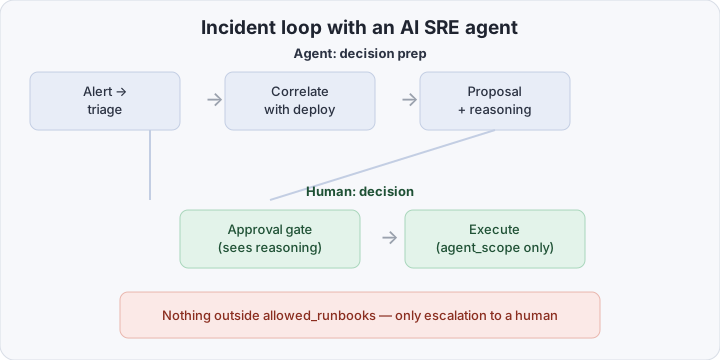
The working model sounds less exciting, but it holds up: the agent triages — sorting the alert stream, cutting duplicates and noise; it correlates — tying an error spike to a recent deploy, a config change, or an external dependency; it proposes — computing a likely rollback target and drafting an action plan. All of that is decision prep. The decision itself, and pressing execute, stays with a human — unless the action falls inside a narrow, pre-approved corridor.
What the agent actually does well
Here’s what already works reliably in production for teams running AWS DevOps Agent, Azure SRE Agent, or independent equivalents:
- Alert parsing and deduplication — hundreds of Prometheus/Datadog firings collapse into one incident with a readable timeline.
- Deploy correlation — the agent matches the onset of degradation against recent changes in CI/CD, config repos, and feature-flag systems.
- Predicted rollback target — not just “roll back,” but a specific version or commit to roll back to, backed by the metrics.
- Context aggregation in one place — logs, traces, recent alerts, and related tickets get pulled into a single summary before a human even opens a terminal.
- Runbook step drafts — the agent proposes a command sequence from an existing runbook, adapted to the specific incident.
What every item has in common: the agent speeds up the path to a decision. The decision itself is a proposal that still needs approval.
What the agent can’t do — and why that’s a boundary, not a bug
Three systematic failure modes show up across every platform the same way.
Opaque systems. If a service has no structured logs, tracing, or metrics with meaningful labels, the agent has nothing to correlate against. It either goes quiet or — worse — produces a confident but wrong hypothesis, because the model is trained to always answer something. Observability is a prerequisite for AI SRE, not an optional extra.
No ground truth for normal behavior. The agent is good at catching deviation from a pattern it has seen before. On services with rare, bursty, or seasonal traffic (sales events, release windows), the baseline for “normal” is blurry, and the agent either raises noise or misses a real degradation.
Permissions. This isn’t a technical limit of the model — it’s a deliberate design choice across every serious deployment: the agent never gets access wider than strictly required for its job. Not because the model is “untrusted” in some abstract sense, but because the cost of an agent’s mistake in prod is the same as the cost of a human’s mistake with excessive rights, minus the pause of “do I really want to click this.”
Human-in-the-loop: what the boundary looks like in practice
Three mechanisms keep the agent inside a safe corridor, and all three are required — none of them work alone.
- Scoping — the agent gets an explicit list of allowed actions (usually a set of runbook IDs or specific API calls), not a broad “operator” role. Anything not on the list is technically impossible, not just discouraged by policy.
- Audit trail — every proposal, every approval, and every executed action is logged separately from regular application logs, tied to the identity of whoever approved it. This isn’t a compliance checkbox — it’s the only way to reconstruct after the fact where the agent went wrong.
- Approval gates — the point where a human explicitly confirms an action before it runs. Critically, the gate has to show the reasoning, not just the command — otherwise approval turns into a reflexive click, and the human stops being a real control.
Comparison: default-wide access vs. scoped access
| Wide access “so it doesn’t get in the way” | Narrow scoped access | |
|---|---|---|
| Reading observability data | unrestricted | unrestricted (no risk) |
| Runbook commands | any, agent’s choice | only from a pre-approved list |
| Infrastructure changes | can act directly | proposes, human confirms |
| Prod credentials and kill switch | reachable | technically unreachable |
| Audit | mixed into app logs | separate trail tied to identity |
| Cost of a model mistake | same as a human with root | bounded by the runbook list |
What it takes to run a safe AI SRE agent
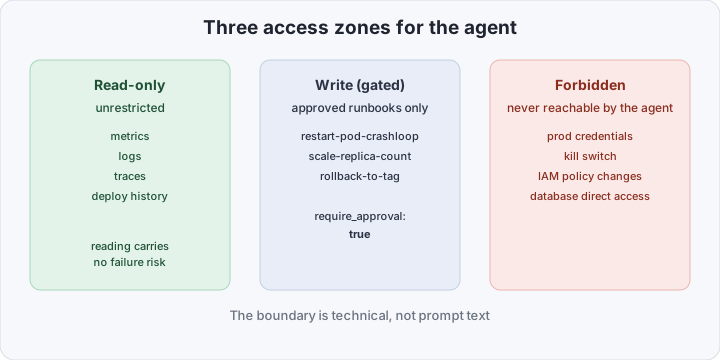
A minimal safe setup comes down to two permission groups and one flow. Permissions: read-only access to the observability stack (metrics, logs, traces, service topology) — this can be granted broadly, since reading carries no failure risk. And write access, but only to a pre-approved set of runbook commands — never a raw shell, never direct cluster API access.
A minimal scoping policy for the agent (whether it’s AWS, Azure, or a homegrown orchestrator on top of an LLM):
agent_scope:
  read:
    - observability.metrics
    - observability.logs
    - observability.traces
    - deploy_history
  write:
    allowed_runbooks:
      - restart-pod-crashloop
      - scale-replica-count
      - rollback-to-previous-tag
    require_approval: true
    approval_timeout_minutes: 15
  forbidden:
    - prod_credentials
    - kill_switch
    - iam_policy_changes
    - database_direct_access
An incident with this setup plays out as: an alert fires → the agent gathers context (metrics, recent deploys, similar past incidents) → the agent proposes a specific action from allowed_runbooks with reasoning → a human sees the proposal and reasoning at the approval gate → approves or rejects → on approval the agent executes and writes the result to the audit trail. If the proposed action isn’t in allowed_runbooks, the agent physically cannot run it — it can only escalate to a human with a text suggestion, with no execute button attached.
How to verify the agent can’t do more than you think
Documenting the scoping policy isn’t enough — you need a negative test. Give the agent a command that’s deliberately outside allowed_runbooks (say, ask it to change an IAM policy directly or reach a prod credential), and confirm it cannot execute it technically, not just “declines per prompt instructions.” The difference matters: a prompt instruction can be talked around by another prompt; a technical access restriction can’t.
# example: request to the agent API with a deliberately forbidden action
curl -s -X POST https://agent.internal/actions \
  -H "Authorization: Bearer $AGENT_TOKEN" \
  -d '{"action":"database_direct_access","target":"prod-primary"}'
# expected response: 403, action not in agent_scope.write
Second test: run a smoke incident end to end and check the audit trail — every agent action should be logged with the identity of whoever approved it and the original reasoning, not just the fact that it “ran.”
Common mistakes
- Approval gates with no reasoning. If the approval UI shows only the command and not “why the agent decided this,” approval quickly becomes a reflex, and the human stops being a real control.
- Widening scope “temporarily” to resolve an incident faster. Temporary permission widening almost never gets rolled back on time — the same pattern as permanent root access for humans.
- One audit trail for everything. Agent action logs mixed with regular application logs are impossible to filter quickly when investigating an incident the agent itself caused.
- Trusting the agent in opaque systems. If a service has no real observability, bolting on an AI agent doesn’t fix that — it adds “the agent is acting without seeing what’s happening” on top of “we can’t see what’s happening.”
- No negative test on permissions. A scoping policy that’s never been deliberately probed for gaps is usually wider than it looks on paper.
Bottom line
AI SRE in 2026 isn’t “on-call replaced” — it’s a co-pilot with a very narrow corridor of action. Technologically, the AWS, Azure, and independent agents already handle the genuinely useful part of the job: clearing alert noise, finding correlations faster than a human, and proposing a concrete plan instead of vague suggestions. But all the value of this model rests on one decision the team makes upfront — exactly where the line sits between read-only, write-with-approval, and flatly forbidden. A properly scoped agent saves hours on triage. An agent with wide access “so approvals don’t slow it down” isn’t a second pair of hands — it’s a new source of incidents, and a harder one to untangle afterward, because a human wasn’t the one who decided.