

Canary releases used to be an “experimental practice” only a few teams committed to: set up traffic shifting, collect metrics, compare them by hand, and decide — promote or roll back — separate work that rarely got finished. Flagger takes that work off people’s plates: one Canary CR on top of an ordinary Deployment, and from there the pipeline walks the release forward step by step, checking metrics, and decides on its own whether to promote or roll back.
Table of contents
Open Table of contents
- The problem: a rollout nobody checks
- What Flagger does
- Three strategies — which to pick
- Metric analysis: how “bad” is defined
- Traffic shifting without a mandatory service mesh
- Webhooks: a load test on every step
- Wiring it into Flux and GitOps
- Comparison at a glance
- What you need to turn on canary with auto-rollback
- How to verify the rollback actually works
- Common pitfalls
- Bottom line
The problem: a rollout nobody checks
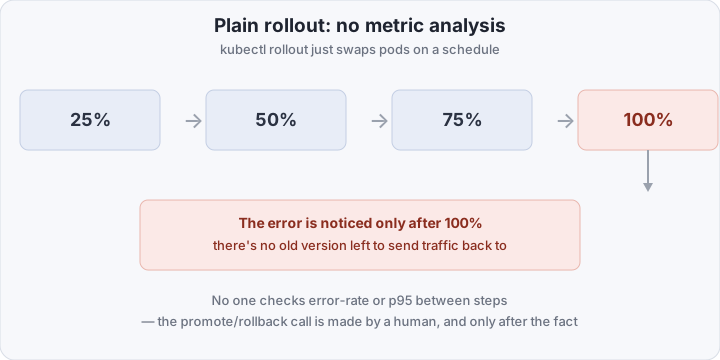
A standard Kubernetes Deployment with a RollingUpdate strategy does one thing — gradually swap old pods for new ones. It knows nothing about error rate, latency, or business metrics. Progress runs on a fixed schedule: 25%, 50%, 75%, 100% — and at no step does anything ask “is this still okay?”
If the new version has a bug that only shows up under load, by the time it’s noticed via alerts or user complaints, all the traffic is already on the new version. There’s nothing to roll back to — the old pods are gone, so you have to bring the previous version back up from scratch, turning seconds of downtime into minutes.
What Flagger does
Flagger is a controller from the Flux (CNCF) ecosystem that takes on exactly what a bare Deployment is missing: gradual traffic shifting and a metrics-driven decision about whether to continue. Everything is managed through one custom resource, Canary.
Here’s how it works: you deploy the new version as usual (update the image in the Deployment), Flagger notices, and instead of swapping directly it creates a shadow Deployment — the canary. It then clones the pods, gradually shifts a percentage of traffic to them, and at every step runs a metric analysis via MetricTemplate. If the metrics are within range, the step advances. If not, Flagger itself performs an abort and shifts 100% of traffic back to the stable version — no human involved.
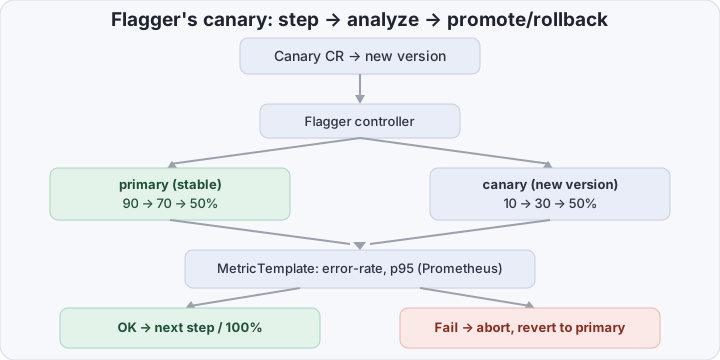
The key difference from a manual canary: the promote/rollback call isn’t made by an on-call engineer, it’s made by a controller against a threshold that’s already defined in git — faster, and with no “heroic hands” on the pager.
Three strategies — which to pick
Flagger supports more than canary. The right strategy depends on what risk you’re willing to take and what you can actually measure:
- Canary — a gradual traffic shift (10% → 30% → 50% → 100%) with analysis at each step. The default choice for services with enough traffic that metrics at 10% are statistically meaningful.
- Blue-green — the new version is deployed in full, tested against shadow traffic or a separate endpoint, and the switchover happens all at once. Useful when a gradual traffic split isn’t possible (no service mesh or ingress with weighted routing) or when even 10% of erroneous traffic is unacceptable.
- A/B (header/cookie-based) — traffic is routed not by percentage but by rule: a specific header, cookie, or region goes to the new version. This isn’t about reliability, it’s about experimentation — useful when who sees the new version matters more than how much traffic it gets.
For SLO-based rollback (this post’s topic), canary is the usual pick — it gives the most signal for the smallest blast radius at each step.
Metric analysis: how “bad” is defined
Analysis is described by a MetricTemplate resource — essentially a query against Prometheus (or Datadog, CloudWatch, New Relic — Flagger is source-agnostic) with a threshold. A typical web-service set is error rate (share of 5xx) and p95 latency. Both are computed only against canary traffic, separately from the stable version — otherwise noise from the old version would drown out the signal.
At every step Flagger waits interval (e.g. one minute), collects the metric, and compares it to the threshold. If the threshold is breached threshold times in a row, the canary is marked failed and Flagger moves to abort. If maxWeight steps pass with no breach, the canary is promoted: the Deployment is actually updated to the new version, and the shadow canary is removed.
Metrics don’t have to be purely infrastructural. MetricTemplate is an arbitrary PromQL query, so you can put a business signal in there too — the share of successful payments, checkout conversion, latency on one specific heavy endpoint. A canary that’s technically flawless but tanks conversion is just as much a reason to roll back, and Flagger doesn’t distinguish between “HTTP broke” and “the funnel broke” as long as both are expressed as a metric with a threshold.
Traffic shifting without a mandatory service mesh
A common misconception is that progressive delivery requires Istio or Linkerd. Flagger can shift traffic through:
- Gateway API — the modern standard, supports weighted routing out of the box, no mesh required;
- ingress-nginx — via canary annotations, also mesh-free;
- service mesh (Istio, Linkerd, App Mesh, Open Service Mesh) — for finer control (retries, circuit breaking) layered on the same canary mechanism.
That lowers the barrier to entry: a team with no mesh in the cluster still gets automated metric-based rollback — traffic just shifts at the Gateway API or ingress-controller level instead of through a sidecar proxy.
Webhooks: a load test on every step
Canary has hooks that fire at different stages of the analysis — pre-rollout, rollout, post-rollout. The most common example is a load-test webhook that triggers a load run (e.g. hey or k6 in a separate Job) at every canary step, so there’s actually traffic to analyze instead of silence from a mere 10% of organic traffic. Without load at a low traffic percentage, metrics can be too sparse to show anything.
Wiring it into Flux and GitOps
There’s nothing extra to set up — the Canary manifest is just YAML in the same git repository as the Deployment, MetricTemplate, or HelmRelease. Flux applies it along with everything else on sync. Metric-based rollback runs on top of the usual GitOps cycle: a CI pipeline bumps the image tag in git → Flux applies the change → Flagger picks up the new Deployment version and starts the canary analysis. Git stays the source of truth; Flagger adds a runtime check before the change actually reaches 100% of traffic.
Comparison at a glance
Deployment + RollingUpdate | Flagger Canary | |
|---|---|---|
| Traffic shift | on a pod schedule | in steps (10/30/50…%) |
| Metric analysis | none, only after-the-fact alerts | automatic, at every step |
| Rollback decision | a human, by hand | the controller, by threshold |
| Time to rollback | minutes to tens of minutes (someone noticed) | seconds to minutes (next analysis tick) |
| Service mesh required | no | no (Gateway API/ingress-nginx also work) |
| Config source | same git as everything else | same git (Canary CR) |
What you need to turn on canary with auto-rollback
At minimum you need: Flagger installed, a Deployment + Service for the app, a MetricTemplate with a threshold, and the Canary itself. Here’s a working example with 10/30/50% steps and analysis on error rate and p95.
First, an error-rate metric template against Prometheus:
apiVersion: flagger.app/v1beta1
kind: MetricTemplate
metadata:
  name: error-rate
  namespace: prod
spec:
  provider:
    type: prometheus
    address: http://prometheus.monitoring:9090
  query: |
    100 - sum(
      rate(http_requests_total{namespace="prod",kubernetes_pod_name=~"{{ target }}-[0-9a-zA-Z]+(-[0-9a-zA-Z]+)?",status!~"5.."}[1m])
    )
    /
    sum(
      rate(http_requests_total{namespace="prod",kubernetes_pod_name=~"{{ target }}-[0-9a-zA-Z]+(-[0-9a-zA-Z]+)?"}[1m])
    ) * 100
Then the Canary itself, which takes over an existing Deployment and Service:
apiVersion: flagger.app/v1beta1
kind: Canary
metadata:
  name: web
  namespace: prod
spec:
  targetRef:
    apiVersion: apps/v1
    kind: Deployment
    name: web
  service:
    port: 80
    targetPort: 8080
  analysis:
    interval: 1m
    threshold: 3 # consecutive failed checks before abort
    maxWeight: 50 # upper bound on canary weight before promote
    stepWeight: 10 # traffic shift step — 10, 30(*), 50%
    metrics:
      - name: error-rate
        templateRef:
          name: error-rate
        thresholdRange:
          max: 1 # no more than 1% errors
        interval: 1m
      - name: request-duration
        interval: 1m
        thresholdRange:
          max: 500 # p95 no more than 500ms
    webhooks:
      - name: load-test
        type: rollout
        url: http://flagger-loadtester.prod/
        timeout: 15s
        metadata:
          cmd: "hey -z 1m -q 10 -c 2 http://web-canary.prod:80/"
threshold: 3 means three consecutive failed checks (on either metric) flip the canary to Failed, and Flagger rolls traffic back to the stable version — no human involved. stepWeight: 10 with maxWeight: 50 gives steps of 10 → 20 → 30 → 40 → 50%, after which, with no breaches, the final promote takes it to 100%.
How to verify the rollback actually works
Checking on production after the fact isn’t an option — you need a controlled negative test. Deploy a version that deliberately breaks some requests (say, a pod with a 20% chance of returning 500) and watch the Canary status:
kubectl -n prod get canary web -wThe expected sequence: Progressing → Weight climbs to the first step → on the next check error-rate exceeds max: 1 → status flips to Failed → Weight drops back to 0. You can also check the events:
kubectl -n prod describe canary webThe events will include an explicit Rolling back entry with the reason — which metric breached the threshold and by how much. If you don’t see that event and Weight keeps climbing despite an obviously broken canary, check that the MetricTemplate is actually looking at canary traffic (the kubernetes_pod_name label with the -canary suffix, substituted automatically via {{ target }}) and not the whole namespace.
Common pitfalls
- Metric threshold too lax. If
maxfor error rate is set to 5–10%, the canary will “survive” a real degradation — set the threshold against your historical error baseline, not a guess. - No load on the canary. With
stepWeight: 10and low overall traffic, 10% of canary traffic can amount to a couple of requests a minute — the metric ends up either empty or noisy. Without aload-testwebhook, the analysis is meaningless. MetricTemplatecomputed over the whole namespace. If the PromQL query doesn’t filter to the canary pod specifically (via the{{ target }}substitution), the metric mixes stable and new-version traffic, and the degradation gets lost in the noise.maxWeightsmaller than the sum of steps to 100%. WithstepWeight: 10andmaxWeight: 50, the final promote happens at 50%, not gradually at 100% — that’s expected behavior, but it’s often mistaken for a stuck rollout.
Bottom line
Automated metric-based rollback removes the most expensive part of a release from the process — a human’s reaction time and their availability right at the moment of deploy. Flagger delivers that on top of an ordinary Deployment, without requiring a service mesh or a separate configuration system — the same Canary manifest ships from git along with everything else. The cost of entry is one CR and a MetricTemplate with a sane threshold; the payoff is a rollback in seconds instead of an alert, an investigation, and a manual kubectl rollout undo in the middle of the night.