

Open a random Helm chart and you’ll almost always find a values.yaml without a single comment, a template that fails with a cryptic error on an empty field, and a charts/ directory full of .tgz files nobody remembers how to update. What actually helps isn’t “yet another linter” — it’s a handful of concrete practices: a schema on values, charts with explicit dependencies, and shipping through the same OCI registry that already holds your images. Here’s what that looks like in practice.
Table of contents
Open Table of contents
- Why the classic chart repository is aging out
- Where a chart usually breaks
- Dependencies: subcharts, alias, and condition instead of copy-paste
- What it takes to build and publish the pair to OCI
- Lint and test before pushing to the registry
- Helm or Kustomize: not interchangeable
- How to verify the chart is actually ready
- Bottom line
Why the classic chart repository is aging out
Helm originally distributed charts the way apt or yum distribute packages: helm repo add registers a URL with an index.yaml file listing every version of every chart in the repository, and helm install fetches the right .tgz from a link in that index. The model works, but it has two chronic pains. First, index.yaml has to be regenerated and republished on every release — a separate step that’s either automated in CI or forgotten. Second, the chart repository lives apart from the image registry: different auth, different RBAC, a different set of vulnerability-scanning tools.
As of Helm 3.8, OCI registry support is stable, and a chart can be published as an ordinary OCI artifact in the same registry that already holds the application’s images. In that model there’s no index.yaml at all — the version becomes the artifact’s tag, and helm push/helm pull talk directly to an oci:// address. But changing the transport doesn’t fix the chart itself: if values.yaml has no validation for required fields and dependencies are .tgz files downloaded by hand, moving to OCI just ships the same problems faster.
Where a chart usually breaks
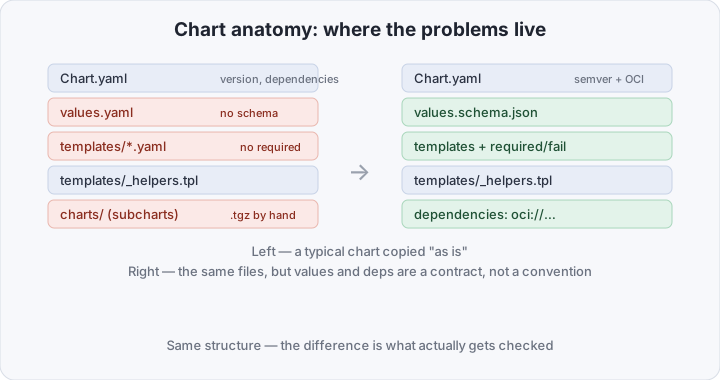
Chart anatomy is simple: Chart.yaml with metadata and a dependencies list, values.yaml with the defaults, templates/ with the manifests, and a templates/_helpers.tpl holding named templates (define/include) for repeated bits like labels. The structure isn’t the problem — it’s identical between a careful chart and a sloppy one. The problem is that values.yaml is usually nothing more than a convention: nothing stops you from passing replicas: "three" or forgetting a required image.repository, and the template either silently renders a broken manifest or fails with a Go-template error that gives no clue which field is at fault.
The fix isn’t “write more carefully” — it’s turning values.yaml into a checkable contract. A values.schema.json next to values.yaml describes field types and required-ness with JSON Schema, and helm install/helm template reject values that don’t validate, before any template even renders:
{
  "$schema": "https://json-schema.org/draft/2020-12/schema",
  "type": "object",
  "required": ["image"],
  "properties": {
    "image": {
      "type": "object",
      "required": ["repository", "tag"],
      "properties": {
        "repository": { "type": "string" },
        "tag": { "type": "string" }
      }
    },
    "replicas": { "type": "integer", "minimum": 1 }
  }
}
Inside the templates themselves the same idea works through required and fail: required stops the render with a clear message if a field is missing, and fail stops it if a combination of fields is invalid on its own (say, ingress.enabled: true without ingress.host):
image: "{{ required "set .Values.image.repository" .Values.image.repository }}:{{ .Values.image.tag }}"
{{- if and .Values.ingress.enabled (not .Values.ingress.host) }}
{{ fail "ingress.enabled=true requires ingress.host" }}
{{- end }}
The practical difference is real: without a schema, a typo in values reaches kubectl apply and fails somewhere inside a controller; with a schema, it fails at helm install naming the exact field.
Dependencies: subcharts, alias, and condition instead of copy-paste
The second recurring pain point is dependencies. The classic way to reuse logic between charts is to copy a template from a neighboring one. Chart.yaml can describe dependencies declaratively instead:
dependencies:
  - name: postgresql
    version: "15.x.x"
    repository: "oci://registry-1.docker.io/bitnamicharts"
    condition: postgresql.enabled
  - name: common
    version: "2.x.x"
    repository: "oci://registry.internal/charts"
    alias: common
condition ties a dependency’s inclusion to a boolean field in the parent chart’s values — so one chart can optionally pull in a bundled database for a dev environment and skip it in production, where the database is external. alias lets you attach the same chart twice under different names (say, two redis instances — one for caching, one as a queue), each getting its own block in values under the alias name. After editing Chart.yaml, helm dependency update fetches the right .tgz files into charts/ — nothing needs to be dropped in there by hand.
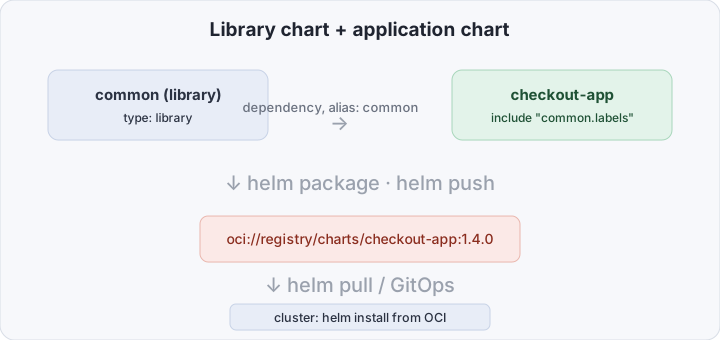
A separate kind of dependency is a library chart: a Chart.yaml with type: library renders no manifests on its own and can’t be installed directly — it only declares named templates in its _helpers.tpl. The point is to move shared labels, annotations, or a common securityContext block into one place and pull them into several application charts via dependencies, instead of copying _helpers.tpl between repositories.
What it takes to build and publish the pair to OCI
Take that exact case: a library chart common with shared helpers, and an application chart checkout-app that uses it. In common/templates/_helpers.tpl:
{{- define "common.labels" -}}
app.kubernetes.io/name: {{ .Chart.Name }}
app.kubernetes.io/managed-by: Helm
{{- end -}}
In checkout-app/Chart.yaml we add the dependency and wire its template into the manifests:
apiVersion: v2
name: checkout-app
version: 1.4.0
dependencies:
  - name: common
    version: "1.0.0"
    repository: "oci://registry.internal/charts"
# checkout-app/templates/deployment.yaml
metadata:
labels:
{{- include "common.labels" . | nindent 4 }}Next comes building and publishing. Package the chart, optionally sign the provenance file with a GPG key, log in to the registry, and push it as an OCI artifact:
helm dependency update checkout-app/
helm package checkout-app/ --sign --key "release@internal" --keyring ~/.gnupg/secring.gpg
helm registry login registry.internal -u "$REGISTRY_USER" -p "$REGISTRY_PASS"
helm push checkout-app-1.4.0.tgz oci://registry.internal/charts
Installing from OCI looks like installing from a classic repository, except instead of helm repo add plus a repo name you use a direct oci:// address with an explicit version — OCI charts have no helm search repo, so you need to know the version up front, which is exactly the part of a GitOps pipeline where Flux or Argo CD just reference a specific tag:
helm pull oci://registry.internal/charts/checkout-app --version 1.4.0
helm install checkout oci://registry.internal/charts/checkout-app --version 1.4.0 -f values-prod.yaml
Lint and test before pushing to the registry
A values schema catches typos in data, but not a broken Go template or invalid output YAML. Three levels of checking are worth running in CI before helm push:
helm lint chart/— a static check of chart structure and obvious template errors;helm template chart/ -f values-prod.yaml | kubectl apply --dry-run=server -f -— renders the chart with real values and validates the resulting manifests through the API server, not just syntactically;helm test <release>— runs pods annotatedhelm.sh/hook: testafter the release is already installed, checking the live service rather than the template (a typical case: a pod that curls the app’s/healthz).
For charts that live in one monorepo and change in batches, chart-testing (ct) adds a level above that: ct lint --config ct.yaml uses git diff to find only the charts that changed and lints those, and ct install deploys each one into an ephemeral kind cluster and checks that helm install and helm test succeed — the thing you’d typically run in GitHub Actions before merging a PR that touches a chart, not before every manual helm push.
Helm or Kustomize: not interchangeable
The question of whether to drop Helm altogether and keep only Kustomize — it ships built into kubectl and needs no templating engine — comes up periodically. The two tools solve different problems:
| Helm | Kustomize | |
|---|---|---|
| Model | Templating + a versioned package with values | Patches over already-valid manifests |
| Parameterization | Full values, a schema, required/fail | No template language — only overlays/patches |
| Cross-package dependencies | dependencies, alias, condition, library charts | No dependency concept — just resources: |
| Distribution | OCI registry or classic repo, semver | Usually just a directory in a git repo |
| Release lifecycle | helm upgrade/rollback, hooks (pre-install, etc.) | No release history — kubectl just applies |
| Where it shines | A reusable package for many consumers | Small per-environment differences within one team |
The practical rule: if the chart is published outward — for another team, for customers, as part of a product — Helm’s versioning and values contract pay for themselves. If the whole point is that dev/staging/prod share the same YAML with a few pointed differences (a different namespace, a different replica count), a Kustomize overlay is shorter and doesn’t force you to maintain a twenty-field values.yaml for three real differences. Mixing both — rendering with helm template and then applying a Kustomize patch on top — is a workable transitional pattern, but as a permanent setup it multiplies the places the render can break.
How to verify the chart is actually ready
Before calling a chart “ready for GitOps,” run the whole chain by hand once. helm lint chart/ should return 0 chart(s) failed. helm template chart/ --values values-prod.yaml --validate (the --validate flag runs validation through the Kubernetes API, not just a render) should fail neither on missing required fields nor on schema errors. After helm push, helm pull oci://registry.internal/charts/checkout-app --version 1.4.0 --prov should successfully fetch both the chart and its provenance file, and helm verify checkout-app-1.4.0.tgz should confirm the signature against the same keyring used for helm package --sign. One last check that’s easy to skip: helm install --dry-run --debug with an empty values.yaml (no overrides at all) should fail with a clear message from required, not a Go-template stack trace — that’s the proof the values contract actually works, rather than just existing in documentation.
Bottom line
A good Helm chart isn’t one without a single {{ if }} — it’s one where values.yaml is guarded by a schema and required/fail, dependencies are declared through condition and alias instead of copy-pasted templates, and delivery goes through an OCI registry with semver and provenance sitting next to the application’s own images, rather than through a separate index.yaml someone forgot to update. None of these steps require rewriting an existing chart from scratch — they can be added one at a time, starting with the values schema, which catches the most surprises for the least effort.