

Load drops at night, but the bill doesn’t: the node group stays the same size it was at noon. Cluster Autoscaler only knows how to add and remove whole groups of pre-defined instances, so most of the cluster sits idle “just in case” almost all the time. Karpenter solves it differently: it watches the actual pods that can’t be scheduled, picks the cheapest instance that fits them from the whole cloud catalog, and boots a node in seconds. As soon as the pod is gone, it shrinks the cluster back. Let’s see how it works and why it’s usually the first lever teams pull when they need to cut a Kubernetes bill.
Table of contents
Open Table of contents
- Why Cluster Autoscaler hits a ceiling
- Why this matters right now
- What Karpenter does differently
- NodePool and NodeClass: what you actually describe
- Consolidation: how the cluster shrinks itself
- Spot, on-demand, and what happens on interruption
- Traps that quietly kill the savings
- Side by side
- What it takes to turn this on
- How to check it’s actually working
- Bottom line
Why Cluster Autoscaler hits a ceiling
Cluster Autoscaler (CA) showed up when the only way to describe scaling was node groups — fixed sets of identical instances tied to an Auto Scaling Group or its equivalent. CA does exactly one thing: grow or shrink an existing group’s size when pods don’t fit or nodes sit idle.
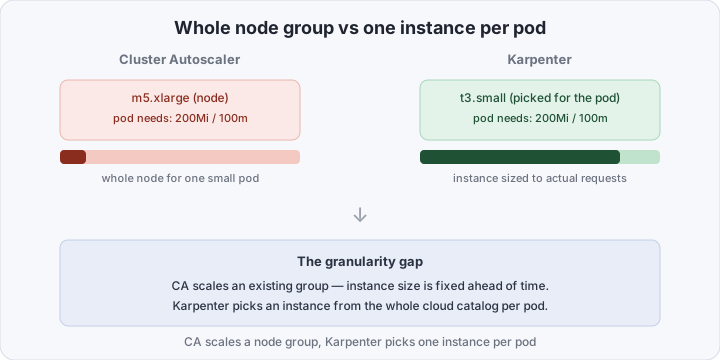
The problem is granularity. If a group is defined as m5.xlarge, CA adds another m5.xlarge even if the pod stuck in Pending only needs 200Mi of memory. Teams react by pre-provisioning a dozen different groups for different load profiles — and take on a second job: maintaining those groups, watching that the right availability zones don’t run out of capacity, and manually deciding where spot makes sense and where on-demand does.
The second weak spot is reaction time. CA checks the Pending-pod queue on an interval (10 seconds by default), but the real time-to-ready-node is the sum of ASG scaling time, image pull, and kubelet startup — usually one and a half to three minutes. For autoscaling meant to absorb a traffic spike, that’s a noticeable lag.
Why this matters right now
For a long time Karpenter was seen as “yet another AWS-specific autoscaler” — an experimental project tied to one cloud. That’s changed: the project reached a stable v1 API (you can build on the manifests without fearing a field rename in the next release — see karpenter.sh), and the community moved its core beyond AWS with providers for Azure and GCP. At the same time, FinOps pressure on Kubernetes budgets keeps growing — the more teams move to managed clusters, the more visible the gap between “paid for” and “actually used” becomes. Karpenter is a rare optimization that doesn’t touch the application at all: only how nodes get allocated for load that’s already there.
What Karpenter does differently
Karpenter drops node groups as a middle abstraction entirely. Instead of “grow this group,” it looks directly at the pod that can’t be scheduled — with all its requests, node affinity, taints, and topology constraints — and decides which specific instance, out of everything available in the cloud, closes that gap the cheapest.
Key differences:
- Bin-packing against real demand, not a template. Karpenter scans dozens of instance types and picks the one that best covers the pending pods’ combined requests — no manual set of “profiles” for every case.
- No pre-declared groups. No need to set up an ASG in advance for every combination of size, zone, and price class — Karpenter chooses from anything allowed in a
NodeClass. - Seconds, not minutes. Karpenter calls the cloud API directly to launch an instance, skipping the autoscaling group as a middleman, and runs instance selection in parallel with provisioning — typical time-to-
Readyis a fraction of CA’s. - Consolidation by default. CA removes empty nodes; Karpenter also repacks underused nodes, replacing several cheap slots with one tighter node — more on that below.
NodePool and NodeClass: what you actually describe
Instead of a node group, Karpenter introduces two resources with a clean split of responsibility.
NodePool is the Kubernetes side: which pods this pool serves (via requirements — architecture, capacity-type, zone), aggregate CPU/memory limits for the pool, and the disruption policy (when and how Karpenter is allowed to touch already-running nodes).
EC2NodeClass (or the equivalent for another cloud) is the cloud side: AMI, subnets, security groups, disk size, node IAM role. A NodePool references a NodeClass via nodeClassRef.
The split pays off in practice: the same NodeClass (same AMI, disk, role) can be reused across several NodePools with different requirements — say, a separate pool for GPU workloads and one for general services, sharing the same cloud-side config.
Consolidation: how the cluster shrinks itself
This is what actually moves the bill. Karpenter runs a disruption controller that constantly looks for two cases:
- An empty node — no pods left on it besides DaemonSets — gets removed almost immediately.
- An underused node — pods can be moved so several underused nodes collapse into fewer, tighter-packed ones. Karpenter plans the replacement, waits for the new nodes to be ready and pods to move over (honoring
PodDisruptionBudget), then terminates the old ones.
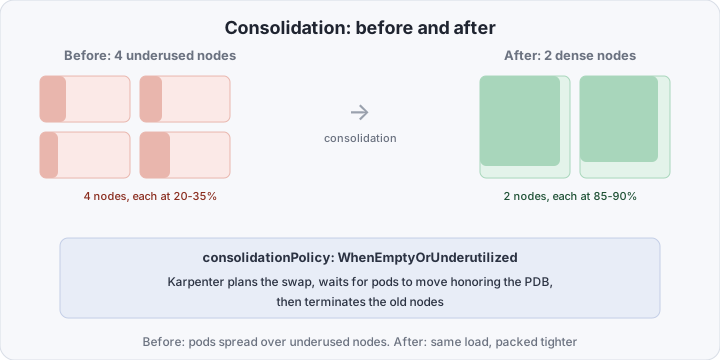
This is controlled by the consolidationPolicy field on the NodePool:
WhenEmptyOrUnderutilized— the aggressive default: Karpenter removes empty nodes and repacks underused ones. This is where most of the savings come from.WhenEmpty— more conservative: only touches fully empty nodes, leaves underused ones alone. Pick this when frequent pod reshuffling creates more noise than savings (say, for stateful workloads with a long warm-up).
Spot, on-demand, and what happens on interruption
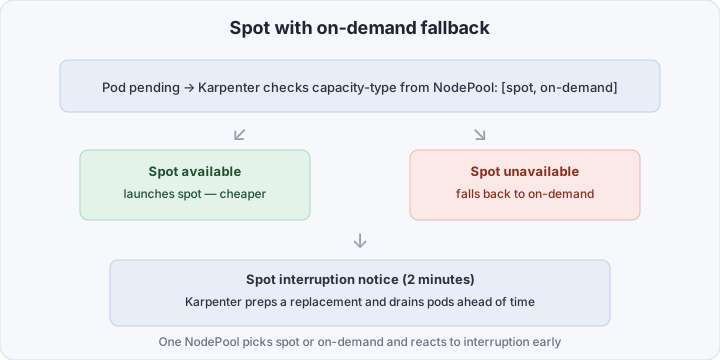
Karpenter can mix capacity types in a single NodePool via requirements on karpenter.sh/capacity-type: [spot, on-demand]. When choosing an instance, it first looks for spot capacity that fits, and falls back to on-demand if none is available — no manual intervention needed.
Separately, Karpenter watches the spot interruption notice — the cloud’s two-minute warning that a specific spot instance is about to be reclaimed. On that signal it starts preparing a replacement early and drains pods gracefully, instead of waiting for the node to vanish and the pods to come back up already Pending.
Traps that quietly kill the savings
- PodDisruptionBudget blocks consolidation. If a PDB is too strict (say,
minAvailableequals the replica count), Karpenter can never safely evict a pod — underused nodes stop collapsing and the savings never show up. Check your PDBs for realism instead of copy-pasting “just in case” values. karpenter.sh/do-not-disrupt: "true"on a pod is a legitimate way to say “don’t touch this node” (for batch jobs, local PVs, restart-sensitive processes). But the annotation sprayed out of habit onto everything quietly disables consolidation across half the cluster — which is exactly why “Karpenter is running but the bill isn’t dropping.”- Bad requests. Karpenter schedules against declared
requests, not actual usage. Pods with no limits/requests, or with requests padded “for safety,” break bin-packing at the source — Karpenter honestly picks an instance for what was asked, even if it’s several times the real usage.
Side by side
| Cluster Autoscaler | Karpenter | |
|---|---|---|
| Unit of scaling | a whole node group | one instance per pending pod |
| Tuning for new load | manually pre-provision groups | requirements in NodePool, no pre-set groups |
| Time to a ready node | ~1.5–3 minutes | seconds |
| Packing idle nodes | empty nodes only | empty + underused (consolidationPolicy) |
| Spot/on-demand fallback | separate groups per type | one NodePool, automatic |
| Support beyond AWS | depends on the cloud provider | AWS, Azure, GCP, bare metal (via providers) |
What it takes to turn this on
At minimum you need the Karpenter controller installed (official Helm chart) with IAM permissions to launch/terminate instances, plus one NodeClass and one NodePool. Here’s a working AWS example with limits and aggressive consolidation:
apiVersion: karpenter.k8s.aws/v1
kind: EC2NodeClass
metadata:
  name: default
spec:
  amiFamily: AL2023
  role: karpenter-node-role
  subnetSelectorTerms:
    - tags: { karpenter.sh/discovery: my-cluster }
  securityGroupSelectorTerms:
    - tags: { karpenter.sh/discovery: my-cluster }
---
apiVersion: karpenter.sh/v1
kind: NodePool
metadata:
  name: default
spec:
  template:
    spec:
      nodeClassRef:
        group: karpenter.k8s.aws
        kind: EC2NodeClass
        name: default
      requirements:
        - key: karpenter.sh/capacity-type
          operator: In
          values: ["spot", "on-demand"]
        - key: kubernetes.io/arch
          operator: In
          values: ["amd64"]
  limits:
    cpu: "1000"
    memory: 1000Gi
  disruption:
    consolidationPolicy: WhenEmptyOrUnderutilized
    consolidateAfter: 1m
Three details that save debugging time:
limitson theNodePoolis a ceiling for the whole pool, not one node. Without it, a manifest mistake (say, accidentally inflatedreplicas) can scale the pool to an unexpected bill — set the limit deliberately from day one.consolidateAfteris the pause before Karpenter starts repacking an underused node. The default protects against thrashing on sharply fluctuating load; for stable clusters you can lower it.subnetSelectorTerms/securityGroupSelectorTermsby tag, not by ID, so theNodeClassdoesn’t need edits when the network gets rebuilt or a new availability zone is added.
How to check it’s actually working
Run a pod with deliberately small requests and watch Karpenter bring up a dedicated node for it in seconds:
kubectl run test-pod --image=nginx --requests='cpu=100m,memory=128Mi'
kubectl get events --field-selector reason=Nominated -w
Check consolidation — after removing the load, confirm the node count drops without manual intervention:
kubectl get nodes -l karpenter.sh/nodepool=default -w
kubectl logs -n kube-system deployment/karpenter -f | grep -i consolidat
If nodes aren’t collapsing, check PDBs and the do-not-disrupt annotation on your pods first — nine times out of ten a stuck consolidation traces back to one of those.
Bottom line
Node-level autoscaling driven by actual load is the fastest, least disruptive FinOps win available in Kubernetes: nothing to touch in the application, nothing to rewrite, just a correctly configured NodePool and NodeClass. Most of the savings come not from Karpenter adding nodes faster, but from it not hesitating to remove and repack them the moment load drops. The cost of entry is getting PDBs and requests right enough that consolidation can actually do its job instead of stalling on the first pod with the wrong annotation.