

Most AWS incidents don’t start with an exotic vulnerability — they start with an account opened “just to try”: root with access keys in ~/.aws, one account for the whole company, security alerts piling up in a mailbox nobody opens. This is the first of five articles on securing infrastructure in AWS, starting at the account level: root, MFA, Organizations and SCPs, contacts, basic alerts. One evening of work — and the precondition for everything else.
Why now: in February 2026 AWS updated its root user best practices — hardware MFA for root is now explicit — and in August Identity Center made accounts optional, removing the last excuse to sign in as root daily. An account “in prod since 2019”? This is its audit. Just starting? This is doing it right from day one.
Table of contents
Open Table of contents
Root is not a user, it’s the key to the apartment
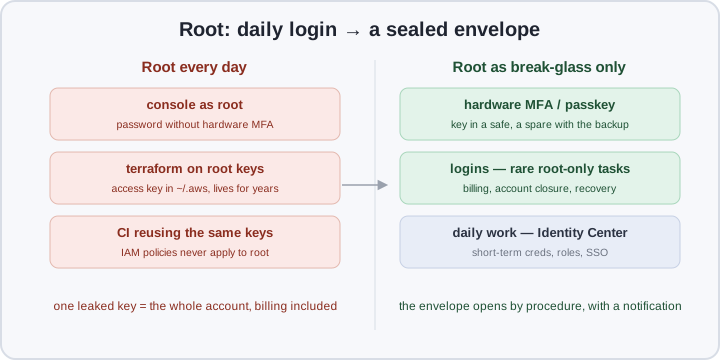
The trajectory is familiar: an account on some mailbox, work in the console as root, then aws configure drops root keys into ~/.aws “so terraform runs”, and from there they migrate to CI. Six months later that key is the most privileged artifact in the company, sitting in a repo next to the README.
The problem with root isn’t awkwardness — ordinary defenses don’t apply to it: IAM policies never apply to root. You can’t scope it down or revoke a single permission. In a member account the only constraint is an SCP (more below); standalone, nothing constrains root at all. Hence the updated hygiene:
- Root must have no access keys. Not “temporary”, not “just for terraform”. A task that seems to need root keys almost always decomposes into role assumption.
- Hardware MFA — a FIDO2 key or passkey on a hardware token. SMS and TOTP apps are worse: phishing can relay them; a FIDO2 key is bound to the AWS console domain.
- Sign in as root only for tasks nobody else can do: changing billing and payment details, closing the account, changing the root email, enabling Organizations. Everything else belongs to people and roles.
- Break-glass instead of “I’ll remember the password”. The root password and the spare MFA key live “in a sealed envelope” — a safe or a manager with dual control. Opening it is a procedure with notification: who, when, why — and afterwards the password rotates. Yes, it looks like nineties bureaucracy, but the envelope opens once a year, while a phishing page for the root console is available to attackers 24/7.
The root mailbox is a key to the apartment too: password resets land there, so make it a shared alias with its own MFA and no auto-forwarding.
One command shows where you stand: aws iam get-account-summary. AccountMFAEnabled: 0 or AccountAccessKeysPresent: 1 — this evening belongs to this article.
Organizations: billing apart, workloads apart
The second account-level decision: stop keeping the whole company in one account. AWS Organizations gives you a tree of accounts with shared billing and policy; the right layout is:
- The management account (the former root account) is for billing and org management only. No workloads, no daily users. The less lives in it, the smaller the attack surface on the tree’s least protected account — SCPs don’t apply to it.
- Member accounts — one per environment and purpose: prod, stage, dev, and later a dedicated one for logs and detection. A compromised dev yields no production data; a leaked dev CI key doesn’t touch prod. Register accounts on aliases like
[email protected], never on people — accounts outlive team rotation. - Consolidated billing is a bonus: budgets, Reserved Instances and Savings Plans are computed org-wide.
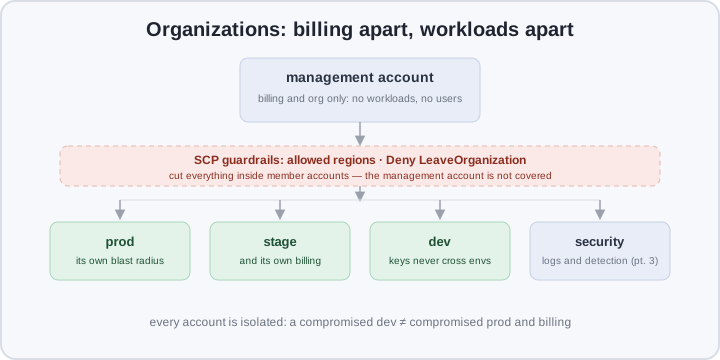
A second line of defense appears — service control policies — and how they work matters.
SCPs: take rights away, never grant them
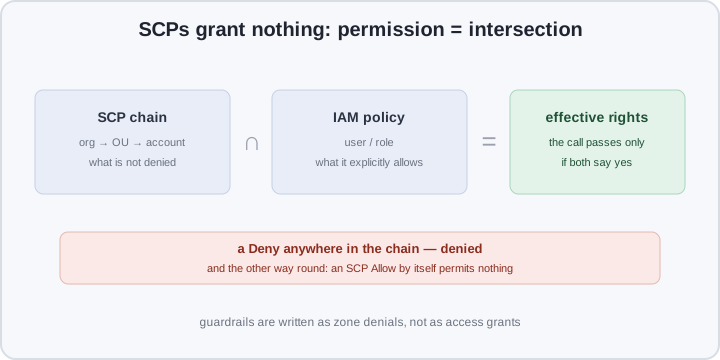
An SCP is not “a policy of permissions for an account” — it’s a filter. A call passes only if allowed by both the SCP chain (org → OU → account) and the user’s IAM policy. An SCP Allow permits nothing by itself — it merely doesn’t interfere. Hence guardrails are written as zone denials:
The minimum set worth turning on during the first evening:
- Deny
organizations:LeaveOrganization. A compromised member account can’t be pulled out of the organization — and so can’t escape your SCPs and CloudTrail auditing; a classic move in multi-account attacks. - A region allowlist via the
aws:RequestedRegioncondition: everything except the explicitly allowed (say,eu-central-1andus-east-1) is denied. That’s security (no data leaking into odd regions) and money (nobody boots an instance in Tokyo by accident). - Global services that live only in
us-east-1(IAM, Route 53, CloudFront, Health, Budgets…) are excluded viaNotAction.
Comparison in one table
| One account, root as the daily driver | Org: management + members + SCPs | |
|---|---|---|
| Everyday login | root, long-lived keys | roles/SSO, root sealed |
| What constrains root | nothing | SCPs in member accounts |
| A leaked dev/CI key | the whole account, billing included | one member account, zones cut |
| Unintended regions | watch manually | Deny by default |
| Pulling an account out of audit | not applicable | LeaveOrganization denied |
| AWS alerts | to the root mailbox nobody reads | alternate contacts + SNS |
| Billing | one pot | per account + budgets |
What you need to close the foundation in one evening
Prerequisites: the root mailbox (a shared one like [email protected], not personal), one or two hardware keys, AWS CLI v2. Order matters: root first, then the organization, then alerts.
1. Root: no keys, hardware MFA. Root console: My Security Credentials → Multi-factor authentication → Add passkey / security key. While there, delete any access keys get-account-summary showed.
2. Alternate contacts. AWS sends alerts about compromised keys, maintenance and billing not only to root:
aws account put-alternate-contact --alternate-contact-type SECURITY \
  --name "On-call" --title "Security" \
  --email-address "[email protected]" --phone-number "+7900…"
# repeat for OPERATIONS (incidents and health), and optionally BILLING
3. The organization:
aws organizations create-organization --feature-set ALL
aws organizations list-roots   # note the r-xxxx
4. SCP guardrails — the scp.json file:
{
  "Version": "2012-10-17",
  "Statement": [
    {
      "Sid": "GuardrailDenyUnauthorizedRegions",
      "Effect": "Deny",
      "NotAction": [
        "iam:*", "organizations:*", "route53:*", "cloudfront:*",
        "budgets:*", "waf:*", "support:*", "health:*"
      ],
      "Resource": "*",
      "Condition": {
        "StringNotEquals": {
          "aws:RequestedRegion": ["eu-central-1", "us-east-1"]
        }
      }
    },
    {
      "Sid": "GuardrailDenyLeaveOrganization",
      "Effect": "Deny",
      "Action": "organizations:LeaveOrganization",
      "Resource": "*"
    }
  ]
}
The NotAction list is the global services with no home region; extend it per the docs. Then:
aws organizations create-policy --type SERVICE_CONTROL_POLICY \
  --name "guardrails" --description "region allowlist + no-leave" \
  --content file://scp.json
aws organizations attach-policy --policy-id <p-id> --target-id r-xxxx
5. A budget alarm — budget.json and notify.json:
{
  "BudgetName": "monthly-cap",
  "BudgetLimit": { "Amount": "300", "Unit": "USD" },
  "TimeUnit": "MONTHLY",
  "BudgetType": "COST"
}
[{
"Notification": {
"NotificationType": "ACTUAL",
"ComparisonOperator": "GREATER_THAN",
"ThresholdType": "PERCENTAGE",
"Threshold": 80
},
"Subscribers": [{ "SubscriptionType": "EMAIL", "Address": "[email protected]" }]
}]aws budgets create-budget --account-id 111122223333 \
--budget file://budget.json \
--notifications-with-subscribers file://notify.json6. Health Dashboard → SNS. Organizational view of health events plus an EventBridge rule:
aws health enable-health-service-access-for-organization
ARN=$(aws sns create-topic --name aws-health-alerts --query 'TopicArn' --output text)
aws sns subscribe --topic-arn "$ARN" --protocol email \
  --notification-endpoint [email protected]
aws events put-rule --name aws-health-to-sns \
  --event-pattern '{"source":["aws.health"]}'
aws events put-targets --rule aws-health-to-sns \
  --targets "Id"="sns","Arn"="$ARN"
How to verify
Every checklist item is one command:
aws iam get-account-summary \
  --query 'SummaryMap.[AccountMFAEnabled,AccountAccessKeysPresent]'
# [1, 0] — MFA enabled, no root keys

aws account get-alternate-contact --alternate-contact-type SECURITY \
  --query 'AlternateContact.EmailAddress'

aws organizations list-policies --filter SERVICE_CONTROL_POLICY \
  --query 'Policies[].Name'

aws budgets describe-budgets --account-id 111122223333 \
  --query 'Budgets[].BudgetName'
The main guardrail check — try what must be denied, from a member account:
AWS_DEFAULT_REGION=ap-southeast-2 aws ec2 describe-vpcs
# AccessDenied … denied by a service control policy — as designed
Pitfalls
- SCPs grant nothing. It’s an intersection, not a sum: “full access” in IAM won’t get through an SCP Deny, and an empty IAM stays empty no matter how generous the SCP.
- The management account is outside SCPs. Its only defenses are root hygiene and minimal contents — run a workload there and it lives outside your guardrails.
- You locked yourself out. A region deny without
NotActionfor global services breaks Route 53 and CloudFront; Deny LeaveOrganization also gets in your way during a reorg — removal then happens by hand from the management account. A deliberate trade, not a bug. - EventBridge → SNS stays silent. The CLI doesn’t set the topic policy: grant
events.amazonaws.compublish rights viaaws sns add-permission, or the rule looks green while no mail arrives. - The root mailbox is personal. Register the account on the founder’s address and it leaves with them. A shared alias only, with MFA too.
- A browser passkey ≠ hardware. A synced passkey resists phishing but lives in a device vendor’s cloud; for root take a non-synced key on a hardware token.
Where the series goes next
Part 2 — IAM and PAM: Identity Center, permission sets, short-term credentials instead of access keys — people instead of keys. Part 3 — logs and detection: the CloudTrail organization trail, GuardDuty, Security Hub. Part 4 — infrastructure protection: VPC isolation, KMS, Backup. Part 5 — the workload: EKS and RDS on a secured baseline. Each assumes the previous ones are done.
Bottom line
AWS security doesn’t start in the VPC — it starts in the billing account: root without keys and with hardware MFA, break-glass instead of a daily password, environments in member accounts under SCPs, alerts routed to a security contact and SNS. One evening, zero infrastructure code — the layer that makes every later layer meaningful: as long as root is the daily login, every other defense is decorative. Next part: people — Identity Center, and credentials that live minutes, not years.