

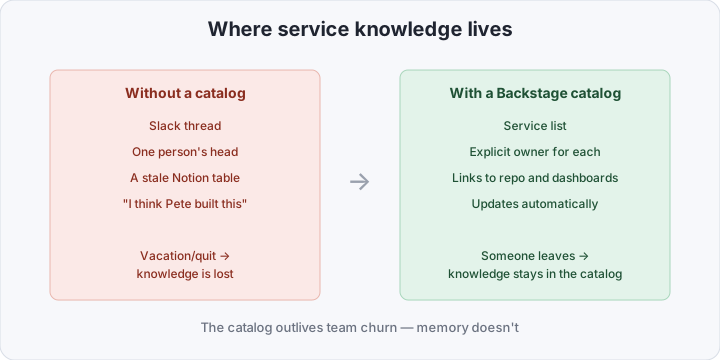
Platform engineering gets sold as a story about companies with hundreds of teams: their own catalog, their own golden paths, a dedicated platform engineer on staff. A team of three to five people has the natural reaction — “that’s not for us, we all already know how things work.” The problem is that “we all know” holds up right up until the first vacation or the first person who quits, and then the knowledge of how to stand up a new service lives in a Slack thread and one person’s head. A minimal Backstage isn’t about scale — it’s about not losing that knowledge.
Table of contents
Open Table of contents
An IDP is not a platform — it’s three concrete things
Internal Developer Platform sounds heavyweight, but in practice it’s three components, each plugging its own hole.
- A service catalog — a single list of what exists: which services there are, who owns them, where the repo is, where the dashboard is, where to look during an incident. Without a catalog, this knowledge is scattered across heads and pinned chat messages.
- Golden paths — not “the one true way,” but a well-trodden path: if you’re building a typical CRUD service in Go, here’s the standard way to build, deploy, and monitor it, already proven on the last three services.
- A scaffolder — the mechanism that turns a golden path into actual code at the push of a button: not a “how to” doc, but a generator that just does it.
Each of these can be roughly faked on its own: a catalog as a Notion table, a golden path as a wiki article, a scaffolder as a cookiecutter template nobody updates. It works for a while. It breaks exactly when the team grows a bit or the lineup changes — the Notion table goes stale, nobody reads the article to the end, and nobody maintains the template forked from someone’s old repo.
Why now, and not two years ago
Not long ago, standing up your own Backstage meant maintaining a separate Node.js monorepo, learning a plugin API that changed between minor versions, and spending weeks on it, not a weekend. What changed:
- The plugin API stabilized. Backstage went through the New Backend System, and community plugins (TechDocs, Kubernetes, GitHub Actions) now install without forking the core.
- “Light” distributions showed up. The official Helm chart and distributions like Roadie removed manual build setup — the image is already built, configuration moves into YAML files instead of code.
- Docker-first startup became the norm. The official
backstageimage from create-app starts in docker-compose with a Postgres backend in ten minutes, no npm install on the host.
The upshot: something that used to be its own project with its own roadmap now fits into a weekend’s worth of config.
A minimal Backstage in docker-compose
This isn’t a production config with full auth and HA — it’s a working minimum to see a catalog and your first Software Template live in one evening.
services:
  postgres:
    image: postgres:16-alpine
    environment:
      POSTGRES_USER: backstage
      POSTGRES_PASSWORD: backstage
      POSTGRES_DB: backstage
    volumes:
      - backstage-db:/var/lib/postgresql/data

  backstage:
    image: ghcr.io/backstage/backstage:1.32.0
    depends_on:
      - postgres
    ports:
      - "7007:7007"
    environment:
      POSTGRES_HOST: postgres
      POSTGRES_PORT: 5432
      POSTGRES_USER: backstage
      POSTGRES_PASSWORD: backstage
      GITHUB_TOKEN: ${GITHUB_TOKEN}
    volumes:
      - ./app-config.production.yaml:/app/app-config.production.yaml

volumes:
  backstage-db:
The key idea in this file is that all customization lives in the mounted app-config.production.yaml, not in a rebuilt image. That file describes the integration with your GitHub/GitLab (where the catalog reads catalog-info.yaml from repos), TechDocs (markdown docs right in the UI), and the list of Software Templates:
catalog:
  locations:
    - type: url
      target: https://github.com/acme/catalog-registry/blob/main/catalog-info.yaml
  providers:
    github:
      acmeOrg:
        organization: "acme"
        catalogPath: "/catalog-info.yaml"
        schedule:
          frequency: { minutes: 30 }
The github provider walks the organization every 30 minutes and pulls catalog-info.yaml from every repo that has one — that’s automatic catalog population without adding services by hand one at a time.
Software Template: a new service in one click
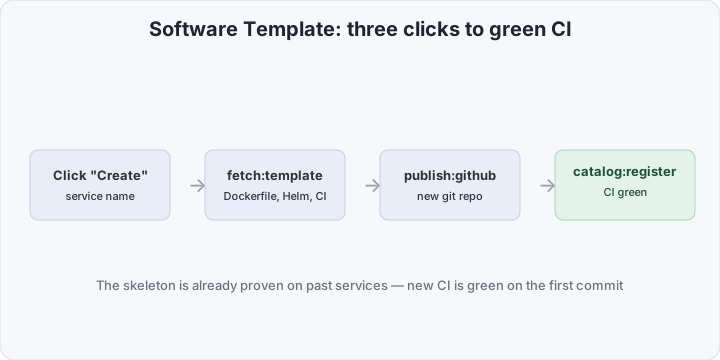
A catalog without a scaffolder is just a list you have to maintain by hand. The real payoff starts with a Software Template — a YAML description of steps that Backstage runs when a developer clicks “Create” in the UI.
A minimal template for a new Go service:
apiVersion: scaffolder.backstage.io/v1beta3
kind: Template
metadata:
  name: golden-path-go-service
  title: "Go service (golden path)"
spec:
  parameters:
    - properties:
        name:
          type: string
          title: "Service name"
  steps:
    - id: fetch
      name: "Generate from skeleton"
      action: fetch:template
      input:
        url: ./skeleton
        values:
          name: ${{ parameters.name }}

    - id: publish
      name: "Create git repository"
      action: publish:github
      input:
        repoUrl: "github.com?owner=acme&repo=${{ parameters.name }}"

    - id: register
      name: "Register in the catalog"
      action: catalog:register
      input:
        repoContentsUrl: ${{ steps.publish.output.repoContentsUrl }}
        catalogInfoPath: "/catalog-info.yaml"
The ./skeleton folder is just a regular set of template files with ${{ values.name }} placeholders: a Dockerfile, a Helm chart with readiness/liveness probes already wired up, a .github/workflows/ci.yaml with linting, tests, and image build, and catalog-info.yaml itself, so the service shows up in the catalog the moment the repo is created.
The result for a developer: three clicks in the UI — service name, “Create,” confirm — and out comes a git repo with working CI that’s already green on the first commit, because the skeleton already went through this pipeline on other services.
Comparison: without a catalog vs. minimal Backstage
| Without an IDP | Minimal Backstage | |
|---|---|---|
| Where to find the service list | Slack, memory, Notion if you’re lucky | Catalog, updates automatically |
| New service | Copy-paste from a “similar” repo + manual edits | Software Template, 3 clicks |
| CI for a new service | Set up from scratch or copied with bugs | Already in the skeleton, proven on prior services |
| Onboarding a new engineer | Verbal explanations + guesswork | Golden path is already the documented norm |
| Service owner | “I think Pete built this” | Explicitly listed in catalog-info.yaml |
Traps that even small teams fall into
- Leaving auth for “later” and living with that forever. The guest provider is convenient for local testing, but if Backstage is reachable even from your internal network,
catalog:registerand repo creation with no identity attached is an open door. The minimum is a GitHub OAuth provider — it’s a five-line block inapp-config. - Postgres with no backup. The catalog isn’t just a mirror of git: it accumulates TechDocs, scaffolder run history, custom annotations. Lose the volume and you’re rebuilding the catalog by hand.
- Secrets in an
app-config.yamlcommitted to the repo. The GitHub token and Postgres credentials should come through environment variables (as in the example above) or a secret manager, not sit as plaintext next to the config in git. - Updating plugins with no plan. The New Backend System cut down breaking changes a lot, but major Backstage upgrades still require reading the changelog. The simple rule: upgrade at least once a quarter in small steps, not once every two years in one jump across a dozen majors.
How to verify it works
Three quick checks after the first run. First, the catalog is alive: curl -s localhost:7007/api/catalog/entities | jq length should return a number greater than zero once the GitHub provider has run at least one sync cycle. Second, the actual scenario: run a Software Template from parameters to completion and confirm a new repo really shows up on GitHub with a running workflow. Third, the whole point of the exercise: open Actions in the freshly created repo and see CI pass green with zero manual fixes after generation.
Bottom line
An IDP isn’t a corporate ritual for companies with a dedicated platform department — it’s a way to codify, once, how your team correctly builds services, and stop explaining it verbally to every new hire. The starting cost is one evening on docker-compose and one Software Template for the most common service type in your stack. It pays for itself by the second or third new service, which now comes up in minutes instead of copy-paste riddled with someone else’s bugs.