

A couple of years ago “Postgres on Kubernetes” sounded like an anti-pattern: the cluster is ephemeral, pods move around, storage is networked — and a database wants the exact opposite. CloudNativePG (CNPG) changes the answer. It’s a Kubernetes operator that takes on everything people were afraid to do by hand: primary election, streaming replication, automatic failover, backup and recovery. In 2025 the project reached CNCF Incubating status, and large banks and SaaS companies publicly described moving production databases onto it. Below: what it actually gives you, and how to stand up a working three-pod cluster.
Table of contents
Open Table of contents
A StatefulSet is not a database
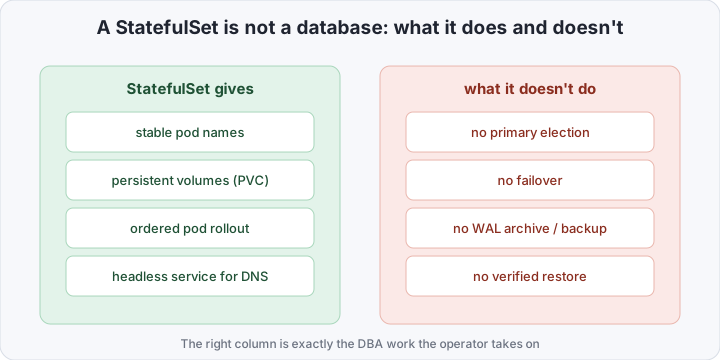
The temptation to “just run a StatefulSet with the postgres image” is understandable: it gives stable pod names and persistent volumes. But a StatefulSet knows nothing about Postgres itself. It can’t tell a primary from a replica, can’t promote a replica when the master dies, doesn’t archive WAL, and never checks that a backup actually restores. All of that is operational work that, done by hand, someone has to do manually or in a hundred lines of bash in init containers.
The outcome is predictable: when the primary dies the cluster stalls because no one decided who to promote; when a pod moves to another node the app can’t find the master for an hour; and the “backup” turns out to be a dump whose restore was last tested never. The problem isn’t that Postgres lives badly in k8s — it’s that between “the database is running” and “the database survives an incident” lies all the DBA’s work, and a StatefulSet doesn’t do it.
What the operator does
CloudNativePG is a controller that extends Kubernetes with a Cluster resource. You describe the desired state declaratively — how many instances, which image, how much storage, where to back up — and the operator drives the cluster to that state and keeps it there. A single three-instance Cluster comes up as one primary and two replicas with streaming replication between them.
The key things CNPG does itself, continuously:
- Elects and holds the primary. The operator knows which pod is the master and publishes it through a dedicated
-rw(read-write) service. Replicas are reachable via-ro(read-only) and-r(any instance). - Performs automatic failover. If the primary dies, the operator promotes the most up-to-date replica and repoints the
-rwservice to it — the app doesn’t need to know who’s master now, it always talks to<cluster>-rw. - Archives WAL and takes backups to object storage (S3, GCS, Azure) via the Barman Cloud Plugin, and from those same WAL files it can restore to any point in time (PITR).
- Upgrades without manual dances: a rolling restart of replicas, then a switchover on the primary — a controlled, brief cutover.
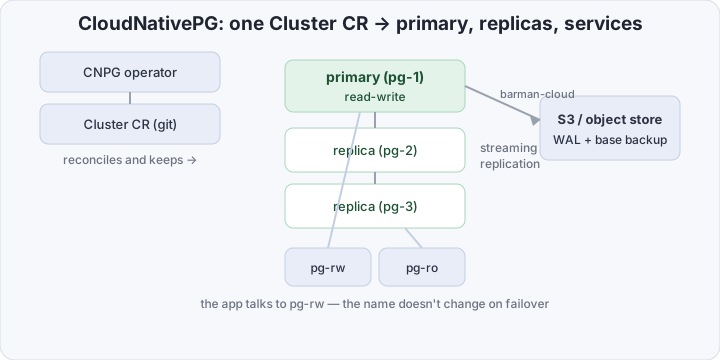
Crucially, this isn’t “yet another way to run a container.” The operator encodes DBA knowledge into a controller: desired state in git, reconciliation with reality on CNPG. Bare Postgres in k8s is still a bad idea; Postgres under an operator is normal.
Bare StatefulSet vs CloudNativePG
StatefulSet with Postgres | CloudNativePG Cluster | |
|---|---|---|
| Primary election | manual / external script | operator, automatic |
| Failover on master loss | none, stalls until you act | replica auto-promoted in seconds |
| App connection point | you must know who’s primary | stable <cluster>-rw service |
| Backup and WAL archive | by hand (cron + scripts) | Barman Cloud Plugin to S3/GCS |
| Point-in-time recovery (PITR) | roll your own | bootstrap.recovery + recoveryTarget |
| Read replicas | configure manually | -ro service out of the box |
| Minor-version upgrade | manual restart, risky | rolling + switchover by the operator |
| Configuration source | scattered manifests | one declarative Cluster CR |
What you need to stand up a cluster
At minimum you need the CloudNativePG operator installed and a StorageClass serving block volumes (ideally local SSD, not slow networked NFS). The operator installs with a single manifest:
kubectl apply --server-side -f \
  https://raw.githubusercontent.com/cloudnative-pg/cloudnative-pg/release-1.27/releases/cnpg-1.27.0.yaml
Then the cluster itself — three instances (1 primary + 2 replicas) with synchronous replication and a dedicated WAL volume:
apiVersion: postgresql.cnpg.io/v1
kind: Cluster
metadata:
  name: pg
  namespace: prod
spec:
  instances: 3
  imageName: ghcr.io/cloudnative-pg/postgresql:17.2

  # synchronous replication: at least one replica confirms the commit
  postgresql:
    synchronous:
      method: any
      number: 1

  storage:
    size: 50Gi
    storageClass: fast-ssd
  walStorage: # WAL on its own volume — less IO contention
    size: 10Gi
    storageClass: fast-ssd

  resources:
    requests:
      cpu: "1"
      memory: 2Gi
    limits:
      memory: 2Gi # requests=limits on memory: no OOM surprises
The app connects not to a pod but to the pg-rw service (writes, always pointing at the current primary) and, for read replicas, pg-ro. That’s the main win: on failover the DNS name doesn’t change, only the pod behind it does.
You almost always put a connection pool in front of the cluster. Postgres handles thousands of short-lived connections poorly — each one forks a process. A Pooler brings up PgBouncer as a separate layer:
apiVersion: postgresql.cnpg.io/v1
kind: Pooler
metadata:
  name: pg-pooler-rw
  namespace: prod
spec:
  cluster:
    name: pg
  instances: 2
  type: rw
  pgbouncer:
    poolMode: transaction # for web workloads it's almost always transaction
    parameters:
      max_client_conn: "1000"
      default_pool_size: "25"
Now the app talks to the pg-pooler-rw service, PgBouncer holds a small pool of real connections to pg-rw, and thousands of client connections are multiplexed into those 25. That removes Postgres’s main pain point under load.
For backups to S3, first describe the storage with an ObjectStore (a resource from the Barman Cloud Plugin), then enable the plugin in the cluster:
apiVersion: barmancloud.cnpg.io/v1
kind: ObjectStore
metadata:
  name: pg-backups
  namespace: prod
spec:
  configuration:
    destinationPath: "s3://my-bucket/pg"
    s3Credentials:
      accessKeyId:
        name: s3-creds
        key: ACCESS_KEY_ID
      secretAccessKey:
        name: s3-creds
        key: ACCESS_SECRET_KEY
---
apiVersion: postgresql.cnpg.io/v1
kind: Cluster
metadata:
  name: pg
  namespace: prod
spec:
  # ...the rest as above...
  plugins:
    - name: barman-cloud.cloudnative-pg.io
      isWALArchiver: true # WAL streams to S3 continuously
      parameters:
        barmanObjectName: pg-backups
With WAL archiving on you get continuous protection: not just a nightly snapshot, but every transaction between snapshots — the source PITR is assembled from. (How to restore from it to a specific second is the topic of the day-2 article.)
The traps people hit
- StorageClass. Slow or networked storage kills Postgres: every commit’s fsync becomes a network round-trip. Use local NVMe/SSD volumes with real IOPS. And check that the StorageClass allows expansion (
allowVolumeExpansion: true) — otherwise growing the disk later hurts. - Don’t disable fsync. The urge to “speed up” a test cluster by turning off fsync regularly leaks into prod and ends in data corruption at the first node crash. CNPG does the right thing by default — don’t override it.
- PgBouncer in transaction mode breaks session features.
poolMode: transactionis incompatible with naive prepared statements, session-level advisory locks, and sessionSETvariables. Either the app accounts for this, or usesessionmode (and a smaller connection win). - requests=limits on memory. Don’t let the Postgres pod get OOM-killed because of a bursty neighbor. Pin memory hard; CPU can be left to burst.
How to test that failover works
The whole point of the operator is that you can kill the primary and nothing breaks. Verify that before prod, not during an incident. Check the cluster status with the kubectl-cnpg plugin and kill the current master:
kubectl cnpg status pg -n prod          # who's primary, who's replica, lag
kubectl delete pod pg-1 -n prod         # kill the current primary
kubectl cnpg status pg -n prod -w       # watch a replica get promoted
Within seconds the operator promotes a fresh replica, and the pg-rw service repoints to it. An app talking to pg-rw experiences this as a brief connection drop — and reconnects, now to the new primary. If you have PgBouncer in front, the drop is even shorter: client connections to the pool don’t break at all.
Bottom line
Postgres on Kubernetes without an operator is still a bad idea: too much operational work that’s easy to do half-way. CloudNativePG encodes that work into a controller: the Cluster CR gives you a primary with replicas, automatic failover, a stable connection point, S3 backups and PITR — declaratively, in the same git as the rest of your app. The cost is the time to understand the operator and discipline around storage. The payoff: the database lives next to the app, without a separate DBA team and without the fear that “the pods will move.” That’s step one. Then day-2 begins: HA under load, verified backups, and major upgrades without downtime — the subject of the next article.