

In 2026 GitOps is no longer an “advanced practice” — it’s the baseline way to operate Kubernetes. But for a small team it often looks scary: it seems you need to stand up an operator zoo and spend a month configuring it. In reality a minimal viable GitOps on Flux takes an evening. Let’s see why it beats the familiar “kubectl apply from CI” and how to build a setup where git is the single source of truth.
Table of contents
Open Table of contents
What’s wrong with “kubectl apply from CI”
The most common way to ship to Kubernetes: CI builds an image and finishes with kubectl apply. It works, but the approach has built-in problems.
First, CI holds the keys to prod. A runner with kubectl apply rights on the cluster is a juicy target: compromise the pipeline, compromise the cluster. Second, there’s no source of truth. Someone did a manual kubectl edit at 3 a.m. — and the cluster’s state diverged from the repo without you knowing. Third, apply is “fire and forget”: it applies a manifest once and doesn’t watch what happens next.
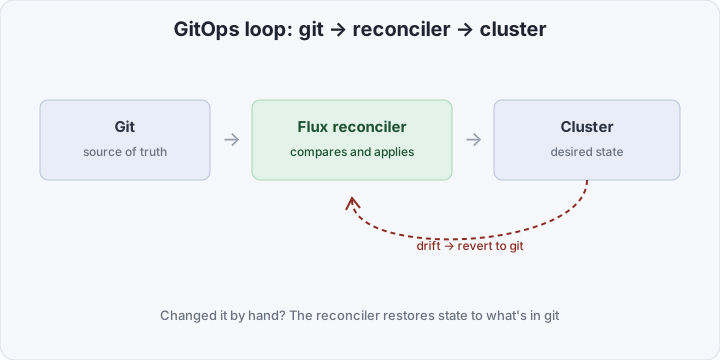
GitOps inverts the model: CI doesn’t push to the cluster; the cluster itself pulls the desired state from git and continuously converges to it.
What Flux is
Flux is a GitOps tool from the CNCF ecosystem (a graduated project). An important detail: it’s not one big agent but a set of small controllers, each doing one thing:
- source-controller — watches sources: git repos, Helm repos, OCI artifacts. Its job is to fetch and verify that a new version appeared.
- kustomize-controller — applies manifests (including via Kustomize) and continuously reconciles actual state against desired.
- helm-controller — the same for Helm releases.
- notification-controller — events and alerts outward (to Slack, to git as statuses).
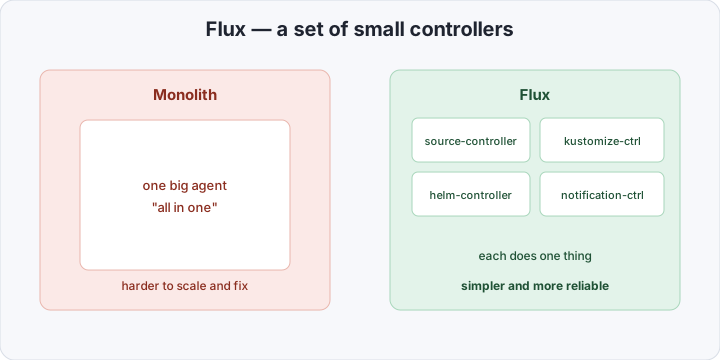
This split isn’t academic. Small controllers are easier to understand, easier to fix, and easier to scale individually. You don’t have to know them all: source- and kustomize-controllers are enough to start.
Reconcile, not apply
The key difference is the reconcile model. The kustomize-controller doesn’t “apply and leave” — it runs in a loop: take desired state from git → compare with actual in the cluster → eliminate the difference. That gives two things kubectl apply doesn’t.
Drift detection. Changed something by hand? On the next reconcile cycle Flux notices the divergence and returns state to what’s recorded in git. The cluster physically can’t drift from the repo for long.
Pruning. Deleted a manifest from git? With prune: true Flux removes the corresponding resource from the cluster too. No “ghost resources” that were applied once and forgotten. Git becomes a truly complete picture of what’s in the cluster.
There’s a third, less obvious benefit — the security of the pull model. In “CI does apply,” access to the cluster is exposed outward: the runner has a kubeconfig with prod rights, and that access has to be stored and protected somewhere. GitOps flips it: the controller lives inside the cluster and fetches changes from git itself. The cluster needs no inbound connections and no external keys to it — it only reads the repo. The attack surface shrinks: a CI compromise no longer automatically means a prod compromise, because CI has no direct cluster access at all. Its job is to build the image and update the manifest in git; the rollout is Flux’s concern.
Comparison at a glance
| kubectl apply from CI | GitOps (Flux) | |
|---|---|---|
| Who changes the cluster | CI pushes | the cluster pulls |
| Keys to prod | on the CI runner | inside the cluster |
| Source of truth | gets blurred | git, always |
| Manual drift | unnoticed | reverted by reconcile |
| Deleting resources | manual | prune: true |
| Rollback | re-deploy | git revert |
What you need to stand up Flux
You’ll need a cluster, the flux CLI, and a git repo (we’ll use GitHub) with a token. The nicest way to start is flux bootstrap: the command installs the controllers into the cluster and commits its own manifests to git, so Flux itself is managed via GitOps from then on.
export GITHUB_TOKEN=<personal-access-token>

flux bootstrap github \
  --owner=acme \
  --repository=infra \
  --branch=main \
  --path=clusters/prod \
  --personal
After that the acme/infra repo gets a clusters/prod folder with Flux manifests. Now describe the source and what to sync from it. One GitRepository (where to fetch) and one Kustomization (what to apply):
# clusters/prod/apps.yaml
apiVersion: source.toolkit.fluxcd.io/v1
kind: GitRepository
metadata:
  name: infra
  namespace: flux-system
spec:
  interval: 1m # how often to check git
  url: https://github.com/acme/infra
  ref:
    branch: main
---
apiVersion: kustomize.toolkit.fluxcd.io/v1
kind: Kustomization
metadata:
  name: apps
  namespace: flux-system
spec:
  interval: 10m # how often to reconcile cluster vs git
  sourceRef:
    kind: GitRepository
    name: infra
  path: ./apps # sync everything in apps/
  prune: true # delete from cluster what's deleted from git
That’s the minimal viable GitOps: whatever you put in the repo’s apps/ folder, Flux applies and keeps current. Want to add a service? Drop its manifest in apps/ and git push. Nothing else.
Ordering and dependencies
As resources grow, ordering matters: CRDs must arrive before the objects that use them, a database before the app. Argo CD had sync waves for this; in Flux, ordering is expressed via dependsOn between Kustomizations:
apiVersion: kustomize.toolkit.fluxcd.io/v1
kind: Kustomization
metadata:
  name: apps
spec:
  dependsOn:
    - name: infra-crds # apps go only after infra-crds
  # ...
Secrets
The big “but what about secrets” in GitOps is solved simply: secrets also live in git, but encrypted. Flux natively supports SOPS — you encrypt values with an age key (or a cloud KMS), commit the encrypted file, and the kustomize-controller decrypts it in the cluster at apply time. The private key lives only in the cluster; the repo holds nothing readable.
How to scale a single root
While services are few, one Kustomization over apps/ is enough. When they grow, the “a root that spawns the rest” pattern is handy: one root Kustomization syncs a folder holding descriptions of other Kustomizations, which in turn point at concrete apps. Conceptually it’s the same as App-of-Apps in Argo CD, only with Flux’s own primitives.
A typical repo layout looks like this:
infra/
├── clusters/
│   └── prod/          # bootstrap put Flux + the root Kustomization here
├── infrastructure/    # ingress, cert-manager, monitoring
│   └── ...
└── apps/              # your services
    ├── web/
    └── api/
The root Kustomization points at infrastructure/ and apps/, with dependsOn between them so platform pieces arrive before applications. Adding a new environment or cluster comes down to a new folder and a new Kustomization, not rewriting pipelines. The whole topology stays in git and reads like a directory tree.
Image automation
A separate nicety: Flux can update image tags in git itself. The image-reflector and image-automation controllers scan the registry, find a new matching tag by a given policy (e.g. a semver range), commit the manifest change back to the repo — and ordinary reconcile takes over. The result is a fully closed loop: build and push an image → Flux spots the new tag → updates the manifest in git → rolls it out to the cluster. Deploy history stays in git as regular commits, and rollback is git revert. For a small team that removes the last manual step between build and prod.
How to verify it works
First, check that Flux picked up the source and synced:
flux get kustomizations
# NAME   READY   MESSAGE
# apps   True    Applied revision: main@sha1:...
READY=True and a fresh revision mean the cluster has been converged to git’s state. Now a telling drift test. Change something by hand and wait a reconcile cycle:
kubectl scale deploy/web --replicas=5      # a "manual" intervention
# wait for the reconcile interval...
kubectl get deploy/web                      # replicas back to what's in git
Flux returns the replica count to what’s recorded in the repo — proof that git really became the source of truth. To force a reconcile without waiting for the interval, use flux reconcile kustomization apps.
Pitfalls
- Drift detection is not a “backup.” Flux returns the cluster to git, including overwriting your urgent manual fix. That’s by design: fix via a commit, not
kubectl edit, or reconcile rolls you back. prunedemands care. Convenient, but deleting a manifest from git deletes the resource from the cluster. Make sure objects Flux shouldn’t manage don’t fall underprune.- Too frequent an
intervalhits the API. A very small reconcile interval loads the kube-apiserver and the git provider. For most clusters, minutes on the source and ten-ish on reconcile is fine. - Plaintext secrets. The most dangerous mistake is committing an unencrypted Secret “just for a minute.” Set up SOPS before the first secret reaches the repo.
- kubectl apply around Flux. If, alongside GitOps, someone keeps shipping by hand, you get an endless reconcile war with a human. GitOps works only when git is the single path for changes.
Bottom line
GitOps is just two things: git as the single source of truth and a reconciler that continuously converges the cluster to it. Flux delivers that as a set of small controllers installed with one flux bootstrap command, managing themselves thereafter. “Too complex” is a myth from the big-enterprise world: for one team and one cluster, a working setup is a GitRepository plus a Kustomization, assembled in an evening. And once you grow into progressive delivery, Flagger layers onto the same model — but that’s a topic for a separate post.