

OpenTelemetry has outgrown the “here’s a spec, figure it out” phase. Today it’s the de-facto standard for telemetry, and its central piece is the Collector: a single process between your applications and the backend for metrics, traces, and logs. It removes vendor lock-in and gives you a control plane over your signals. Let’s see how it works and build a minimal config you can ship to prod without blushing.
Table of contents
Open Table of contents
- Why you need a Collector at all
- receivers, processors, exporters — three words
- What the collector actually buys you
- Agent vs Gateway
- Semantic conventions: names matter more than values
- Three signals, one process
- Comparison at a glance
- What you need for a minimal setup
- How to verify it works
- From contrib to your own distribution
- Pitfalls
- Bottom line
Why you need a Collector at all
You can send telemetry from the app straight to the backend — so why an extra process in the middle? Because without it every app is hard-wired to a specific vendor: endpoint, format, and API key baked into the code. Decide to switch from Datadog to Grafana — re-roll every service. Want to redact sensitive fields or sample traces — do it in each app separately.
The Collector breaks that coupling. The app knows only one address — the local collector — and one protocol, OTLP. Everything else (where to send, what to filter, how to batch and sample) is decided in the collector’s config, not in code. It’s the same idea as a reverse proxy for HTTP: a small process in the middle that gives you a point of control.
There are more down-to-earth reasons too. Without a collector each service is responsible for retries, buffering, and behavior when the backend is down — which means an observability outage can take down the app itself, choking on a queue of unsent telemetry. The collector takes that dirty work off your hands: the app makes a fast local call and forgets, while reliable delivery, retries, and burst smoothing are the job of a separate process that doesn’t share fate with your business logic.
receivers, processors, exporters — three words
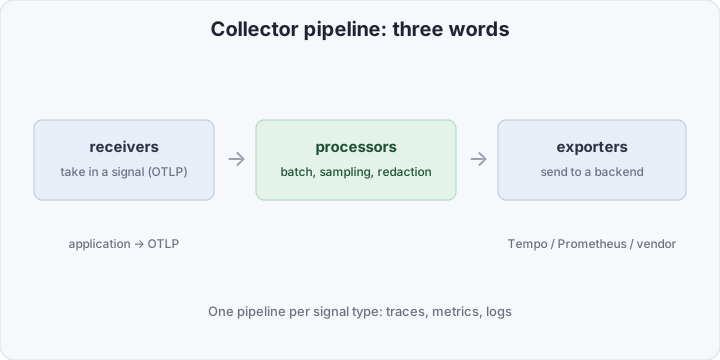
All of the collector’s work is described by three kinds of components, and once you get them you get the OTel Collector entirely.
- receivers — how a signal gets in. Most often an OTLP receiver (gRPC or HTTP), but there are also receivers for Prometheus, Kafka, host metrics.
- processors — what to do to a signal in transit: batch, sample, strip sensitive attributes, add metadata, limit memory.
- exporters — where to send it out: OTLP to Tempo/Grafana, to Prometheus, to a vendor backend.
These components are assembled into a pipeline — a separate one per signal type: one for traces, one for metrics, one for logs. Within a pipeline the signal flows strictly receivers → processors → exporters.
What the collector actually buys you
Four things people install it for:
- Decoupling. Apps don’t know about the vendor. Switching backends is a one-exporter edit in one config, not a release of every service.
- Batching. The collector accumulates signals and sends them in batches. Fewer network calls, less load on the backend, lower cost.
- Sampling. Storing 100% of traces is expensive and unnecessary. The collector can keep, say, all error and slow traces plus a percentage of the rest — a serious cut to the observability bill.
- Redaction. Sensitive data (tokens, emails, numbers) is stripped centrally before it leaves for the vendor. One processor instead of auditing every team’s code.
Agent vs Gateway
The collector is deployed in two topologies, and usually both at once.
Agent — a collector next to the app, typically a DaemonSet on each node. It receives signals locally (low latency), adds host and Kubernetes metadata, and takes retries off the app’s plate.
Gateway — a central collector (a Deployment with autoscaling) where agents forward what they’ve collected. It’s the right place for heavy work: tail-based sampling across a whole trace, deduplication, a single egress point.
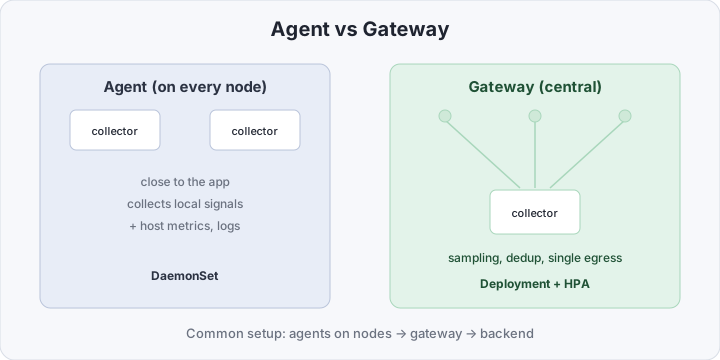
A small project is fine with a single collector, but even then keep this split in mind: it tells you which processors belong where.
Semantic conventions: names matter more than values
A separate but critical point: OTel defines semantic conventions — standard attribute names. The HTTP method is http.request.method, not method, verb, or httpMethod to each team’s taste. This is boring right up until you want one dashboard across all services or to compare the latency of two apps. If names drift, no query can stitch the data together. So the value of telemetry is largely set by naming discipline — and the collector helps maintain it by normalizing attributes in processors.
Three signals, one process
A big part of the collector’s value is that metrics, traces, and logs go through the same abstraction. Adding metrics to our trace pipeline is a few more lines in service.pipelines:
service:
  pipelines:
    traces:
      receivers: [otlp]
      processors: [memory_limiter, batch]
      exporters: [otlp/tempo]
    metrics:
      receivers: [otlp]
      processors: [memory_limiter, batch]
      exporters: [prometheus]
Same logic — only the exporter changes for each signal’s backend. That’s what “a single control plane” means: instead of three different agents (one for metrics, one for traces, one for logs) you have one process with three pipelines and a single policy for batching, sampling, and redaction. When tomorrow you need to reroute logs to different storage or add PII stripping across all three signals at once, those are edits in one file, not three separate projects.
The reverse matters too: pipelines are independent. You can sample traces aggressively but keep 100% of metrics; you can strip attributes only in logs. The collector doesn’t force a single policy on everything — it gives you a place to describe those policies side by side.
Comparison at a glance
| Vendor agent in every pod | OTel Collector | |
|---|---|---|
| Vendor coupling | hard-wired, in code | one config line |
| Switching backends | release every service | edit an exporter |
| Sampling / redaction | in each app | centralized |
| Protocol | proprietary | OTLP (open) |
| Batching | hit or miss | built in |
| Signals | often just its own set | traces, metrics, logs |
What you need for a minimal setup
Let’s stand up a local trio of containers: an app (sends OTLP), the collector, and a trace backend — we’ll use Grafana Tempo. Start with the collector config.
# otel-collector.yaml
receivers:
  otlp:
    protocols:
      grpc:
        endpoint: 0.0.0.0:4317
      http:
        endpoint: 0.0.0.0:4318

processors:
  memory_limiter:
    check_interval: 1s
    limit_percentage: 80 # don't let the collector eat all memory
  batch:
    timeout: 5s # accumulate for 5s, then send a batch

exporters:
  otlp/tempo:
    endpoint: tempo:4317
    tls:
      insecure: true # local only; use real TLS in prod

service:
  pipelines:
    traces:
      receivers: [otlp]
      processors: [memory_limiter, batch]
      exporters: [otlp/tempo]
The config reads like a sentence: receive OTLP → limit memory and batch → send to Tempo. Now the docker-compose that wires it together:
services:
  tempo:
    image: grafana/tempo:latest
    command: ["-config.file=/etc/tempo.yaml"]
    volumes:
      - ./tempo.yaml:/etc/tempo.yaml

  otel-collector:
    image: otel/opentelemetry-collector-contrib:latest
    command: ["--config=/etc/otel-collector.yaml"]
    volumes:
      - ./otel-collector.yaml:/etc/otel-collector.yaml
    ports:
      - "4317:4317" # OTLP gRPC
      - "4318:4318" # OTLP HTTP
    depends_on: [tempo]

  app:
    image: your-app:latest
    environment:
      OTEL_EXPORTER_OTLP_ENDPOINT: "http://otel-collector:4317"
      OTEL_SERVICE_NAME: "demo-app"
    depends_on: [otel-collector]
The app needs only two environment variables — where to send and what to call itself. No vendor SDKs: most languages have OTel instrumentation that reads OTEL_EXPORTER_OTLP_ENDPOINT on its own.
We use opentelemetry-collector-contrib, not the base distribution: contrib bundles nearly all receivers/processors/exporters, including vendor ones. For prod you can later build your own trimmed distribution with only the components you need.
How to verify it works
Bring up the stack and check the collector logs — at startup it prints which pipelines were assembled:
docker compose up -d
docker compose logs otel-collector | grep -i "Everything is ready"
Then run a couple of requests through the app and confirm traces reached Tempo. The easiest way is to add a temporary debug exporter to the collector and see the signals in the logs directly:
exporters:
  debug:
    verbosity: detailed
# and add debug to the exporters of the relevant pipeline
If the collector logs show spans with your service.name=demo-app and Tempo finds a trace by that name — the chain works. After checking, remove the debug exporter so it doesn’t pollute prod logs.
From contrib to your own distribution
For getting started, opentelemetry-collector-contrib is ideal: it has everything and you don’t have to think about where each component comes from. But you don’t have to ship an image with every existing receiver and exporter to prod — that’s extra size and extra attack surface. Once the config settles and you know which components you need, it’s worth building a trimmed distribution via the OpenTelemetry Collector Builder (ocb): you list only the needed modules in a manifest and get a minimal binary tailored to your pipeline.
The collector is light on resources: a single agent instance usually fits in tens to hundreds of megabytes of memory, and load scales via batching and horizontally (a gateway behind an HPA). The one thing not to forget is memory_limiter: it’s what turns “the collector occasionally dies under a spike” into “the collector cleanly throttles intake and survives.”
Pitfalls
- Without
memory_limiterthe collector dies under load. On a telemetry spike it balloons in memory and gets OOM-killed.memory_limitermust be the first processor in the pipeline. batchisn’t optional, it’s the norm. Without batching you send each span as a separate request: costly for both the network and the backend. The batch processor is needed almost always.latestin prod. Handy for a demo, but pin a specific collector image version in prod — behavior changes between releases.- Tail-based sampling and the agent. Whole-trace sampling only works correctly where the entire trace is visible — i.e. on the gateway, not on node agents. On an agent you can only do head-based.
- Drifting attribute names. The sneakiest one — the data is there but you can’t stitch it into a dashboard. Stick to semantic conventions from day one.
Bottom line
The OTel Collector is “nginx for telemetry”: a small process in the middle that removes vendor lock-in and gives a single point of control over metrics, traces, and logs. A minimal production setup is literally one OTLP receiver, two processors (memory_limiter + batch), and one exporter. It’s where any new observability system should start: dragging a proprietary agent into every pod in 2026 is an anachronism, and moving to an open protocol later costs far more than baking it in from the start.