

HTTP/3 is the third major version of the protocol the whole web runs on. The big change isn’t new headers — it’s a new foundation: the transport moved from TCP to UDP, and on top of it runs a new protocol called QUIC. Let’s see why, how it beats the older versions, and what you need to enable HTTP/3 on your own server.
Table of contents
Open Table of contents
A quick recap of the predecessors
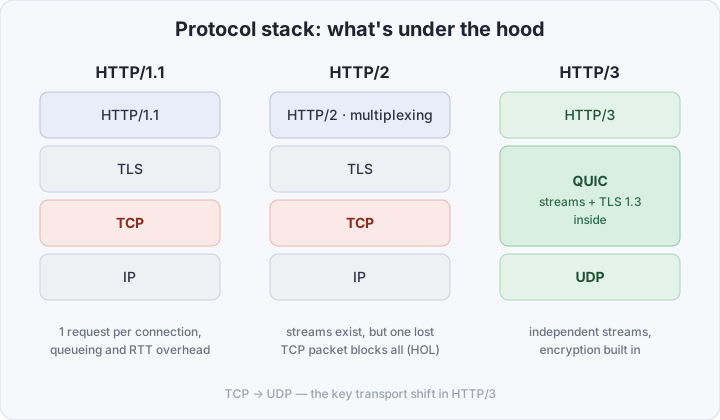
HTTP/1.1 (1997) — one connection serves one request at a time. To load a page with dozens of files, the browser opens 6 parallel TCP connections per domain and still hits a queue. Hence hacks like sprites and bundled CSS.
HTTP/2 (2015) brought multiplexing: many logical streams over a single connection. Noticeably faster, but one fundamental problem remained — hidden one layer down, in TCP.
The problem TCP can’t solve
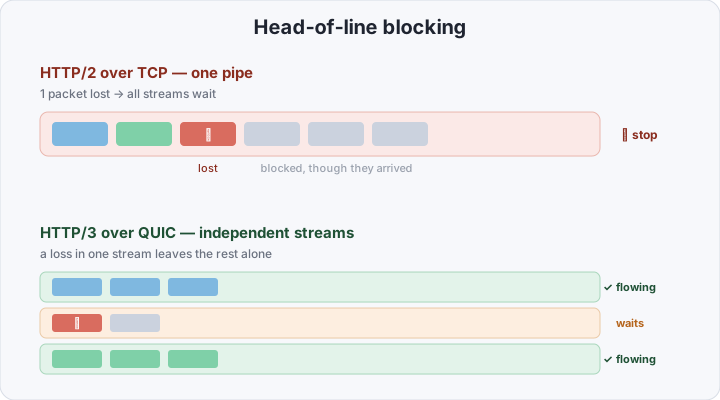
TCP guarantees byte delivery in strict order. That’s exactly its weak spot. HTTP/2 sends several streams over one TCP connection, but TCP doesn’t see streams — it sees a single byte stream. Lose one packet and TCP halts delivery of all data that arrived after it until the lost packet is retransmitted. Even data belonging to other, fully received streams.
This is head-of-line blocking. Invisible on a fast wired network, but on a lossy mobile link HTTP/2 sometimes behaves no better than HTTP/1.1.
What QUIC changes
QUIC is a transport protocol on top of UDP, originally built at Google and standardized by the IETF in RFC 9000. UDP guarantees neither order nor delivery — QUIC implements all of that itself, but now with awareness of streams. The key differences:
- Streams are independent. A packet loss in one stream only stalls that stream. The rest keep flowing — transport-level head-of-line blocking is gone.
- Encryption is built in. TLS 1.3 isn’t a separate layer on top, it’s part of QUIC. Unencrypted QUIC simply doesn’t exist.
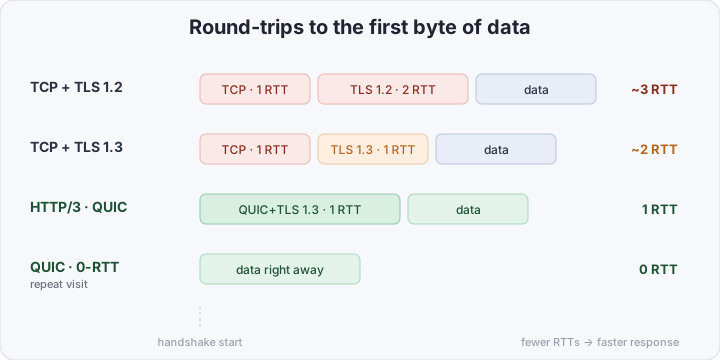
- Fast handshake. Connection setup and TLS are merged into one exchange. That’s 1 RTT instead of two or three, and on a repeat connection — 0-RTT: data ships in the very first packet.
- Connection ID instead of IP+port. The connection is tied to an identifier, not an address. Switch from Wi-Fi to LTE and the connection survives — nothing is re-established. This is called connection migration.
Side by side
| HTTP/1.1 | HTTP/2 | HTTP/3 | |
|---|---|---|---|
| Year | 1997 | 2015 | 2022 |
| Transport | TCP | TCP | QUIC / UDP |
| Multiplexing | no | yes | yes |
| Head-of-line | yes (HTTP+TCP) | yes (TCP) | no |
| Encryption | optional | de facto TLS | mandatory (TLS 1.3) |
| Handshake | 1+ RTT | 1+ RTT | 1 / 0 RTT |
| Network change | drops | drops | seamless |
What you need to enable HTTP/3
Good news: in production it’s usually a couple of config lines. You need three things.
1. A server that speaks QUIC. Caddy does HTTP/3 out of the box. Nginx — from the 1.25 branch onward (the ngx_http_v3_module, built with BoringSSL/QUIC). HAProxy, Cloudflare and most CDNs handle it too.
2. TLS 1.3. QUIC won’t run without it. If you already have a valid certificate and TLS 1.3 enabled, this box is ticked.
3. An open UDP/443. The most common “it won’t start” cause: the firewall only allows TCP/443. QUIC travels over UDP and must be allowed explicitly.
A minimal Caddy example — HTTP/3 is on automatically, no extra directives needed:
example.com {
	reverse_proxy localhost:8080
}
For Nginx 1.25+, enable quic on listen and advertise support to the client via the Alt-Svc header:
server {
    # TCP for HTTP/1.1 and HTTP/2
    listen 443 ssl;
    # UDP for HTTP/3 (QUIC)
    listen 443 quic reuseport;

    ssl_protocols TLSv1.3;

    # tell the browser: "I speak HTTP/3, come over on it"
    add_header Alt-Svc 'h3=":443"; ma=86400';

    server_name example.com;
    # ...
}
Don’t forget the firewall:
# open UDP/443 for QUIC
sudo ufw allow 443/udp
How browsers actually use it
An important detail: the browser does not connect over HTTP/3 right away. The first request almost always goes over HTTP/2 on TCP. In the response the server sends an Alt-Svc: h3=":443" header, meaning “you can also reach me over HTTP/3.” The browser remembers that and establishes its next connections to that host over QUIC. So HTTP/3 “kicks in” on the second visit — that’s normal.
How to verify it works
The simplest check, working with any curl, is to see whether the server advertises HTTP/3 via the Alt-Svc header:
curl -sI https://example.com | grep -i alt-svc
# alt-svc: h3=":443"; ma=86400
If the header is there, the server correctly tells browsers it supports HTTP/3. This doesn’t need HTTP/3 in curl itself (the stock build from Ubuntu/Debian repos is almost always compiled without QUIC) — the header is served over plain HTTPS.
To see an actual HTTP/3 connection — in the browser DevTools Network tab, enable the Protocol column: requests will show h3.
If you don’t have an HTTP/3-capable curl on hand, the easiest check is online via http3check.net: enter your site’s address and the service reports whether HTTP/3 and QUIC are supported, which QUIC versions respond, the Alt-Svc header the server returns, and TLS certificate details. Handy for confirming HTTP/3 is actually reachable from the outside, not just in your own config.
Is it worth switching
For a typical site on a fast wired connection the difference will be small. HTTP/3’s real win shows where networks are unreliable: mobile traffic, regions far from the server, frequent Wi-Fi/LTE handoffs. Fewer RTTs on the handshake, no stream blocking under loss, seamless network migration — all of it directly improves load time on a weak link.
The risk is minimal: HTTP/3 layers on top of existing HTTP/2 and HTTP/1.1, not in place of them. A browser that can’t do QUIC (or a network where UDP/443 is closed) simply stays on HTTP/2. You can turn it on and just watch.
Bottom line: HTTP/3 isn’t cosmetics — it’s moving the transport from TCP to QUIC/UDP. The price is mandatory encryption and an open UDP port; the payoff is no head-of-line blocking, a 0–1 RTT handshake, and connections that survive a network change.