

You have a Kafka topic, consumers chew through messages in batches, and load swings from zero overnight to thousands of messages a minute at peak. HPA on CPU is nearly useless here: an idle consumer waiting on a slow downstream call doesn’t burn CPU, so nothing scales it down, and under a sudden spike the CPU metric catches up minutes late. KEDA takes a different angle — it scales on the event itself: queue depth, a metric value, a cron schedule — and, unlike HPA, it can drive load all the way down to zero when there’s no work at all.
Table of contents
Open Table of contents
Why HPA can’t answer “how many workers do I need”
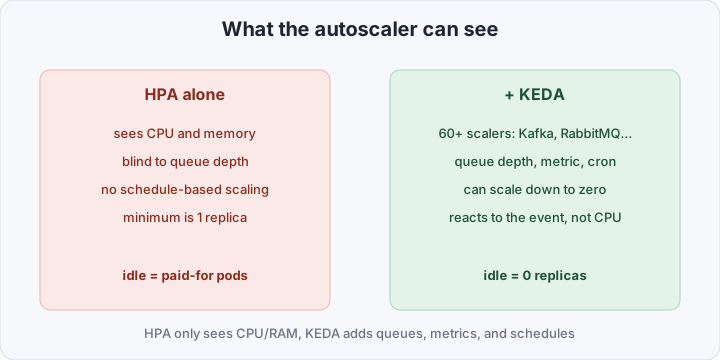
The Horizontal Pod Autoscaler was designed around one scenario: a web service whose load roughly correlates with CPU or memory. More requests, more CPU, HPA adds replicas. For queues, batch processing, and cron-like workloads that correlation breaks down:
- A queue consumer can sit at 2% CPU with 10,000 unprocessed messages in Kafka — it’s just waiting on a slow downstream service.
- A batch job only loads CPU during the actual run and should hold zero resources between runs.
- CPU metrics lag: HPA averages over a multi-minute window, while a queue can grow in seconds.
There’s a harder architectural limit underneath: HPA cannot scale a Deployment to zero replicas. That’s not a bug — it needs at least one running pod to have anything to measure in the first place. Which means any “bursty, then idle” workload either keeps replicas running (and billed) around the clock, or gets scaled by hand.
What KEDA adds on top of HPA
KEDA (Kubernetes Event-Driven Autoscaling) is a CNCF graduated project that doesn’t replace HPA — it extends it in two directions at once.
First, KEDA brings 60+ scalers — connectors to event sources: Kafka, RabbitMQ, AWS SQS, Prometheus, PostgreSQL, cron schedules, and dozens more. Each scaler turns “queue depth” or “metric value” into a number Kubernetes understands.
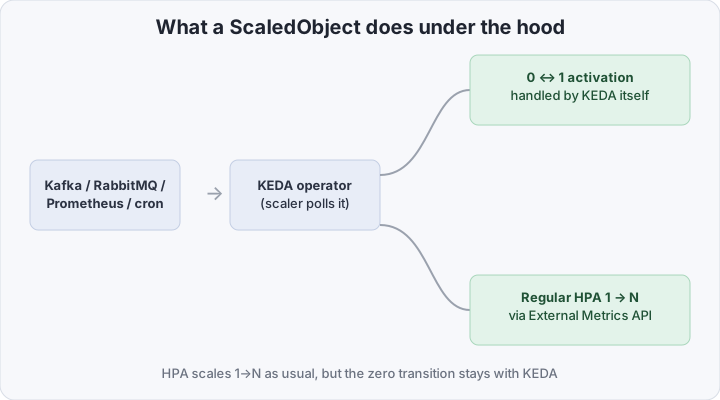
Second, and this is the key difference, KEDA solves the zero problem. Under the hood it works like this: you describe a ScaledObject — a CRD that points at your Deployment or StatefulSet and defines triggers. The KEDA operator responds by creating a regular Kubernetes HPA wired to KEDA as an External Metrics API — from Kubernetes’ point of view nothing exotic is happening, an ordinary HPA is just fed a metric that KEDA supplies. But HPA fundamentally cannot make the 0-to-1 transition — that’s handled by separate logic inside the KEDA operator itself: while replicas are at 0, no HPA exists at all, and KEDA watches the event source directly; the moment activity appears, it scales the Deployment to 1 replica and hands control off to the regular HPA from there.
For one-off work there’s ScaledJob instead of ScaledObject — it creates one Kubernetes Job per unit of work (say, per queue message) rather than scaling a long-lived Deployment.
Comparison
| HPA | KEDA | |
|---|---|---|
| Metric source | CPU, memory, custom metrics via a manual adapter | 60+ built-in scalers: queues, DBs, metrics, cron |
| Minimum replicas | 1 (architecturally can’t be 0) | 0 — separate activation logic |
| What actually scales | Deployment/StatefulSet directly | creates and manages an HPA + its own 0↔1 controller |
| Schedule (cron) | no | built-in cron scaler |
| Custom metrics | needs your own Metrics/External adapter | External Metrics API out of the box |
| One-off event-driven work | no | ScaledJob — one Job per unit of work |
What you need to autoscale by Kafka lag
Install KEDA once per cluster (a single install; every workload then gets its own ScaledObject):
helm repo add kedacore https://kedacore.github.io/charts
helm install keda kedacore/keda --namespace keda --create-namespace
Then a ScaledObject that scales a consumer Deployment by the depth of the orders topic and drains it back to zero when the queue is empty:
apiVersion: keda.sh/v1alpha1
kind: ScaledObject
metadata:
  name: order-consumer
  namespace: default
spec:
  scaleTargetRef:
    name: order-consumer
  minReplicaCount: 0
  maxReplicaCount: 20
  pollingInterval: 15
  cooldownPeriod: 120
  triggers:
    - type: kafka
      metadata:
        bootstrapServers: kafka-broker:9092
        consumerGroup: order-consumer-group
        topic: orders
        lagThreshold: "50"
        activationLagThreshold: "1"
      authenticationRef:
        name: kafka-trigger-auth
The two thresholds do different jobs: lagThreshold is what KEDA hands to HPA as the scaling target from 1 up to maxReplicaCount (a lag of 500 against a threshold of 50 → HPA aims for 10 replicas). activationLagThreshold is a separate, more sensitive threshold used only for the 0-to-1 transition — it can be much lower, so the consumer wakes up on the first message instead of waiting for lag to build up to a full scaling threshold.
How to verify it’s actually working
KEDA doesn’t hide its logic — it’s visible as plain Kubernetes objects:
# the ScaledObject exists and is active
kubectl get scaledobject order-consumer -o wide

# the HPA that KEDA created and manages itself
kubectl get hpa keda-hpa-order-consumer

# activation status and the conditions behind it
kubectl describe scaledobject order-consumer | grep -A6 Conditions

# replicas in real time under load
kubectl get pods -l app=order-consumer -w
A good test is to push a batch of messages into the topic by hand and watch order-consumer come up from zero within pollingInterval, then drain back to zero cooldownPeriod after the queue empties out.
Gotchas
pollingIntervalis a reaction delay, not a free lunch. The default is 30 seconds — that’s how often KEDA polls the scaler. A lower value reacts faster to a spike, but adds load on the source (Prometheus or the Kafka brokers, at scale, across hundreds ofScaledObjects).- Activation threshold and scaling threshold are different knobs — easy to conflate. One decides “should we wake up from zero at all,” the other decides “how many replicas to scale to.” Using the same value for both either leaves a worker at zero too long under light load, or wakes a replica earlier than it’s actually needed.
cooldownPeriodguards against flapping, and it costs money. The default is 300 seconds of idle time before KEDA scales back to zero. It’s a deliberate trade-off: too short and pods flap on every brief lull in the queue (which also triggers the cold start below); too long and you’re paying for idle replicas almost as if KEDA weren’t there.- Cold start is a price, not a bug. While a Deployment sits at zero replicas, the first message isn’t handled instantly: KEDA has to notice the activity (up to
pollingInterval), scale a pod up, and the pod still has to pull its image and initialize. If your SLA requires sub-second handling, keepminReplicaCount: 1for the critical queues — scale-to-zero pays off where a cold-start delay is acceptable.
Bottom line
KEDA doesn’t reinvent autoscaling — it removes a limitation that was architectural in HPA from day one: blindness to anything but CPU/RAM, and the inability to reach zero. For steady web traffic, HPA is still enough on its own. But wherever load is driven by a queue, a schedule, or an external metric rather than how much CPU a pod happens to burn, KEDA turns scale-to-zero from a manual workaround into a default setting — and the difference shows up in the very next cluster bill.