

Stale dependencies are the quietest, most common supply-chain vector there is: everyone knows they should update, but nobody has the bandwidth for a PR per package, so hundreds of versions pile up in the backlog along with one closed CVE. Renovate doesn’t fix this by swapping manual labor for more manual labor — it automates the whole cycle: scans manifests, groups updates by meaning, and merges some of them without a human in the loop.
Table of contents
Open Table of contents
Why “we’ll update before the audit” stopped working
The classic update process is a one-off event. Once a quarter someone on the team spends half a day going through npm outdated or pip list --outdated, opens a batch of PRs, figures out what broke, and merges whatever passes tests. That works fine as long as there aren’t many updates and the gap to the latest versions is small.
The problem is that by the time this “sweep” happens, the distance to the current version is already dozens of releases, and it’s easy to lose a breaking change somewhere in that diff. And “we’ll update before the audit” or “before the release” is exactly the moment nobody wants to be firefighting a compatibility break against a deadline.
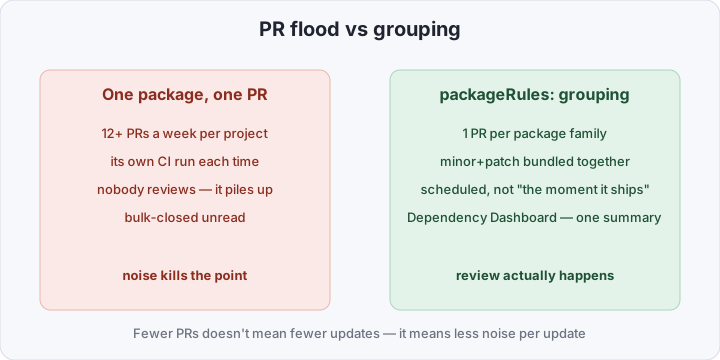
Dependabot partially solved this for GitHub — it opens a PR per update and supports basic grouping via groups in dependabot.yml. But grouping there is limited to one dimension at a time (usually ecosystem or a name pattern), with no conditions on update type, CI outcome, or a delay after release. On an active project with fifty-odd dependencies, that still means dozens of separate or half-grouped PRs a week, each with its own CI run. Nobody watches that queue, and within a month the PRs get bulk-closed unread — which defeats the whole point of automating this in the first place.
What Renovate actually does differently
Renovate isn’t just “another bot that opens PRs.” The real difference is how configurable the process itself is, and that it works across platforms.
- Works everywhere. GitHub, GitLab, Bitbucket, Azure DevOps, Gitea — one tool instead of a different bot per platform. For teams with repos split between GitLab and GitHub, it’s the only option with the same UX and the same config in both places.
- Grouping instead of a PR flood.
packageRuleslet you bundle all minor/patch updates of one package family (all@types/*, all ofaws-sdk) into one PR instead of ten separate ones. - Scheduled, not “the moment it ships”. Updates pile up and open on a
schedule— say, weekly on Mondays — instead of every time upstream cuts a release. - Dependency Dashboard. A dedicated issue summarizing every pending, awaiting, and errored update — one entry point instead of hunting for PRs across tabs.
lockFileMaintenance. A separate periodic lockfile update (package-lock.json,poetry.lock) even when manifest versions haven’t changed — it pulls in transitive dependencies nobody else ever touches.- Merge Confidence. Each PR gets badges showing how many open-source projects already run the new version and how long it’s been in production without a rollback. Not a guarantee, but a signal that separates “shipped yesterday, nobody’s tried it” from “thousands of projects have run this for weeks.”
Shareable configs via extends save time at org scale, too. The config:recommended preset in the example below is Renovate’s own set of sane defaults; you can publish your own preset as a separate repo and pull it into every project with the same one-liner instead of copy-pasting renovate.json around.
Comparison at a glance
| Manual update | Dependabot | Renovate | |
|---|---|---|---|
| Platforms | — | GitHub | GitHub, GitLab, Bitbucket, Azure DevOps, self-hosted |
| Grouping updates | manual | limited (groups) | flexible packageRules, any slice |
| Scheduling | none | limited | full cron-like schedule |
| Automerge | none | basic | yes, gated by update type and cooldown |
| Self-hosted | — | no | yes (renovate CLI or a CI job) |
| Status overview | none | PR tab | Dependency Dashboard issue |
What you need to turn Renovate on
At minimum you need three things: a config with grouping rules and a schedule, bot access to the repo, and — if the platform isn’t GitHub — a self-hosted run in CI. Start with the config.
On GitHub, Renovate installs as a regular GitHub App — you authorize it against a repo or org, and on the first run it opens an onboarding PR with a proposed renovate.json you can tweak before merging. Self-hosted platforms (GitLab, Bitbucket, Azure DevOps) don’t have that app — the config just gets committed up front, and Renovate itself runs from CI, as shown below.
renovate.json at the repo root:
{
  "$schema": "https://docs.renovatebot.com/renovate-schema.json",
  "extends": ["config:recommended"],
  "timezone": "Europe/Moscow",
  "schedule": ["before 6am on monday"],
  "lockFileMaintenance": {
    "enabled": true,
    "schedule": ["before 6am on monday"]
  },
  "packageRules": [
    {
      "matchUpdateTypes": ["minor", "patch"],
      "matchDepTypes": ["dependencies"],
      "groupName": "minor and patch (prod)",
      "automerge": false
    },
    {
      "matchDepTypes": ["devDependencies"],
      "matchUpdateTypes": ["minor", "patch"],
      "groupName": "dev dependencies",
      "automerge": true,
      "automergeType": "branch",
      "minimumReleaseAge": "3 days"
    },
    {
      "matchUpdateTypes": ["major"],
      "labels": ["breaking"],
      "automerge": false
    }
  ],
  "vulnerabilityAlerts": {
    "labels": ["security"],
    "automerge": false
  }
}
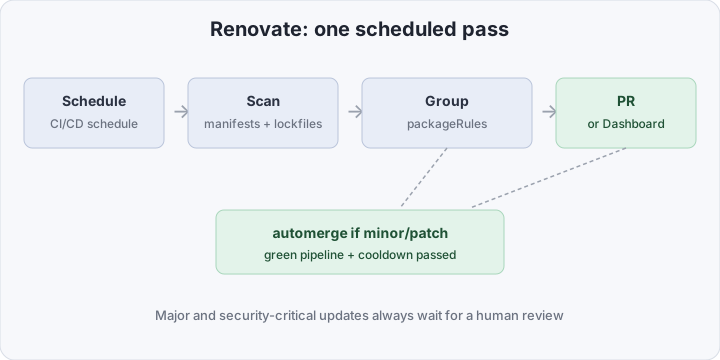
Three things in this config keep automerge safe instead of just “on.” First, automerge only applies to devDependencies, and only for minor/patch — prod dependencies and any major always go through a human. Second, minimumReleaseAge (called stabilityDays in older versions) makes Renovate wait a few days after a package is published before offering it for automerge: a freshly published version is the most common supply-chain attack vector — malicious code gets pushed into a brand-new release after a maintainer’s account is compromised — and a couple of days’ delay is usually enough for such a version to get pulled. Third, vulnerabilityAlerts is broken out on its own and deliberately not automerged — a security patch deserves a human’s eyes, not blind trust in CI.
For self-hosted platforms (GitLab, Bitbucket), Renovate runs as a scheduled job rather than an external GitHub App. A GitLab CI job:
renovate:
  stage: dependencies
  image: renovate/renovate:latest
  rules:
    - if: $CI_PIPELINE_SOURCE == "schedule"
  variables:
    RENOVATE_PLATFORM: gitlab
    RENOVATE_ENDPOINT: $CI_SERVER_URL/api/v4
    RENOVATE_TOKEN: $RENOVATE_BOT_TOKEN
    RENOVATE_AUTODISCOVER: "true"
    RENOVATE_AUTODISCOVER_FILTER: "acme-group/*"
  script:
    - renovate
The pipeline fires off a CI/CD Schedule (a separate entity in GitLab’s project settings, a plain cron expression like 0 6 * * 1), not a long-running process. RENOVATE_TOKEN is a bot account’s token with Merge Requests and Repository access on the relevant projects, and RENOVATE_AUTODISCOVER_FILTER limits which repos in the group the bot even sees — without the filter, Renovate will try to open PRs across everything the token can reach, which is almost never what you want.
How to verify it works
After the first run, a Dependency Dashboard issue should show up in the repo — it tells you at a glance what Renovate found, what it grouped, and what it deferred. If the issue never appears but the pipeline runs green, the culprit is almost always RENOVATE_AUTODISCOVER_FILTER (the repo isn’t matched) or a token missing access to the right group.
You can validate the config locally without a real run:
LOG_LEVEL=debug npx renovate-config-validator renovate.jsonAnd do a dry run against the real repo without opening any PRs:
RENOVATE_TOKEN=... LOG_LEVEL=debug npx renovate --dry-run=full acme-group/appThe output shows which packages were found, how packageRules grouped them, and which updates automerge would have taken if it weren’t a dry run — the fastest way to debug a config before it starts opening PRs for real.
Common pitfalls
- Automerge without
minimumReleaseAge. Without a cooldown, the bot can merge into prod a version a malicious actor published an hour ago. A few days’ delay is the minimum defense, not an optional knob. - Overly broad
packageRules. A rule like"matchPackagePatterns": ["*"]with automerge on everything turns Renovate into the thing deciding what ships to prod. Scope rules down to specificmatchDepTypesandmatchUpdateTypes. - Forgetting
RENOVATE_AUTODISCOVER_FILTER. Self-hosted without a filter means the bot tries to open PRs in every repo the token can reach — including ones nobody expected Renovate to touch. - Ignoring the Dependency Dashboard. If nobody opens the issue for months,
erroredandawaitingupdates pile up unnoticed — the same failure mode as forgotten PRs, just consolidated into one place instead of ten.
Bottom line
Renovate doesn’t remove the need to think about updates — it removes the need to do it by hand, one package at a time. Grouping cuts the noise down to something people actually review, scheduling turns random updates into a predictable weekly stream, and minimumReleaseAge plus a hard line between dev and prod dependencies keep automerge safe by default. The cost of entry is one renovate.json and, for self-hosted setups, one CI job. For a team still pushing updates off “for later,” this is the cheapest way to turn them into background noise this week.