

Two days ago we assembled a WAF from parts: Coraza + OWASP CRS, SecLang configs, an hour of tuning exclusions. It works, but it’s a kit — it assumes you’re willing to read other people’s rules and edit them by hand. Chaitin Tech bets the opposite way: their SafeLine is a self-hosted WAF that behaves like a product — management console, a semantic detection engine instead of regex rules, and zero configuration to start. Below: what it catches out of the box, how the free edition differs from Pro, when it beats Coraza — and how the program that awards Pro licenses for articles like this one actually works.
Table of contents
Open Table of contents
The problem: signatures versus obfuscation
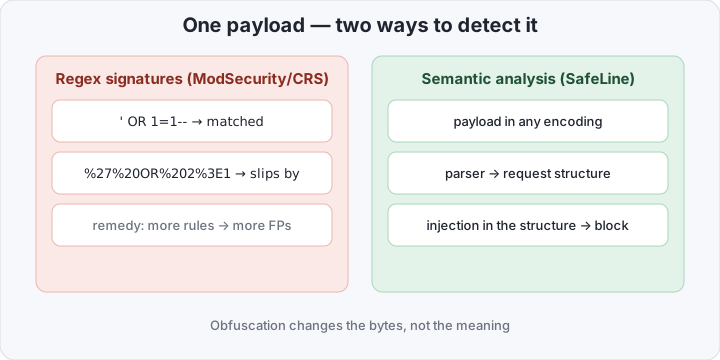
Classical WAF detection is regex signatures run over raw chunks of the request: ModSecurity and CRS push parameter strings through hundreds of rules like “find union select”. The upside is transparency — every rule is visible and editable. The downside is a permanent arms race. The payload ' OR 1=1-- matches trivially, but %27%20OR%202%3E1 hidden in encoding, or split with comments as SEL/**/ECT, does not. The signature world answers with more rules covering more spellings, and every new signature drags in the risk of matching legitimate text. In the Coraza article this showed up as the paranoia-level dilemma: raise the level, get wider coverage and more false positives.
Semantic analysis changes where the effort goes: not “search for a substring” but “understand the request”. The engine parses HTTP parameters into structures — think of a SQL AST for injections — and looks for signs of attack in the structure. Obfuscation changes the bytes, not the meaning: %27 and ' are the same thing to the parser.
What SafeLine is
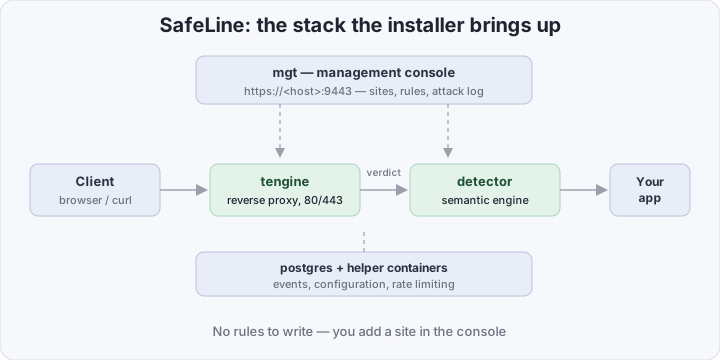
SafeLine is a self-hosted WAF by Chaitin Tech, a Chinese company that grew out of attack-defense competition teams. The open repository has collected 22,800+ stars, and Chaitin claims 700,000+ installations. The product doesn’t live in the repo’s code but in Docker images: the official installer brings up an entire stack.
What’s inside:
- tengine — an nginx fork, the data plane: terminates traffic, listens on 80/443;
- detector — the semantic engine itself: tengine sends it the request and waits for a verdict;
- mgt — the management console on port 9443: sites, rules, attack log;
- postgres plus a couple of helper containers — events, configuration, rate limiting.
Detection is claimed not only broader but quieter: Chaitin’s own benchmark over 33,669 samples gives ModSecurity (PL1) 69.7% detection at 17.6% false positives, and SafeLine in Balance mode 71.7% at 0.07%. Vendor numbers — treat them accordingly — but the order of the FP gap matches the logic of the approach: when a trigger is tied to structure rather than substring, text that merely “looks like SQL” in a support ticket rarely trips it.
Beyond signature detection, these work out of the box: bot protection with built-in JS challenge and CAPTCHA, dynamic protection — per-response encryption of HTML/JS, rate limiting against HTTP floods, auth challenge (a password in front of the site), and a Web ACL.
An honest caveat: “open source” here is conditional. The repository holds the installer, a compose file, and glue; the detection engine itself ships as a closed image from Chaitin’s registry. “Free forever” — yes; auditable code like Coraza or ModSecurity — no.
Free edition versus Pro
The free edition (Community in the repo, Personal on the pricing page) has no time limit. The paid line: Lite at $10/mo, Pro at $100/mo, Ultimate above that “on request”.
| Personal — $0 | Lite — $10/mo | Pro — $100/mo | |
|---|---|---|---|
| Applications | up to 10 | up to 20 | unlimited |
| Semantic engine | ✓ | ✓ | ✓, stronger + advanced configs |
| Geo blocking, threat intel, Discord/Telegram alerts | — | ✓ | ✓ |
| Attack log export | — | ✓ | ✓ |
| Custom block page, upstream LB, master-slave | — | — | ✓ |
| ARM support | — | — | ✓ |
Who needs what: Personal covers “a blog, a pet project, two or three internal services” — the engine and detection are the same. Lite gets bought for geo blocking and notifications. Pro is production with a team: multiple nodes, config sync, custom pages. For a personal site there’s no honest need for Pro — except, perhaps, an ARM server: on ARM the free edition doesn’t run at all.
SafeLine versus Coraza: when to use which
| Coraza + CRS | SafeLine | |
|---|---|---|
| Shape | an engine, a layer in your proxy | a product: its own reverse proxy + console |
| Rules | SecLang, CRS, full control | closed engine, configured from the UI |
| Entry barrier | know SecLang, tune exclusions | five minutes, zero rules |
| Transparency | open source | core closed, vendor images |
| Resources | one container, ~150–200 MB | a stack of ~6 containers, from 1 GB RAM |
| Where it embeds | Caddy, Traefik, Envoy, HAProxy, Go | only SafeLine’s own proxy |
| ARM | ✓ | paid editions only |
The choice reduces to “who owns the WAF at your place”. If it’s a developer who already runs Caddy or Traefik and wants a WAF layer inside the existing infrastructure — Coraza. If there’s no time or expertise and the site needs protecting today — SafeLine removes the configuration question entirely. They aren’t even competing for the same slot: SafeLine replaces the “proxy + WAF” pair, Coraza is only the WAF inside it.
What it takes to put SafeLine in front of your app
Requirements are modest: Linux x86_64, Docker 20.10.14+, compose v2, 1 CPU / 1 GB RAM / 5 GB disk, and SSSE3 support — the last one rules out some of the cheapest VPS boxes, check ahead of time: lscpu | grep ssse3.
The official installer is one command as root:
bash -c "$(curl -fsSLk https://waf.chaitin.com/release/latest/manager.sh)" -- --enIt downloads the compose file and .env into /data/safeline, brings the stack up, and finally prints the console URL https://<IP>:9443 with a generated password. The manual path is three steps, if you want to see exactly what runs:
mkdir -p /data/safeline && cd /data/safeline
wget https://waf.chaitin.com/release/latest/compose.yaml
cat > .env <<'EOF'
SAFELINE_DIR=/data/safeline
IMAGE_TAG=latest
MGT_PORT=9443
POSTGRES_PASSWORD=change-me
SUBNET_PREFIX=172.22.222
IMAGE_PREFIX=chaitin
REGION=-g
EOF
docker compose up -d
Then, the console. The protected site is added through the UI: Applications → Add application, you give the domain and the upstream address — app:80 for a neighboring container or 127.0.0.1:8080 for a service on the host. SafeLine writes the server block into tengine and starts taking traffic on 80/443. Point DNS at the WAF host and you’re done — for a local test, a line in /etc/hosts is enough.
How to verify it works
Three curls, same as last time:
curl -i http://your-domain/                                            # 200 — the app answers
curl -i "http://your-domain/?id=1%20OR%201%3D1--"                      # 403 — SQLi, SafeLine's block page
curl -i "http://your-domain/?q=%3Cscript%3Ealert(1)%3C%2Fscript%3E"    # 403 — XSS
Every block shows up immediately in the console’s Attack Logs: attack type, IP, geolocation, request body, and — the console’s main advantage over grepping Coraza’s JSON logs — one-click replay of the request. Bot protection and dynamic protection toggle on from the same screen: your very next visit will show a JS challenge instead of the page.
The resource budget is checked with docker stats: the whole stack fits in a gigabyte — no longer “a 150 MB container”, but not an enterprise appliance either.
A Pro license for an article: the Content Contributor Program
Now, the hook this article exists because of. Chaitin hands out Pro licenses for content — the Content Contributor Program:
- Format — any original material: a tutorial, a load test, a feature deep-dive, a comparative review, an integration walkthrough;
- Platforms — Medium, Dev.to, Substack, a personal blog, YouTube, X, LinkedIn, Reddit;
- Reward — Silver: 3 months of Pro, Gold: 6 months; the tier is assigned on the material’s quality and the platform’s reach;
- Submission — publish, send the link: a DM to user Carrie in the official SafeLine Discord, or [email protected];
- Restriction — the license is strictly for personal use; resale and commercial use are prohibited.
The submission checklist: write a tutorial (this article can be your starting point) → publish it on your platform → join the SafeLine Discord → DM the link to Carrie → wait for the decision. Nothing to pay: the Pro key simply arrives in your DMs.
A disclaimer I owe you: this article has been submitted to the program. Chaitin did not see the text before publication and had no editorial input — the order is: write what you think, then send the link. The program pays no money, and the license isn’t eternal: after 3–6 months Pro is either renewed with new content or rolls back to the free edition — configurations and data stay in place.
Bottom line
SafeLine is the “WAF in five minutes” option for anyone who finds tuning Coraza/CRS too much, or simply unnecessary: one installer, a console, a semantic engine, zero rules — and a free edition with no expiry. The price of the simplicity is a closed core and a gigabyte-scale stack against a single transparent container. It’s an honest trade: control — Coraza, speed — SafeLine. And Pro, if you want it, also becomes free — for the price of one honest article.