

A WAF used to be a purchase: a cloud service billed by traffic, or an appliance with “contact us for pricing”. Meanwhile the classic self-hosted option — ModSecurity — grew a reputation for fragility: C dependencies, floating issues in the v3 nginx connector, leisurely development. In 2026 there is a working alternative without those trade-offs: Coraza, a WAF engine written in Go that understands the same SecLang and OWASP Core Rule Set v4 — and fits into a container of a few dozen megabytes. This post sits outside the Wazuh series, but next door to it: at the end we’ll feed the WAF’s blocks into the same SIEM.
Table of contents
Open Table of contents
What a WAF actually blocks — and what it doesn’t
A WAF is a reverse proxy with signature-based HTTP analysis: it parses the path, headers, query string, and body, runs them through a rule set, and decides — pass or reject. OWASP CRS, the de facto standard rule set, covers the typical arsenal:
- SQL injection —
union select,' or 1=1payloads, the libinjection dictionary, - XSS —
<script>in parameters, event handlers, obfuscated vectors, - path traversal —
../../etc/passwdand the encodings that hide it, - scanners and known-CVE exploits — the unified Probe/Exploit rule groups.
What a WAF does not solve — worth stating honestly, or it becomes a false sense of security:
- business-logic bugs — an IDOR “view someone else’s order by changing its number” looks like a perfectly legitimate request,
- stolen credentials and valid sessions — a signature cannot tell the attacker who logged in from the owner who did,
- attacks that match no signature — a targeted exploit against your API often matches none of the out-of-the-box rules.
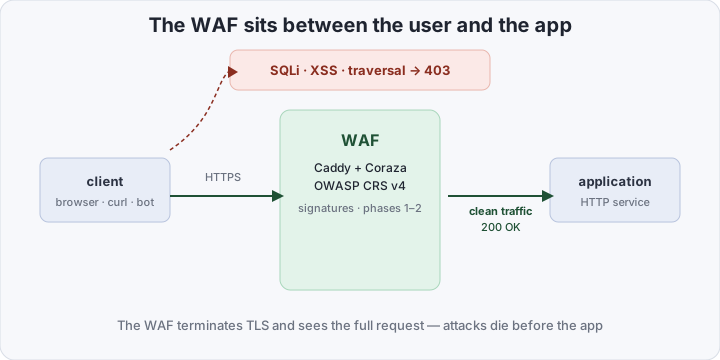
A note on TLS: in our design the WAF is the reverse proxy that terminates encryption, so the rules see requests in the clear. The corollary is simple: don’t place it behind a TLS-passthrough load balancer — there it would only see encrypted noise.
A WAF is a filter for typical attacks in front of the app — not a replacement for audits, dependency scanning, and sane access control.
Backstory: ModSecurity and SecLang
For a decade, “self-hosted WAF” meant exactly one thing: ModSecurity. Under Apache the v2 module is stable, but it’s legacy code — and a separate web server just for the WAF; under nginx the v3 connector (libmodsecurity) has long been known for floating segfaults and memory leaks. Development slowed down, while the ecosystem around it did not: the OWASP CRS rules live their own life and need a compatible engine.
The valuable thing ModSecurity left behind is not code but SecLang: a declarative rule language (SecRule, phases, transformations, actions) in which tens of thousands of rules are written — including all of CRS. So the successors compete not on “their own format” but on compatibility with it.
Coraza: the engine and its frontends
Coraza is a WAF engine written in Go from scratch, with no C dependencies. It understands SecLang — including parts of the v3 syntax that ModSecurity users waited years for — and officially supports OWASP CRS v4. In ngrok’s benchmark running CRS on both engines, Coraza came out 20–40% faster than classic ModSecurity under the same load. As a library it embeds anywhere, and ready-made frontends cover the mainstream proxies:
- the Caddy module (
coraza-caddy) — the WAF becomes a Caddyfile directive; our pick for the example below, - the Traefik plugin — enabled with an annotation on the container,
- Envoy via a WASM filter (
coraza-proxy-wasm) — for service meshes, - HAProxy via SPOA (
coraza-spoa), - your own Go service — the engine plugs in as a library, no proxy at all.
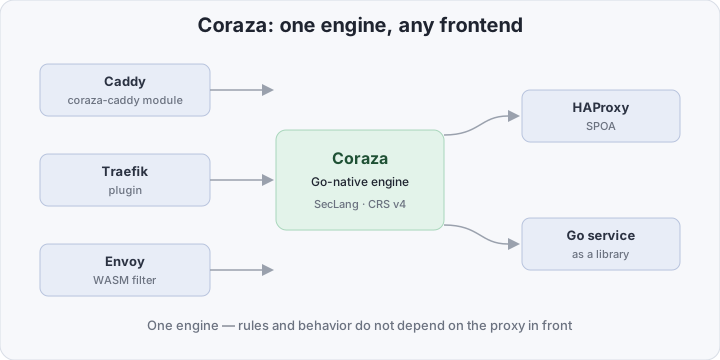
The practical consequence: the WAF stops being a separate product. It’s a layer inside the proxy you already run — upgradable, testable, and asking for no license key.
Paranoia levels: coverage vs false positives
CRS tunes its aggressiveness with a single number — the paranoia level, 1 through 4. Each level enables additional rule groups: what slipped through at PL1 matches and gets blocked at PL2. The cost is predictable — more false positives: legitimate JSON fields, product searches, code snippets in tickets start tripping SQLi and XSS rules.
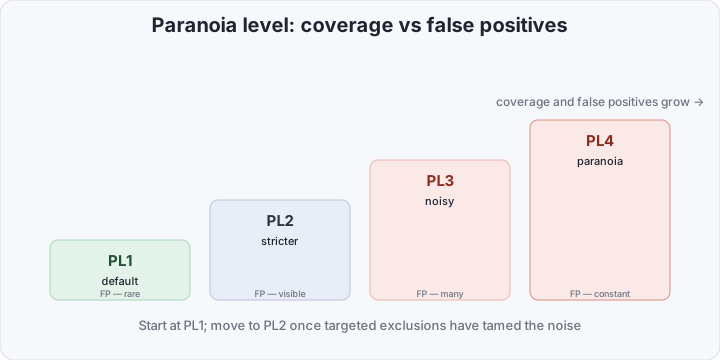
The tuning loop is the same regardless of level:
- start at PL1 and watch the block log — what legitimate traffic gets caught,
- kill each false positive surgically — not by disabling the whole rule but by excluding one parameter:
SecRuleRemoveTargetById 942100 "ARGS:q"lifts the SQLi rule from the search parameter only, - move up to PL2 once tuning has cleaned up the noise and you still want coverage.
Levels 3 and 4 exist but are rare in production: they’re built for environments where noise is an acceptable price for coverage — PCI DSS monitoring feeds, or honeypots with barely any legitimate traffic. For an ordinary application the sensible ceiling is PL2 with well-groomed exclusions.
Surgical exclusions are the discipline that separates a working WAF from one switched off a month later because “it breaks everything”.
ModSecurity vs Coraza
| ModSecurity | Coraza | |
|---|---|---|
| Language and dependencies | C, libmodsecurity | Go, no C dependencies |
| Rule language | SecLang (native) | SecLang-compatible |
| Integrations | Apache v2 module, nginx v3 connector | Caddy, Traefik, Envoy (WASM), HAProxy, library |
| OWASP CRS v4 | supported | supported |
| Speed on CRS | baseline | +20–40% (ngrok benchmark) |
| Container image | hundreds of MB | tens of MB |
What you need to put a WAF in front of your app
You need Docker and any application that answers HTTP. The demo layout:
waf-demo/
├── compose.yaml
└── waf/
    ├── Dockerfile
    ├── Caddyfile
    ├── coraza.conf
    └── crs-tuning.conf
waf/Dockerfile — Caddy built with the Coraza module, plus a clone of CRS:
FROM caddy:2-builder AS builder
RUN xcaddy build --with github.com/corazawaf/coraza-caddy
RUN git clone --depth 1 https://github.com/coreruleset/owasp-modsecurity-crs.git /owasp-crs

FROM caddy:2
COPY --from=builder /usr/bin/caddy /usr/bin/caddy
COPY --from=builder /owasp-crs /etc/caddy/owasp-crs
RUN cp /etc/caddy/owasp-crs/crs-setup.conf.example /etc/caddy/owasp-crs/crs-setup.conf
COPY Caddyfile /etc/caddy/Caddyfile
COPY coraza.conf crs-tuning.conf /etc/caddy/
waf/Caddyfile — the WAF as the first directive, the upstream set by a single env var:
{
	order coraza_waf first
}

waf {
	load_owasp_crs /etc/caddy/owasp-crs
	include /etc/caddy/coraza.conf
}

:8080 {
	coraza_waf waf
	reverse_proxy {$UPSTREAM}
}
waf/coraza.conf — turn the engine on, wire in CRS, enable a JSON audit log of blocks:
SecRuleEngine On
SecRequestBodyAccess On
SecResponseBodyAccess Off
SecRequestBodyLimit 13107200
SecRequestBodyNoFilesLimit 131072
SecRequestBodyLimitAction Reject

# tuning BEFORE CRS: paranoia level and application variables
Include /etc/caddy/crs-tuning.conf

# OWASP CRS v4: setup + rules
Include /etc/caddy/owasp-crs/crs-setup.conf
Include /etc/caddy/owasp-crs/rules/*.conf

# exclusions AFTER CRS — they act on already-loaded rules
# SecRuleRemoveTargetById 942100 "ARGS:q"

# audit log of blocks: one JSON line per transaction
SecAuditEngine RelevantOnly
SecAuditLog /dev/stdout
SecAuditLogFormat JSONwaf/crs-tuning.conf:
# 1 — default, 2 — more aggressive (raise after tuning exclusions)
SecAction "id:110000,phase:1,pass,t:none,nolog,setvar:tx.paranoia_level=1"
One nuance about include order: SecRuleRemove* and SecRuleUpdateTarget* act on rules that are already loaded, so exclusions are written after the CRS Include; variables like paranoia_level go before, so the CRS setup picks them up at startup.
compose.yaml:
services:
  app:
    image: traefik/whoami
    expose:
      - "80"

  waf:
    build: ./waf
    environment:
      UPSTREAM: app:80
    ports:
      - "8080:8080"
    depends_on:
      - app
Start it with docker compose up -d --build. Swap traefik/whoami for your image and UPSTREAM for your app’s address — nothing else changes.
How to verify it works
A clean request passes; SQLi and XSS are dropped on the fly:
curl -i http://localhost:8080/                          # 200 — legitimate request
curl -i "http://localhost:8080/?id=1%20OR%201%3D1--"     # 403 — SQLi, rule 942100
curl -i "http://localhost:8080/?q=%3Cscript%3Ealert(1)%3C%2Fscript%3E"  # 403 — XSS, 941100
The container log holds JSON transactions with the rule ID that fired:
docker compose logs waf | grep -E '942100|941100'Each transaction carries client_ip, the URI, the response code, and the list of triggered rules with their messages — enough to dissect any block without guessing. And the 200 on the clean request will show whoami’s headers: proof the traffic actually reached the app and wasn’t synthesized by the proxy.
The budget is checked the same way: the container fits in ~150–200 MB of RAM — the WAF squeezes into the same $10/month VPS that already runs your application.
Where the blocks go
Every 403 is a signal: someone is probing your app. Waiting until a human notices them in the logs is optional — in the Wazuh series we already built the “JSON log → Fluent Bit → manager’s syslog listener” pipeline for Kubernetes audit. Here it repeats verbatim: Fluent Bit tails the WAF container log and ships the lines over syslog to 514/tcp.
[INPUT]
    Name   tail
    Path   /var/log/containers/*waf*.log
    Parser docker

[OUTPUT]
    Name   syslog
    Host   WAZUH_MANAGER_IP
    Port   514
    Format rfc5424
On the manager, the JSON decoder unfolds the transaction and a rule hooks the response code — the numbering continues the series:
<rule id="100230" level="6">
  <decoded_as>json</decoded_as>
  <field name="transaction.response.http_code">^403$</field>
  <description>waf: request blocked by Coraza — check transaction.messages for rule id</description>
</rule>
From there it’s familiar machinery: levels, an active response to repeat offenders, a dashboard. Hosts, cluster audit, and now WAF blocks converge on one SIEM.
Bottom line
A WAF “on a budget” is not a five-thousand-dollars-a-month enterprise appliance — it’s one container between the user and the application: Caddy with the Coraza module, OWASP CRS v4, and an hour of careful exclusion tuning. It covers 80% of typical web attacks — SQLi, XSS, traversal, scanners — for ~150–200 MB of RAM and $0 in licenses, honestly making no claim on business-logic bugs or stolen sessions. And the blocks, in turn, are ready-made SIEM events: the attack was repelled, but the residue remains — and it’s in your dashboard.