

Signing artifacts has long been the task everyone agrees to do “later.” The reason is almost always the same: where do you put the private key. Sigstore flips the question — there is no key. A CI job proves its identity over OIDC, gets a ten-minute certificate, signs the image, and the signature is recorded forever in a public log. Let’s see how it works and what you need to turn it on.
Table of contents
Open Table of contents
Why key-based signing never sticks
The classic setup: generate a key pair, store the private key in CI secrets, verify with the public one. Fine on paper, but in practice it raises questions no one has a good answer for.
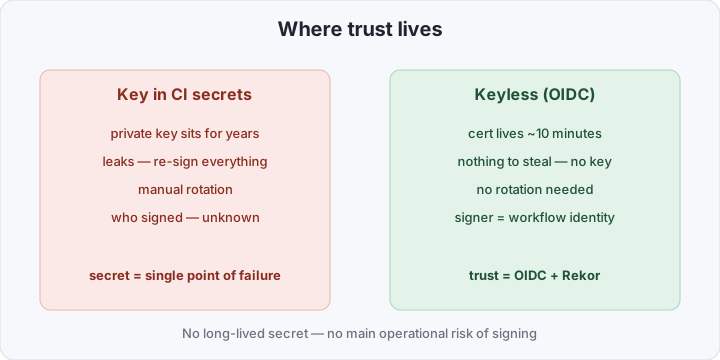
The key lives for years. That means it will eventually leak — into a log, a fork, a compromised runner. Once it leaks you have to reissue it and re-sign everything it ever signed. Rotation is manual, which means it doesn’t happen. And crucially: a signature can’t tell you who produced it or in which pipeline. It proves “someone had this key,” not “this image was built by this release workflow from this repo.”
So teams either don’t sign at all, or set up one shared key “for everything” — which is worse than not signing, because it creates the illusion of control.
What keyless means
Keyless is signing without a long-lived key. Instead of “I hold a secret,” the signer proves “I am this pipeline,” and the Sigstore infrastructure turns that proof into a verifiable signature. Three components do the work:
- cosign — the CLI that actually signs and verifies. It runs inside your pipeline.
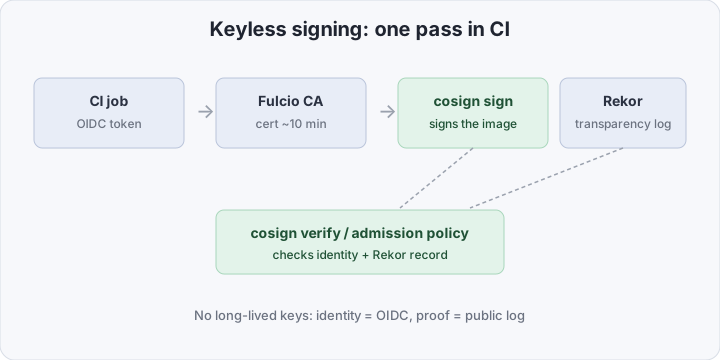
- Fulcio — the certificate authority. It takes an OIDC token from CI and issues a short-lived (~10 min) certificate that bakes in the signer identity, e.g.
https://gitlab.com/acme/app//.gitlab-ci.yml@refs/tags/v1.2.0. - Rekor — the public transparency log. It records the signature: what was signed, which identity, when. The log is append-only — nothing can be altered after the fact.
Per run the flow is: CI gets an OIDC token → Fulcio validates it and issues a cert → cosign signs the image with that cert → the record goes to Rekor → the cert expires. There’s nothing to steal: by the time an attacker reaches the runner, the certificate no longer exists.
“Sign the image” is not one thing
When people say “sign,” they often blur three different things. Keep them separate:
- Signing the image — the simplest: “this digest came from me.” Answers “was the image tampered with in transit.”
- Signing an SBOM — attach an attested list of what’s inside (packages, versions). Answers “what is the image made of” and feeds vulnerability scanners.
- Signing provenance — an attested description of how the image was built: which commit, which workflow, which inputs. This is the basis for SLSA, covered in a separate post on SLSA Level 2.
cosign does all three via cosign sign, cosign attest --type spdx, and cosign attest --type slsaprovenance. Start with signing the image — it delivers the most value for the least effort.
Comparison at a glance
| Key in CI secrets | Keyless (Sigstore) | |
|---|---|---|
| What’s stored | a private key, for years | nothing |
| Trust lifetime | until rotation (≈never) | ~10 minutes |
| On leak | re-sign everything | nothing to steal |
| Who signed | unknown | pipeline OIDC identity |
| Audit | your own signature registry | public Rekor |
| Setup | secret + rotation | one id_tokens block |
What you need to sign images in CI
You need three things: permission to mint an OIDC token, a signing step, and a verification step. Here’s a working .gitlab-ci.yml that builds, pushes to the GitLab Container Registry, and signs the image keyless.
stages: [build, sign]

variables:
  IMAGE: $CI_REGISTRY_IMAGE # the project's Container Registry

build:
  stage: build
  image: docker:27
  services: [docker:27-dind]
  rules:
    - if: $CI_COMMIT_TAG
  script:
    - docker login -u "$CI_REGISTRY_USER" -p "$CI_REGISTRY_PASSWORD" "$CI_REGISTRY"
    - docker build -t "$IMAGE:$CI_COMMIT_TAG" .
    - docker push "$IMAGE:$CI_COMMIT_TAG"
    - DIGEST=$(docker inspect --format='{{index .RepoDigests 0}}' "$IMAGE:$CI_COMMIT_TAG")
    - echo "DIGEST=$DIGEST" >> build.env
  artifacts:
    reports:
      dotenv: build.env # pass the digest to the next job

sign:
  stage: sign
  image: bitnami/cosign:latest
  rules:
    - if: $CI_COMMIT_TAG
  id_tokens:
    SIGSTORE_ID_TOKEN: # keyless won't work without this
      aud: sigstore
  script:
    - cosign sign --yes "$DIGEST"
The key block is id_tokens. It asks GitLab to mint an OIDC token with the sigstore audience and put it in the SIGSTORE_ID_TOKEN variable — cosign picks it up automatically and hands it to Fulcio. The --yes flag confirms the public Rekor record without an interactive prompt. We sign by digest, not by tag: a tag can be moved to another image, a digest can’t.
On the receiving side (another pipeline, a server, a cluster) verification looks like this — you must state whom you trust:
cosign verify \
  --certificate-identity-regexp '^https://gitlab.com/acme/app//' \
  --certificate-oidc-issuer https://gitlab.com \
  registry.gitlab.com/acme/app@sha256:...
Without the two --certificate-* flags the check is meaningless: it only confirms “signed by something valid from Sigstore,” not “signed by our release pipeline.” Identity is the trust policy. (For self-managed GitLab the issuer is your instance URL, not gitlab.com.)
Block unsigned images at admission
No one verifies by hand, so the rule belongs at admission in the cluster. Kyverno does this with a verifyImages policy:
apiVersion: kyverno.io/v1
kind: ClusterPolicy
metadata:
  name: require-signed-images
spec:
  validationFailureAction: Enforce
  rules:
    - name: verify-gitlab
      match:
        any:
          - resources:
              kinds: ["Pod"]
      verifyImages:
        - imageReferences:
            - "registry.gitlab.com/acme/*"
          attestors:
            - entries:
                - keyless:
                    issuer: https://gitlab.com
                    subject: "https://gitlab.com/acme/app//*"
Now a pod with an unsigned or “foreign” image simply won’t start: Kyverno checks the signature and identity before the scheduler ever sees the pod.
How to verify it works
Three quick checks. First, that a signature exists and passes for the right identity (the cosign verify above; on success it prints JSON with the verified record). Second, what landed in the transparency log:
cosign tree registry.gitlab.com/acme/app@sha256:...This shows the signatures and attestations attached to the image. Third, a negative test: deploy a deliberately unsigned image into a cluster with the policy and confirm admission rejected it. A policy you’ve never seen fire is usually set to Audit, not Enforce.
Pitfall: Rekor is public
The one thing to keep in mind: Rekor is a public log. It records your signer identity and metadata — project path, branch/tag, pipeline ref. The image itself isn’t uploaded, but the fact that “project acme/secret-project cut a release” becomes visible to everyone. For most that’s fine, even useful. If the artifact’s very existence is a secret, you need a private Sigstore instance (Rekor + Fulcio in your own perimeter). And separately: don’t put internal hostnames or paths into an SBOM or provenance — an attested attestation also ends up in the log.
Bottom line
Keyless removes almost every operational reason not to sign images: no key means no storage, no rotation, no “what do we do on a leak.” In return, the signature is tied to the pipeline’s identity rather than a secret, and it’s verifiable against a public log. The cost of entry is one id_tokens block in the job and a couple of seconds in the build. For a team still planning to “sign things later,” it’s the cheapest way to close an entire class of supply-chain attacks this week.