

We wanted Claude to see real training data from Intervals.icu and give advice on the plan, not generic platitudes. The fix: stand up an MCP server, put it behind the identity-aware proxy Pomerium, and add it as a connector. And to make the advice land — build a dedicated coach project in Claude with instructions. Here’s how we did it and why this way.
Table of contents
Open Table of contents
What MCP is and why it’s here
MCP (Model Context Protocol) is an open protocol through which Claude reaches external tools and data: it calls functions, reads resources, gets a structured response. Roughly, it’s a “USB port” for the model — instead of pasting exports by hand, you hand Claude a tool and it fetches what it needs.
Intervals.icu is a training-analysis platform (cycling, running, swimming): activities, wellness, calendar, plans. It has an open API, and several community MCP servers sit on top of it (Python and TypeScript). The server translates Claude’s requests into Intervals.icu API calls and returns the data in a model-friendly shape.
The problem: where to put the secrets
The simplest path is to run the MCP server locally in Claude Desktop and drop the API key into the config. It works, but it doesn’t scale: the key sits in plain text on every machine, there’s no single point of access control, and you can’t connect from the web or your phone — the server only lives on your laptop.
We needed a remote MCP server: one instance reachable from Claude in the browser and the apps, but not exposed naked to the internet. Anyone who knows the URL must not be able to pull your training data. So the server needs auth in front of it.
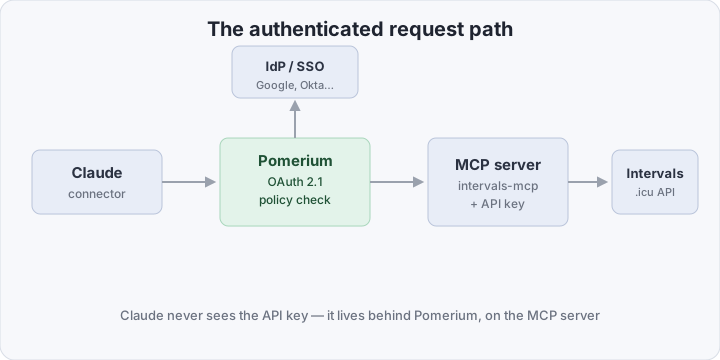
What Pomerium changes
Pomerium is an identity-aware reverse proxy (Zero Trust). Since 2025 it can act as an OAuth 2.1 authorization server in front of MCP — taking on the whole login flow the MCP spec expects from a client:
- Claude stores no secrets. The Intervals.icu API key stays on the MCP server behind the proxy. Claude only gets a short-lived session token.
- Login via your IdP. Pomerium authenticates the user through Google, Okta, Keycloak — whatever you already run, with MFA.
- Access policies. Only the right email or group reaches the route. You can even block “destructive” tools by name.
- Dynamic Client Registration. Claude, as the MCP client, registers itself over OAuth — no hand-cranked client_id.
The result: the server is reachable from any Claude, but a full Zero Trust perimeter sits behind it instead of one static token in a header.
The old way vs the new way
| Criterion | Local MCP + key in config | Remote MCP behind Pomerium |
|---|---|---|
| Where the API key lives | Plain config on every machine | On the server, behind the proxy |
| Web / phone access | No, Claude Desktop only | Yes, any Claude client |
| Authentication | None (or the key itself) | OAuth 2.1 + your IdP + MFA |
| Access control | None | Policy by email/group |
| Revoking access | Re-issue the key everywhere | One click in the policy |
| Login audit | None | Pomerium logs |
What you need to connect it
Assume Pomerium is already deployed and wired to your IdP. Then it’s three steps.
1. Get Intervals.icu credentials. In Settings → Developer create an API key. The Athlete ID is in the URL: intervals.icu/athlete/i12345/... — that’s i12345.
2. Run the MCP server (example with a ready community image). Pass the key and ID via environment variables — they never reach Claude:
services:
  intervals-mcp:
    image: ghcr.io/mvilanova/intervals-mcp-server:latest
    environment:
      API_KEY: "${INTERVALS_API_KEY}"
      ATHLETE_ID: "i12345"
    expose:
      - "8000"
3. Add a Pomerium route with an mcp block that marks the route as an MCP server and turns on the OAuth flow:
routes:
  - from: https://intervals-mcp.example.com
    to: http://intervals-mcp:8000/mcp
    name: Intervals.icu MCP
    mcp:
      server: {}
    policy:
      and:
        - email:
            is: [email protected]
If the server itself had to reach a third-party API over OAuth (say GitHub), you’d add an mcp.server.upstream_oauth2 block with client_id, client_secret, scopes and endpoint. Intervals.icu doesn’t need that — it’s a key.
4. Add the connector in Claude. In Settings → Connectors → Add custom connector give the URL https://intervals-mcp.example.com. Claude opens the Pomerium login, you authenticate via the IdP, and the tools show up in chat.
How to verify it works
A direct request to the server with no token should hit a redirect to the Pomerium login, not hand over data:
curl -i https://intervals-mcp.example.com/mcp
# expect a 302/401 to Pomerium, not a 200 with JSON
And inside Claude, after adding the connector, ask: “Show my last 5 activities from Intervals.icu.” If the answer is real workouts with dates and power, the chain is wired.
A Claude project as a personal coach
MCP supplies the data, but a coach is also context: your goals, injury history, methodology. To avoid repeating that in every chat, Claude has projects — isolated spaces with their own instructions, knowledge, and connected connectors.
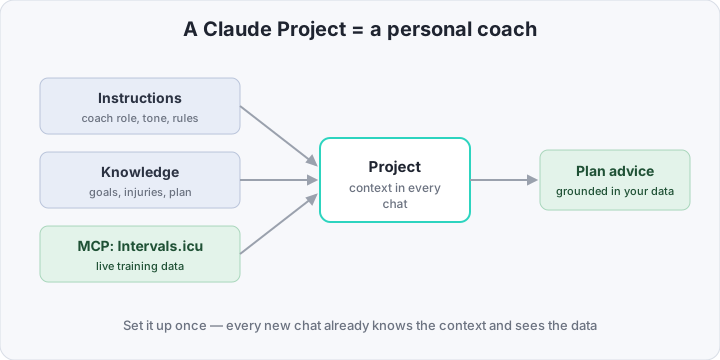
Here’s the build:
- Create a project (
Projects → New project) and name it, say, “Coach”. - Custom instructions are the project’s system prompt — set the role and rules here.
- Project knowledge — upload files: the current plan, target races, HR/power zones, health limits. Claude keeps these in context for every chat.
- The Intervals.icu connector is enabled in the project — the coach sees live data, not just static files.
A sample set of coach instructions:
You are my triathlon coach. Before any advice, always check the
actual data from Intervals.icu (load, form, sleep, HRV). Goal:
Olympic-distance race in September. Constraint: right knee, avoid
plyometrics. Answer briefly: what to do this week and why, citing
concrete numbers from my training. If data is missing — call the
right tool first, then answer.
Now every chat inside the project starts with that context: “How should I adjust volume this week?” — and Claude first pulls real CTL/ATL via MCP, checks it against the plan in knowledge, and answers on point instead of in generalities.
Bottom line
The cost is standing up the MCP server and a Pomerium route once. The payoff: Claude gets real training data while the API key never leaves the perimeter, access is gated by your IdP with MFA, and it’s revoked in one click. And the coach project turns one-off answers into a steady assistant that remembers your goals and looks at current numbers. The same approach carries to any other MCP: bring data to Claude — but always through an identity-aware proxy, never a naked token on the internet.