

An SBOM answers “what’s inside the artifact.” SLSA answers a different question entirely — “how was this artifact built.” These are separate layers, and confusing them is expensive: you can have a perfect SBOM and still have no idea your binary was swapped on a compromised runner. SLSA Level 2 is the minimum level that catches SolarWinds-class attacks. Let’s see what it actually buys you and how to turn it on in a couple of lines.
Table of contents
Open Table of contents
SBOM and SLSA are about different things
An SBOM (Software Bill of Materials) is an inventory: the list of packages, libraries, and versions inside an artifact. It’s priceless when the next Log4Shell drops and you need to know in a minute whether you’re affected. But an SBOM says nothing about where the artifact came from. You can generate one for any binary — including a tampered one.
SLSA (Supply-chain Levels for Software Artifacts) comes at it from the other side. It’s not an inventory of contents but provenance — an attested description of the build process: from which commit, by which pipeline, on which build runner this exact digest was produced. Roughly: SBOM is the ingredient list on the label, SLSA is the tamper seal stamped “made at this factory, this shift, by this recipe.”
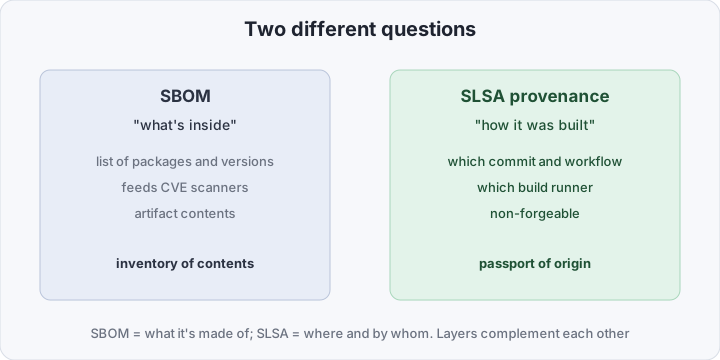
So “SBOM or SLSA” is the wrong question. You need both: the SBOM feeds vulnerability scanners, SLSA gives you trust in the very fact that the artifact came from your pipeline and not from someone else’s hands.
L1–L3 in plain terms
In SLSA v1.0 the levels describe how hard the provenance is to forge.
- L1 — provenance simply exists. You generate a build description and attach it. Trivial to forge: it’s produced by the same process that builds the artifact. The value is documentation, not protection.
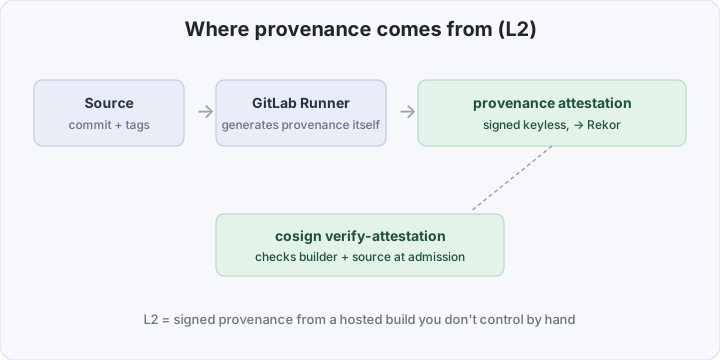
- L2 — provenance is produced on a hosted build platform and signed by a key the build author has no direct access to. This is the key jump: the provenance is generated by a trusted service (the GitLab Runner itself, on the platform side), not by your own build step. You can’t forge it without compromising the platform itself.
- L3 — adds hardened build isolation: no leakage between steps, protection against parameter tampering. Expensive, and not everyone needs it.
L2 is a realistic target for the vast majority of teams. It needs no infrastructure of your own, catches the most common attack scenario (tampering during the build), and switches on in GitLab CI with a single variable. L3 is for large platforms, regulated industries, and isolated runners.
Why L2 “catches SolarWinds”
The SolarWinds attack worked because the attacker got into the build environment and swapped the artifact after the code passed review. The source in git was clean, the release signature was valid — yet the binary carried a backdoor. Neither code review nor an SBOM catches that: they look at the input and the contents, not at the build process itself.
L2 provenance closes exactly that gap. It binds the artifact digest to a specific commit and a specific pipeline on a trusted runner. If someone builds “their own” artifact bypassing the pipeline, they won’t have valid provenance from your builder identity — and verification on the consumer side will reject it.
Comparison at a glance
| SBOM | SLSA provenance | |
|---|---|---|
| Question | what’s inside | how it was built |
| Format | SPDX / CycloneDX | in-toto attestation |
| What it catches | known CVEs in deps | tampering during build |
| Who can create it | anyone, for anything | a trusted build runner (L2+) |
| Forgeability | high | low (signed, not by your key) |
| Purpose | vuln prioritization | trust in origin |
What you need to get L2 in GitLab CI
The big good news: you don’t write the provenance format by hand — the GitLab Runner generates it for you. Just turn on the RUNNER_GENERATE_ARTIFACTS_METADATA variable and, next to each of a job’s build artifacts, a file with SLSA provenance appears.
stages: [build]

variables:
  RUNNER_GENERATE_ARTIFACTS_METADATA: "true" # the runner generates provenance

build:
  stage: build
  rules:
    - if: $CI_COMMIT_TAG
  script:
    - make build # your normal build
  artifacts:
    paths:
      - dist/app # the runner attaches provenance to this artifact
What’s happening: your script only builds the artifact, while the provenance is created by the runner itself — a platform component separate from your code, which the build script can’t touch. That separation is exactly what earns L2: provenance is created by a different step than the artifact. Next to dist/app you get artifacts-metadata.json (or <name>-metadata.json) — an in-toto Statement with a predicate in the SLSA Provenance v1 format, which GitLab declares SLSA Level 2 compliant.
For container images the logic is the same: build and push the image, then attach provenance to its digest keyless with cosign — using the same id_tokens block with the sigstore audience as for image signing: cosign attest --type slsaprovenance --predicate artifacts-metadata.json registry.gitlab.com/acme/app@sha256:....
Verification on the consumer side
Provenance is useless if no one verifies it. For artifacts GitLab ships the glab CLI, which checks provenance via the attestation store (Sigstore/cosign under the hood, keyless over OIDC):
glab attestation verify acme/app dist/appThis confirms the provenance was issued by the expected builder identity and shows the payload — inside a buildDefinition with the source commit, project, and build parameters. From there you compare those fields against policy: “accept only from a refs/tags/ ref, only from project acme/app.”
For container images the same is done via cosign verify-attestation --type slsaprovenance with the https://gitlab.com issuer, and the rule itself belongs at admission in the cluster — Kyverno can verify not only image signatures but attestations too, via verifyImages with an attestations block that matches conditions against the provenance contents.
What’s inside the provenance
It helps to picture exactly what you’re verifying. The provenance is an in-toto attestation in the SLSA Provenance v1 format, with a few key blocks:
subject— the list of artifacts with theirsha256digests. This is what the whole document is bound to: the provenance describes a specific digest, not “the image” in general.runDetails.builder.id— who built it. For L2 this is the GitLab Runner’s identifier on the platform, not your own step. This is the field you check on verification (viaglabor cosign’s--certificate-identity-regexp).buildDefinition.buildType— by which “recipe” the build ran (the build type).buildDefinition.externalParameters— the inputs: repository, ref, trigger. Here you’ll seerefs/tags/v1.2.0and can require releases to come only from tags.buildDefinition.resolvedDependencies— the pinned build sources: the source commit and its digest.
The point of verification isn’t “provenance exists” but “the builder.id is one I trust, and the externalParameters point at my repository and the right ref.” Without that comparison, the mere presence of provenance proves nothing.
How to verify it works
Three steps. First, that provenance is attached at all: for an artifact glab attestation verify acme/app dist/app shows it, for an image cosign tree registry.gitlab.com/acme/app@sha256:... shows the attestation next to the signature. Second, that verify-attestation passes and the payload contains the expected commit — check specific fields, not mere presence. Third, a negative test: build an artifact “by hand” (locally, no pipeline), run it through verification, and confirm it’s rejected without valid provenance.
Common pitfalls
- Rolling your own provenance in a build step. If you assemble “provenance” with your own script, that’s L1, not L2, even if the result is signed. The whole point of L2 is that provenance is produced by the runner itself (via
RUNNER_GENERATE_ARTIFACTS_METADATA), on infrastructure your build script can’t touch. Homegrown provenance is trustworthy only as far as you trust your (potentially compromised) build. - Verifying presence, not contents. A check that passed means nothing if you didn’t compare
builder.idand the parameters. An empty check waves through provenance from someone else’s project built by the same runner. - Signing by tag, not by digest. As with plain signing, provenance must be bound to a
@sha256:. A tag can be moved, and then valid provenance points at a different image than the one actually running. - Treating L2 as a replacement for scanning. Provenance doesn’t look inside the artifact. Without an SBOM and a scanner you’ll have “verifiably our vulnerable image.”
- Forgetting the consumer. Provenance that’s generated but never verified on the receiving end is a piece of paper. Protection only appears the moment unsuitable provenance blocks something — at admission, in a deploy gate, or in a registry policy.
Pitfall: provenance ≠ “the code is safe”
L2 proves origin, not quality. It guarantees the artifact was built by your pipeline from a specific commit — but if that commit has a vulnerability or a planted backdoor, the provenance will be perfectly valid. SLSA and SBOM/scanners solve different problems and don’t replace each other: the first answers “this is our artifact,” the latter “it has no known holes.” The full picture is the combination: image signature (who), provenance (how it was built), and SBOM/scan (what’s in it and how vulnerable).
Bottom line
SLSA Level 2 isn’t “another SBOM wrapper” — it’s proof that an artifact was produced by your pipeline rather than swapped somewhere between commit and registry. It’s the line between “trusting the code” and “trusting the build” — and that’s exactly the line bypassed in the high-profile supply-chain attacks. The cost of entry is laughable: flip one CI variable and add one check on the consumer side. Given that regulation (US EO 14028, EU CRA) has already made provenance a de-facto must-have, it’s the kind of hygiene that’s cheaper to adopt now than to explain the absence of later.