

In part 3 we taught Wazuh to see aggressive SSH brute force: rule 100100 fires on the fourth failure within a minute from a single IP and raises a level-12 alert. The problem is what stands next in the chain: a human. At 3 a.m. there are twenty minutes to a whole morning between “detection fired” and “someone blocked the IP at the firewall” — and a brute-forcer needs five. Part 4 is about removing the human from that chain: Active Response, the mechanism built into Wazuh that bans IPs, isolates hosts, and runs arbitrary scripts on rule matches — without an external SOAR.
Table of contents
Open Table of contents
What Active Response is and where it lives
The mechanism was inherited from OSSEC and has barely changed since — the same declarative XML as the rules, and just as long-lived an investment. The idea is simple: every alert has a level, a rule id, and a group, and you keep a list of “if this fired, do that”. There is no separate service: analysisd makes the decision, and execution is delegated to wazuh-execd.
- analysisd runs the event through the rules (parts 1–3) and raises an alert;
- active-response — a block in ossec.conf describing what to react to (level, rules_id, or rules_group), with what (the command name), and where (which host executes it),
- execd on the target host — the manager or a specific agent — runs a script from
/var/ossec/active-response/bin/, passing it JSON on stdin, - timeout — when it expires, execd runs the same script again with a rollback command: the block lifts itself, there is nothing to clean up by hand.
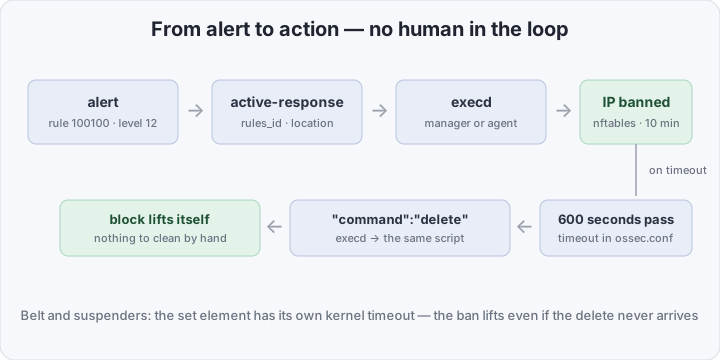
The key nuance of this scheme: the script must live on the host where it executes. A local response executes on the agent that sent the event — so the script, and nftables, must be present on every agent. That is the price of reacting where the attack is happening, not where the server sits.
Built-in commands: firewall-drop and when it’s enough
The package ships with ready-made scripts, and most of the time they are enough:
- firewall-drop — blocks the srcip through the host firewall: firewalld or iptables/nftables on Linux, WFP on Windows,
- host-deny — appends the IP to /etc/hosts.deny (TCP wrappers; not honored everywhere),
- disable-account — locks the account being targeted by the login attempts.
firewall-drop is the workhorse: for SSH brute force, scanners, and web attacks it is sufficient most of the time. It is enabled by a block in the manager’s ossec.conf, and the script already ships in both the server and the agent package.
When the built-ins fall short: you need an nftables set with your own timeouts, a call to an external API — file a ticket, isolate the host in the EDR, disable the account in the IdP — or a reaction that depends on alert context. Then you write your own script, and it speaks exactly the same stdin/JSON contract as the built-ins.
The anatomy of the setup: command and active-response
The configuration lives in the manager’s ossec.conf and consists of two blocks — “what to run” and “when to run it”:
<command>
  <name>nft-ban</name>
  <executable>nft-ban.sh</executable>
  <timeout_allowed>yes</timeout_allowed>
</command>

<active-response>
  <command>nft-ban</command>
  <location>local</location>
  <rules_id>100100</rules_id>
  <timeout>600</timeout>
</active-response>- command (first block) — the executable’s definition: a name, the script from active-response/bin, and the timeout_allowed flag; without it the command is one-shot and there is no timeout rollback,
- command (inside active-response) — which definition to run,
- location — where to run it:
local— on the agent that sent the alert;server— on the manager;defined-agentwith<agent_id>— on a specific host;all— on every agent at once. The docs warn aboutallfor good reason: one false positive and the whole network is unreachable, - rules_id / level / rules_group — the triggers; a rule is the most precise of them, which is why we hang it on 100100 from part 3,
- timeout — seconds until the automatic rollback.
Practice: a custom nftables ban with a safety exception
Let’s build the example from the brief: repeated failed authentications → the IP goes into an nftables set, the block lifts itself, and the admin subnet is never banned. No ban registry and no cron cleanup — the timeout is held by the nftables kernel itself.
The nftables base on the agent, /etc/nftables.conf:
table inet wazuh_ar {
  set banned {
    type ipv4_addr
    flags timeout
  }
  chain input {
    type filter hook input priority -10; policy accept;
    ip saddr @banned drop
  }
}- set banned — a named set with the timeout flag: elements live for the specified time and disappear on their own, without an external scheduler,
- chain input — everything inbound from addresses in the set is silently dropped.
The script goes to /var/ossec/active-response/bin/nft-ban.sh:
#!/usr/bin/env bash
# Active Response: ban srcip in nftables for 10 minutes, never touch admin subnets.
LOG="/var/ossec/logs/active-responses.log"

INPUT=$(cat)
cmd=$(echo "$INPUT"   | jq -r '.command')
srcip=$(echo "$INPUT" | jq -r '.parameters.alert.data.srcip' | grep -E '^[0-9.]+$')

log() { echo "$(date '+%F %T') nft-ban [$cmd] $*" >> "$LOG"; }

[ -n "$srcip" ] || { log "no valid srcip — skip"; exit 0; }

# Safety: never ban admin subnets, even if the rule fired
case "$srcip" in
  192.0.2.*|10.10.*) log "safety: $srcip is admin range — skip"; exit 0;;
esac

case "$cmd" in
  add)
    nft add element inet wazuh_ar banned { "$srcip" timeout 10m } \
      && log "blocked $srcip for 10m" || log "nft add failed for $srcip" ;;
  delete)
    nft delete element inet wazuh_ar banned { "$srcip" } 2>/dev/null \
      && log "unblocked $srcip" ;;
esac
What matters here:
- stdin is JSON, not arguments. Wazuh 4.x passes a message like
{"version":1,"origin":{…},"command":"add","parameters":{"alert":{…},"extra_args":[],"program":"…"}}; srcip lives at parameters.alert.data.srcip, and on timeout the same script is invoked with"command":"delete", - grep -E ’^[0-9.]+$’ — mandatory validation: a value from someone else’s log is fed into a privileged command, so an empty or malformed srcip must be filtered out before it reaches nft,
- the safety exit comes before any action — the admin-subnet check runs first, the ban second. Even if the rule fired falsely, the admin stays reachable,
- timeout 10m right on the set element — if execd dies and the delete never arrives, the kernel drops the address after ten minutes on its own.
Installation and permissions — on every agent where the script will execute:
install -m 750 -o root -g wazuh nft-ban.sh /var/ossec/active-response/bin/
systemctl restart wazuh-agent
Then the ossec.conf on the manager (the blocks from the previous section) and systemctl restart wazuh-manager.
How not to ban yourself
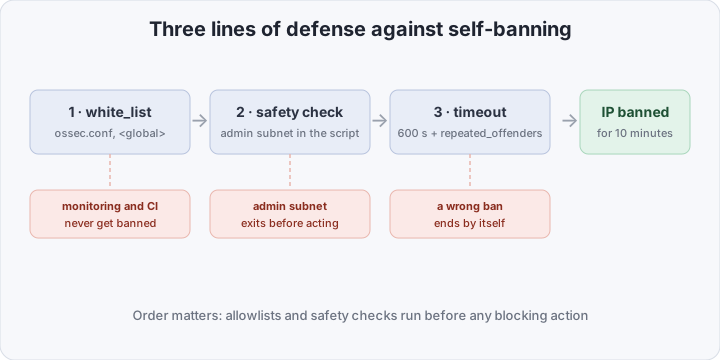
Auto-blocking is great while it blocks the other guys. Three lines of defense, each saving you in its own scenario:
- white_list in ossec.conf —
<global><white_list>192.0.2.10</white_list></global>: an address the built-in scripts will never touch. Add your monitoring, CI, and bastion before enabling AR — not after the first incident, - the safety prefix in the script — a second layer over white_list: it protects against your own bugs in the rules, not just against other people’s addresses,
- location: local instead of all — block only on the attacked host, not across the entire network at once.
About timeouts — two units that are easy to mix up: timeout in ossec.conf counts seconds, while repeated_offenders counts minutes, and it lives in the agent’s ossec.conf, not the manager’s:
<active-response>
  <repeated_offenders>30,60,1440</repeated_offenders>
</active-response>
The first hit blocks for the base timeout (600 seconds), the second for 30 minutes, the third for an hour, the fourth for a day. The mechanism does not work on Windows agents — keep that in mind in a mixed fleet. Starting values: 10–15 minutes of base ban is enough to kill enumeration and not so scary if a legitimate host gets caught.
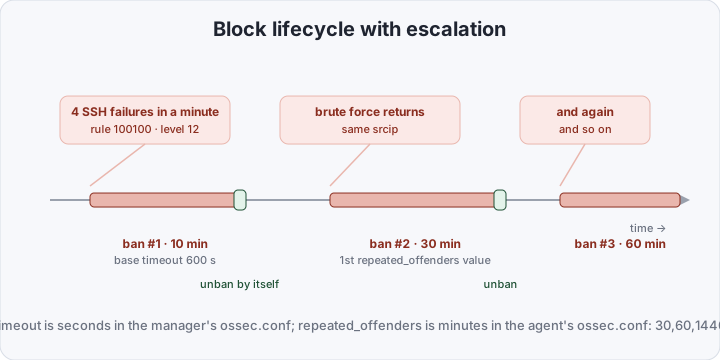
And the main rule of rollout: test from an address whose access you can afford to lose. The first week is a short timeout and tail on the logs; you grow the repeated_offenders ladder once you trust there are no false positives.
| Question | On-call human | firewall-drop | Custom AR script |
|---|---|---|---|
| Reaction time | minutes–hours | seconds | seconds |
| Capable of | anything a human is | block srcip via the host firewall | any code: nftables, APIs, isolation |
| Rollback | by a human | timeout | timeout or your own mechanism |
| False positive | fatigue decides | a legitimate IP banned for N minutes | exactly what you wrote |
| Entry cost | already paid | one block in ossec.conf | a script + a staging test |
How to verify it works
Wazuh-logtest won’t help here: it runs the rules in an isolated session and does not trigger active response — you have to verify with a live event.
From a spare host outside the admin subnet, four failed SSH attempts against the agent:
for i in 1 2 3 4; do sshpass -p wrong ssh nosuchuser@AGENT_IP true; doneOn the manager — that the alert fired and reached the reaction:
tail -f /var/ossec/logs/alerts/alerts.json | grep 100100On the agent — the script’s own life and the result:
tail -f /var/ossec/logs/active-responses.log
nft list set inet wazuh_ar banned
The set must show the address with a timeout counting down, and SSH from the test host must stop answering. After ten minutes the element disappears on its own: that way you verify both the ban and the rollback. If active-responses.log stays empty — check /var/ossec/logs/ossec.log for execd errors, and make sure the rules_id matches and the script has 750 root:wazuh permissions.
Bottom line
Detection without response is just an expensive log: pretty, but the attack is over by the time anyone reads it. Active Response will not replace a full SOAR — there is no orchestration, playbooks, or approval chains here — but it closes the first step toward automated response almost for free: one block in ossec.conf for the built-in firewall-drop, forty lines of bash for nftables with a safety exception and a timeout — and the SIEM from parts 2 and 3 sees the brute force and closes the attacker’s IP by itself for the first time. In part 5 the series moves to Kubernetes: collecting the cluster’s audit logs and learning to see who does what in it.