

In part 1 we stood up the manager; in part 2 we enrolled agents and turned on FIM, and the events started flowing. But the decision “which of these is an incident” is still not yours: out of the box Wazuh loads thousands of rules written for other people’s infrastructures and other people’s thresholds. Part 3 is about taking that decision back: the anatomy of rules and decoders, a custom brute-force detection for SSH and your app’s JSON logs, testing without a manager restart, and the local files that survive ruleset upgrades.
Table of contents
Open Table of contents
- What happens to an event after the agent
- Anatomy of a rule
- Tuning false positives: override, don’t edit defaults
- A decoder for your application’s JSON logs
- Practice: SSH brute force with your own threshold
- Testing with wazuh-logtest, no restart
- File layout so upgrades don’t eat your custom work
- How to verify it works
- Bottom line
What happens to an event after the agent
Every event that reaches the manager enters analysisd and passes through three phases:
- predecode — from a syslog-like line it extracts the timestamp, hostname, and program name;
- decode — a decoder parses the payload into fields: srcip, user, action and so on;
- rules — the decoded event runs through the rule tree; matched rules above the severity threshold become alerts (the threshold is the
<alerts>section in ossec.conf).
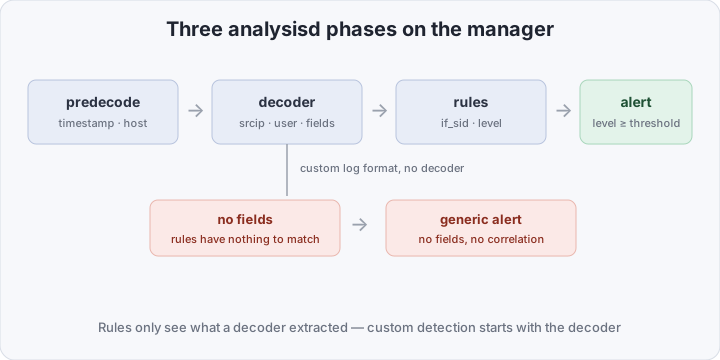
The key insight of this pipeline: a rule can only match what a decoder extracted. If your application logs JSON and there is no decoder for it, the engine sees an unstructured string: at best a generic “something arrived” alert — no fields, no correlation. So custom detection is almost always two steps: first teach Wazuh to read your log, then write rules against the fields.
Before writing your own, check what already exists: three thousand rules cover a surprising amount. grep -ri "description" /var/ossec/ruleset/rules/ | grep -i ssh is faster than inventing a detection that sits two files above yours. You write custom rules when the behavior you need is missing — a different threshold, a different format, your own business event — not because you can.
And a durability note: the rules/decoder format is declarative XML that hasn’t changed in years and doesn’t depend on the 5.0 beta with its rewritten agent-server protocol. Of everything in the Wazuh stack, it’s the longest-lived investment of your time.
Anatomy of a rule
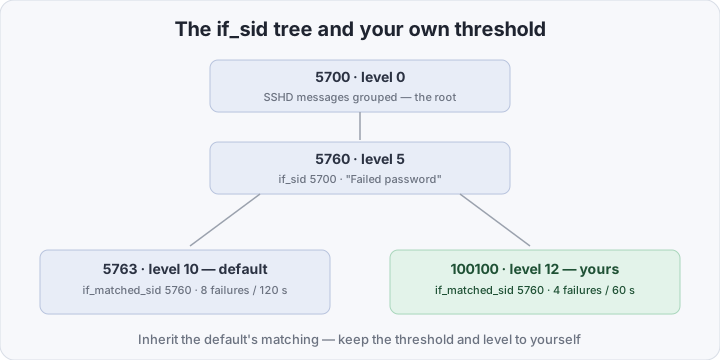
Take a real slice of the default 0095-sshd_rules.xml — the failed-SSH-login chain:
<group name="syslog,sshd,">

  <rule id="5700" level="0" noalert="1">
    <decoded_as>sshd</decoded_as>
    <description>SSHD messages grouped.</description>
  </rule>

  <rule id="5760" level="5">
    <if_sid>5700</if_sid>
    <match>Failed password|Failed keyboard|authentication error</match>
    <description>sshd: authentication failed.</description>
  </rule>

  <rule id="5763" level="10" frequency="8" timeframe="120" ignore="60">
    <if_matched_sid>5760</if_matched_sid>
    <same_source_ip />
    <description>sshd: brute force trying to get access to the system. Authentication failed.</description>
  </rule>

</group>
Element by element:
- id — a unique number; Wazuh reserves the 100000–120000 range for custom rules;
- level — severity: 0 means “decoded, don’t alert”, 3–6 is context and noise, 7–10 is worth a look, 12+ means page a human;
- group — tags used to find and filter rules;
<if_sid>5700</if_sid>means “fire only if the parent fired” — that’s how the tree is built; - match — a substring/regex against the raw log;
<field name="...">checks decoded fields instead; - frequency + timeframe + if_matched_sid — correlation: fire if rule 5760 fired 8 times within 120 seconds;
<same_source_ip />narrows the window to one source, andignoresilences repeat alerts for 60 seconds.
So the default brute-force threshold is 8 failed attempts from one IP in two minutes. For some that’s late; for others it’s a stream of false positives from monitoring and CI. A threshold is a parameter of your risk appetite, and the default here is no better than an average hospital temperature.
Tuning false positives: override, don’t edit defaults
The first reflex on a false positive is to open 0095-sshd_rules.xml and edit it. Don’t: /var/ossec/ruleset belongs to the package, and the next upgrade silently wipes your edits. There are two proper tools.
Override with the same id. Copy the default rule into local_rules.xml, change what you need, and add overwrite="yes" — the rule with the same id replaces the default:
<!-- local_rules.xml: default level 5 -> 10 -->
<rule id="5710" level="10" overwrite="yes">
  <if_sid>5700</if_sid>
  <match>illegal user|invalid user</match>
  <description>sshd: Attempt to login using a non-existent user</description>
</rule>
One limitation: linkage conditions (if_sid, if_group, if_matched_sid and neighbors) cannot be overwritten — they are preserved from the original; you can change the level, description, match and other parameters.
A child rule with level 0. When you need to silence not the whole rule but a known-benign pattern — a monitoring probe banging on SSH every half hour — write your own descendant rule with level zero:
<rule id="100110" level="0">
  <if_sid>5760</if_sid>
  <srcip>10.20.30.40</srcip>
  <description>Known monitoring host — not an incident</description>
</rule>
Rule 5760 still fires for that IP, but your branch intercepts the event with level 0 — it never reaches the alerts, yet stays in the statistics.
A decoder for your application’s JSON logs
Say billing writes single-line JSON to syslog:
{"app":"billing","event":"payment_declined","user":"a.ivanov","src_ip":"203.0.113.7","outcome":"fail"}You don’t need to hand-write a regex for JSON — Wazuh ships a built-in JSON decoder; you only have to “reach” it with a prematch. In /var/ossec/etc/decoders/local_decoder.xml:
<decoder name="billing-json">
  <prematch>^{"app":"billing"</prematch>
  <plugin_decoder>JSON_Decoder</plugin_decoder>
</decoder>- prematch — how to pick “your” line out of thousands of foreign ones; the more specific, the less chance of hijacking someone else’s log;
- plugin_decoder — after the prematch, the JSON engine parses the line: top-level keys become dynamic fields (
event,user,src_ip,outcome), nested objects flatten into dot-separated paths. If the JSON comes after a prefix (say,json_data: {...}), addoffset="after_prematch".
Now rules work against fields, not substrings:
<group name="billing,">

  <rule id="100200" level="5">
    <decoded_as>billing-json</decoded_as>
    <field name="outcome">^fail$</field>
    <description>billing: payment declined</description>
  </rule>

  <rule id="100201" level="12" frequency="10" timeframe="300">
    <if_matched_sid>100200</if_matched_sid>
    <description>billing: many declined payments — possible carding</description>
  </rule>

</group>
<field> matches a decoded field against a regex — the same mechanism the default rules use to read srcip and user; the fields are just yours now. From here the full engine is available: frequency, timeframe, groups, active response.
Practice: SSH brute force with your own threshold
As promised, rule 100100 in local_rules.xml, more aggressive than the default 5763: 4 failures in 60 seconds from one IP instead of 8 in 120:
<group name="local,sshd,authentication_failures,">
  <rule id="100100" level="12" frequency="4" timeframe="60" ignore="30">
    <if_matched_sid>5760</if_matched_sid>
    <same_source_ip />
    <description>sshd: aggressive brute force — 4 failures in 60s from one source</description>
    <mitre>
      <id>T1110</id>
    </mitre>
  </rule>
</group>
By inheriting from default rule 5760 via if_matched_sid, you get all of its “Failed password” matching for free — the default itself is untouched, both rules live side by side. In part 4 we’ll hang an active response on this level 12: firewall-drop for 10 minutes, and the brute force starts curing itself.
Testing with wazuh-logtest, no restart
The big fear around custom rules is “I have a production log stream, and I’m editing XML here”. That’s what /var/ossec/bin/wazuh-logtest on the manager is for (in part 1’s Docker setup: docker exec -ti wazuh.manager /var/ossec/bin/wazuh-logtest): the utility loads the ruleset into its own session and runs a line through all phases without touching the live analysisd.
Paste a real log line and watch the three phases: pre-decode (timestamp, hostname, program), decode (fields), and rules — which rule fired, at what level, in which groups. For our SSH example:
Phase 3: Completed rule (level: 5): 5760 — sshd: authentication failed.An important detail: frequency rules accumulate within a session. Paste the Failed password ... line four times in a row — on the fourth, logtest shows rule 100100 firing, and you’ve seen your threshold in action before the rule ever sees production. Only then apply the changes to the live manager:
systemctl restart wazuh-manager # Docker: docker restart wazuh.managerA bonus of logtest for decoder debugging: if Phase 2 says “no decoder” or shows empty fields — the prematch missed, or the JSON isn’t single-line; fix that before the rules, not after. And a small continuity note: older guides mention ossec-logtest — Wazuh 4.2+ replaced it with wazuh-logtest, which adds sessions and frequency counters inside them.
File layout so upgrades don’t eat your custom work
Everything we wrote lives in two files on the manager:
/var/ossec/etc/rules/local_rules.xml— your rules and overrides;/var/ossec/etc/decoders/local_decoder.xml— your decoders.
Both load after the official ruleset, so an override with overwrite="yes" wins, and the files themselves don’t belong to the package and survive upgrades. Custom files in /var/ossec/etc/rules/ and /var/ossec/etc/decoders/ work too, but local_* is the first candidate for review and backups: one file of custom work is easier to keep in git. The default /var/ossec/ruleset/ directory we don’t touch at all — it gets overwritten on every upgrade.
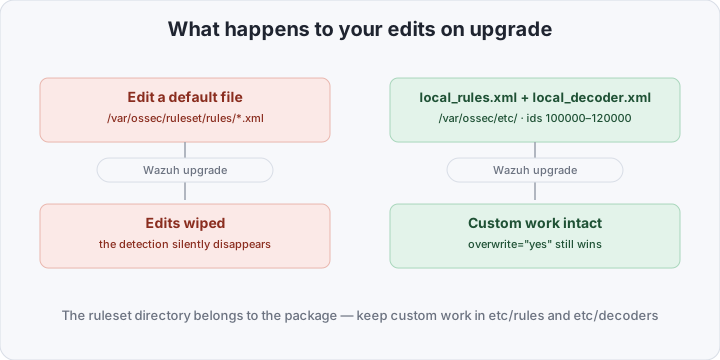
And keep your ids in the 100000–120000 range: lower ids are Wazuh territory, and the next ruleset update may land its own rule on the number you squatted.
| Question | Editing the default ruleset | local_rules.xml + local_decoder.xml |
|---|---|---|
| Non-standard logs | generic alert with no fields | decoder → fields → precise rules |
| Thresholds | someone else’s (8/120 for SSH) | yours, tuned to your risk appetite |
| False positives | live until the next upgrade | overrides and level-0 child rules |
| Wazuh upgrades | silently wipe your edits | local files and 100000+ ids untouched |
| Levels | from someone else’s playbooks | mapped to your response process |
How to verify it works
A full smoke test in one logtest session:
docker exec -ti wazuh.manager /var/ossec/bin/wazuh-logtestPaste this line four times with a real IP:
Oct 5 06:12:41 app01 sshd[28412]: Failed password for invalid user admin from 203.0.113.7 port 51234 ssh2On the fourth pass Phase 3 shows id: '100100', level: '12' and the authentication_failures group. Do the same with a billing JSON line — check that Phase 2 yields the fields and Phase 3 fires rule 100200. After the manager restart, check the live stream: tail -f /var/ossec/logs/alerts/alerts.json | grep 100100 — and in the dashboard → Security events filter by rule.id: 100100.
Bottom line
The default ruleset is an honest starting point: it knows SSH, sudo, auditd and a hundred more sources, but its thresholds and levels are someone else’s, and your applications it doesn’t understand at all. The real value of a SIEM starts not where the installation ends, but where you begin writing rules for your own infrastructure: a decoder for your JSON, a threshold for your monitoring, levels for your response process — otherwise it’s just an expensive log aggregator. The format will outlive 5.0, and the time you invest in it won’t burn. In part 4 — active response: how to make Wazuh not only see the brute force via rule 100100, but drop the attacker’s IP at the firewall itself.