

In part 1 we stood up a single-node Wazuh and got a dashboard with exactly one event source — the manager itself, agent ID 000. Without agents a SIEM is blind: it won’t see a tweak to /etc/sudoers, a new Run key in the Windows registry, or someone rebuilding sshd on a server. Part 2 is about the eyes: we enroll agents on Ubuntu and Windows, turn on File Integrity Monitoring (FIM) via syscheck, wire up rootcheck and SCA against CIS Benchmarks — and look at why out of the box this is usually a noise generator, not a signal.
Table of contents
Open Table of contents
- Why an agent, and not syslog
- Enrollment: register once, keys forever
- What you need to connect an Ubuntu server
- Windows without clicking
- syscheck: FIM you can actually read
- rootcheck and SCA: different questions
- Agent groups: config from one point
- Noise versus signal
- How to verify it works
- Bottom line
Why an agent, and not syslog
You can get logs to the manager without an agent: wazuh-remoted accepts syslog. But everything interesting in Wazuh lives only on the agent — hashing a file, running a CIS check, or collecting a package inventory means executing code on the host itself. An agent is a single daemon (wazuh-agent, a systemd unit) that collects events locally and keeps a persistent encrypted connection to the manager. It needs two ports, both outbound:
- 1514 — the event stream and keepalive, encrypted with the agent key;
- 1515 — one-time registration (enrollment), needed only when adding the host.
The agent always initiates the connection itself: no inbound ports on the monitored host, which removes half the security objections up front.
Enrollment: register once, keys forever
Before sending events, an agent has to introduce itself — and be accepted. That is enrollment:
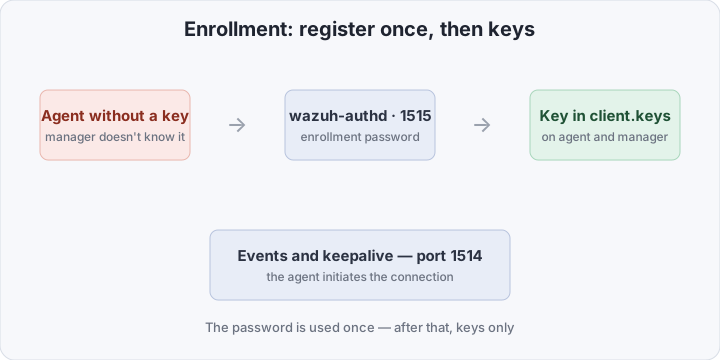
The manager runs wazuh-authd by default, listening on 1515. Turn on password protection:
<!-- /var/ossec/etc/ossec.conf on the manager -->
<auth>
  <use_password>yes</use_password>
  <port>1515</port>
</auth>
echo 'S0meEnr0llPass' > /var/ossec/etc/authd.pass
chmod 640 /var/ossec/etc/authd.pass
systemctl restart wazuh-manager # Docker from part 1: docker restart wazuh.managerThe password is shared by all agents and is used exactly once — at registration. After that, each side stores a symmetric per-agent key in /var/ossec/etc/client.keys, and all traffic on 1514 rides on that key. Get this straight immediately: the authd password is not “the password for events”, it is the key to the gate.
The manual route is the manage_agents utility on both sides: on the manager you add the agent (Add) and export its key (Extract), on the agent you import it. On Windows, manage_agents.exe in the install directory does the same. The manual route is for when 1515 is blocked by network segmentation or policy forbids auto-enrollment.
And keep the horizon in mind: Wazuh 5.0 rewrites the agent-server protocol from scratch (release notes). Enrollment details may change in 5.x, but the model “register once → key → event stream” will survive it — learn the model, not the buttons.
What you need to connect an Ubuntu server
You need root on the agent, network access to the manager on 1514/1515, and a minute:
# repository
apt-get update && apt-get install -y curl gnupg
curl -s https://packages.wazuh.com/key/GPG-KEY-WAZUH | \
  gpg --dearmor -o /usr/share/keyrings/wazuh.gpg
echo "deb [signed-by=/usr/share/keyrings/wazuh.gpg] https://packages.wazuh.com/4.x/apt/ stable main" \
  > /etc/apt/sources.list.d/wazuh.list
apt-get update

# install and enroll in one go
WAZUH_MANAGER="10.0.0.5" \
WAZUH_REGISTRATION_SERVER="10.0.0.5" \
WAZUH_REGISTRATION_PASSWORD="S0meEnr0llPass" \
apt-get install -y wazuh-agent

systemctl enable --now wazuh-agent
The package’s postinst script picks up the variables: it writes the manager address into /var/ossec/etc/ossec.conf and immediately calls authd for a key. If the agent was already installed unenrolled, the same works manually:
/var/ossec/bin/agent-auth -m 10.0.0.5 -P 'S0meEnr0llPass'
# then check <address> inside <client> → <server> in ossec.conf
systemctl restart wazuh-agent
Windows without clicking
The MSI installs silently and takes the same variables:
msiexec.exe /i wazuh-agent-4.14.7-1.msi /q `
  WAZUH_MANAGER="10.0.0.5" `
  WAZUH_REGISTRATION_SERVER="10.0.0.5" `
  WAZUH_REGISTRATION_PASSWORD="S0meEnr0llPass"
NET START WazuhSvc
The config is C:\Program Files (x86)\ossec-agent\ossec.conf — the same XML as on Linux. The service is called WazuhSvc; restart it with Restart-Service WazuhSvc. From here the platforms barely differ: same sections, different paths.
syscheck: FIM you can actually read
The agent’s main module is syscheck — it is the File Integrity Monitoring. The logic: on first start syscheck walks the configured paths and builds a baseline — hashes (MD5/SHA1/SHA256), size, permissions, owner, modification time. Then three watching modes:
- periodic scan — every
<frequency>seconds: cheap, but with a blindness window of hours; - realtime — inotify on Linux, ReadDirectoryChangesW on Windows: events arrive within seconds;
- whodata — realtime plus the answer to “who did it”: on Linux the metadata comes from auditd, on Windows from SACL auditing in the security log.
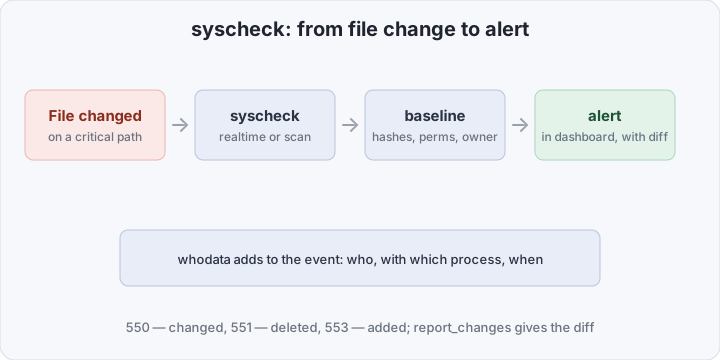
A practical block for an Ubuntu agent — critical paths, realtime, diffs in alerts, and whodata on the most important bits:
<syscheck>
  <disabled>no</disabled>
  <frequency>43200</frequency>
  <scan_on_start>yes</scan_on_start>

  <!-- critical paths: realtime + the diff right in the alert -->
  <directories check_all="yes" realtime="yes" report_changes="yes">/etc,/root,/bin,/sbin</directories>
  <directories check_all="yes" realtime="yes" report_changes="yes">/usr/bin,/usr/sbin</directories>

  <!-- the crown jewels: also "who changed it" via auditd -->
  <directories check_all="yes" whodata="yes" report_changes="yes">/etc/ssh,/etc/sudoers.d</directories>

  <!-- permanent noise goes away -->
  <ignore>/etc/mtab</ignore>
  <ignore type="sregex">^/etc/apparmor.d/cache</ignore>

  <!-- secret contents must not leak into alerts -->
  <nodiff>/etc/shadow,/etc/gshadow</nodiff>
</syscheck>
Element by element:
- check_all — hashes and every attribute; you can narrow it to
check_sumand selected attributes, but start full; - report_changes — puts the diff of the changed file into the alert; the reason FIM exists at all;
- whodata=“yes” — instead of plain realtime; on Linux it requires auditd (syscheck adds the audit rules itself), on Windows the Object Access audit policy;
- ignore and nodiff — the first disables monitoring for a path entirely, the second keeps the event but hides the diff.
On Windows, directories are joined by the registry — the persistence classic:
<windows_registry check_all="yes" realtime="yes" report_changes="yes" whodata="yes">HKEY_LOCAL_MACHINE\Software\Microsoft\Windows\CurrentVersion\Run</windows_registry>
<windows_registry check_all="yes" realtime="yes" report_changes="yes">HKEY_LOCAL_MACHINE\System\CurrentControlSet\Services</windows_registry>
A modified file maps to rule 550, a deleted one to 551, a new one to 553; the registry has its own rule line. All of it lands in dashboard → Modules → Integrity monitoring — with the diff and the before/after.
rootcheck and SCA: different questions
rootcheck is an old but cheap detector of system anomalies: hidden processes and files (a ps output that disagrees with /proc), odd entries under /dev, rootkit and trojan signatures from the shipped lists. It will not outsmart modern tooling, but it costs pennies and on Linux agents just sits in the config:
<rootcheck>
  <disabled>no</disabled>
</rootcheck>
SCA (Security Configuration Assessment) answers a different question: “does this host comply with a formal standard?”. Policies are YAML files with checks from CIS Benchmarks: kernel parameters, file permissions, services, the registry on Windows. The output is pass/fail per check. This is not intrusion detection — it is configuration drift control: a server that “suddenly” no longer matches its baseline is an event in itself.
For an Ubuntu agent, wire up the ready-made CIS policy:
<sca>
  <enabled>yes</enabled>
  <scan_on_start>yes</scan_on_start>
  <interval>12h</interval>
  <policies>
    <policy>cis_ubuntu22.04.yml</policy>
  </policies>
</sca>
Policy files live in /var/ossec/ruleset/sca/ on the agent. Match the policy to the distro: cis_ubuntu22.04 on Debian yields a stream of false fails before you break anything yourself.
Agent groups: config from one point
Past three agents, editing ossec.conf on each host is hopeless. Groups fix it: the manager keeps a shared config per group and ships it to the members.
/var/ossec/bin/agent_groups -a -g prod-linux -q        # create the group
/var/ossec/bin/agent_groups -a -d 002 -g prod-linux -q # add an agent (ID from agent_control -ls)
/var/ossec/bin/agent_groups -l -g prod-linux           # check membership
The group config is /var/ossec/etc/shared/prod-linux/agent.conf:
<agent_config>
  <syscheck>
    <directories check_all="yes" realtime="yes" report_changes="yes">/etc,/root,/bin,/sbin,/usr/bin,/usr/sbin</directories>
    <ignore>/etc/mtab</ignore>
    <nodiff>/etc/shadow,/etc/gshadow</nodiff>
  </syscheck>
</agent_config>
Sections from agent.conf take priority over the agent’s local ossec.conf — keep one module configured in one place, or in a month you won’t untangle whose directive won.
Noise versus signal
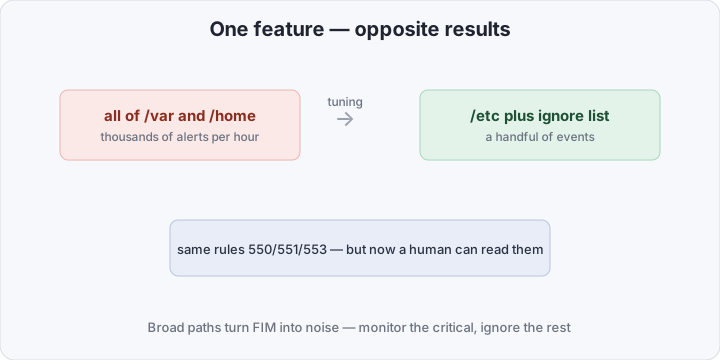
The very same syscheck produces opposite results depending on the paths:
| Dimension | Default syscheck | Tuned FIM |
|---|---|---|
| Paths | a broad “just in case” set | only critical directories |
| Mode | mostly periodic scans | realtime, whodata on the critical |
| Who changed | unknown | user and executing process |
| Diff | none | report_changes + nodiff for secrets |
| SCA | whatever it found | CIS policy for your specific distro |
| In alerts | a stream of benign events | a handful of real-change signals |
The usual mistakes that get FIM switched off within a week:
- all of
/var,/home,/tmp— logs and caches change every second, and nobody reads alerts about them; - realtime on thousands of files — you hit the inotify limits (
fs.inotify.max_user_watches) and realtime quietly degrades; - a forgotten
nodiff— the contents of/etc/shadowride into alerts, and alerts are read by humans and bots alike; - whodata without auditd (or without the audit policy on Windows) — the “who” metadata simply won’t be there, the event stays blind;
- an SCA policy for the wrong distro — false fails on every check, and people stop opening the report.
How to verify it works
On the manager (in part 1’s Docker setup — via docker exec -ti wazuh.manager):
/var/ossec/bin/agent_control -lsThe agent must show Active. Then a FIM smoke test — on the agent:
echo '# fim smoke test' | sudo tee /etc/ssh/sshd_config.d/99-fim-test.confWithin seconds the event arrives: tail -f /var/ossec/logs/alerts/alerts.json | grep fim-test shows an alert with rule 553, and dashboard → Modules → Integrity monitoring shows the entry with its diff. SCA results live in Endpoints Summary → agent → SCA — the CIS policy score. Remove the test file, wait for rule 551 — the loop is closed.
Bottom line
Agents are the eyes of Wazuh, and connecting them takes minutes: a repository, env variables, a key. The real work is not “enabling FIM” but carving the noise out of it: short path lists, ignore entries for the eternal churners, nodiff for secrets, whodata on the handful of directories that truly matter, SCA matched to your distro. An hour of tuning separates an endless stream of alerts about benign file changes from the few events you actually want to react to. Next in the series: custom rules and decoders — what to do when stock 550 and 553 say “a file changed” but what you need is “someone got root”.