

In part 1 we sealed root and split environments across member accounts. What remains is the most common source of incidents: people with IAM users and non-expiring access keys — in ~/.aws, in CI, in a terraform repo since 2021. Part 2 is about who enters AWS and how: Identity Center for people, roles for machines, hour-long sessions, and PAM practices — JIT elevation and audited break-glass.
Why now: in 2026 Identity Center grew up — February brought multi-region replication of the identity store, October brought network access controls, and AWS now describes governance automation — discovery and reporting over permission sets — in a dedicated post. What’s left is to stop handing out eternal keys.
Table of contents
Open Table of contents
- Why the access key is a relic
- Identity Center: one door for all people
- Credentials for machines — also without keys
- The layered model of permissions
- JIT elevation and break-glass
- Comparison in one table
- What you need to close access in one evening
- How to verify
- Pitfalls
- Where the series goes next
- Bottom line
Why the access key is a relic
An access key created “for a week” lives until someone deletes it by hand. It never expires, never rotates itself, and isn’t bound to a person or a device. Hence a whole class of incidents: the key migrates into a git repo, a laptop, CI, a script on a server — and every copy lives for years. A credential report on a grown-up account is a museum: keys of people who left, keys of services nobody remembers.
Worse: a leaked key is indistinguishable from a legitimate one. Everything it signs looks like normal traffic — neither GuardDuty nor a budget alarm can tell an attacker with a stolen key from your terraform.
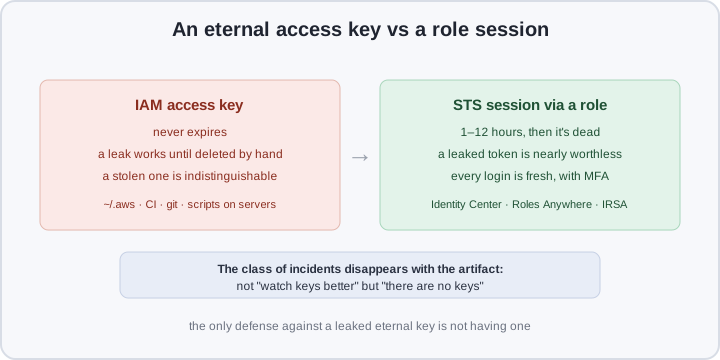
The alternative has existed for years — STS: credentials are issued for a session and die with it. A leaked one-hour token is nearly worthless by the time anyone finds it. This isn’t “better key monitoring” — it’s the disappearance of the very artifact that can be lost.
Identity Center: one door for all people
IAM Identity Center (formerly AWS SSO) is the single entry point for humans: one portal, one MFA, one offboarding. The mechanics:
- Permission set — a “job title” you grant to a user or group in a specific account: a set of managed policies (
ReadOnlyAccess,ViewOnlyAccess) and/or custom policies. Under the hood it’s still an IAM role in the account — Identity Center creates them and hands out assignments, so you don’t sync roles across accounts by hand. - Session duration is a permission set attribute: 20 minutes to 12 hours. Daily work — an hour, “just look at prod” — less.
- MFA and login in one place. No IdP of your own — enable MFA in Identity Center itself; have Entra ID, Okta or Google Workspace — attach them via SAML/OIDC, and passwords with offboarding live there.
- Offboarding a departed engineer takes minutes. Disable the user in the identity store (or in the IdP) — sessions expire within one duration at most. Not “walk every account and delete their keys, if we find them”.
AWS-managed policies are a good start (ReadOnlyAccess covers 90% of daily work); custom ones get added surgically. The 2026 replication and network controls make the door fault-tolerant too: the central component of the scheme is no longer a SPOF.
Credentials for machines — also without keys
People are covered by Identity Center; everything else that reaches into AWS with credentials is services. Same rule: nobody stores an eternal secret.
- EC2 — an instance profile: a role attached to the instance, credentials delivered via IMDSv2. A key in the instance’s
~/.awsis an anti-pattern familiar to anyone who has investigated a leak through a compromised instance. - EKS pods — IRSA: an AWS role bound to a pod’s service account, tokens via the cluster’s OIDC provider. Details in part 5.
- External CI and laptops — IAM Roles Anywhere: instead of an eternal key, a client X.509 certificate of your CA exchanged for STS credentials. Certificates are short-lived, revocable via CRL, and the helper renews sessions itself.
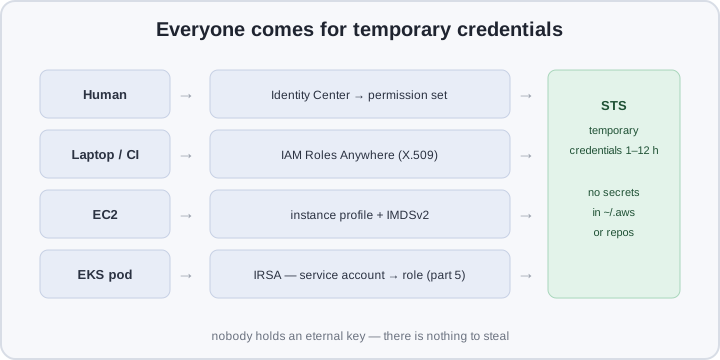
Everyone gets their own lawful path to temporary credentials; eternal keys remain only where nobody bothered to look for them. Hunting them down is a separate step in the practical section.
The layered model of permissions
In part 1 we covered SCPs: permission is the intersection of the SCP chain and the IAM policy, and an SCP Allow grants nothing. Identity Center adds layers:
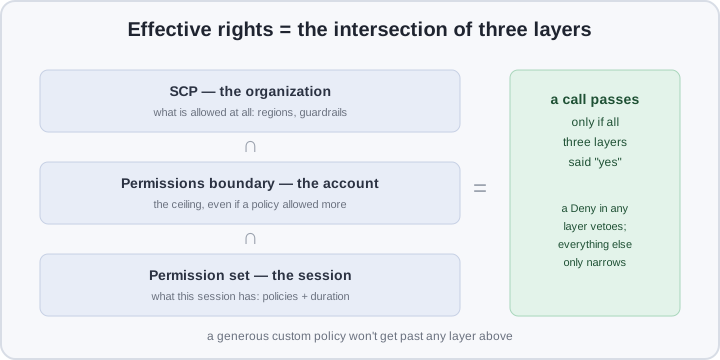
- SCP answers “what the organization allows at all” — the region allowlist and other guardrails from part 1.
- Permissions boundary — the ceiling inside the account: even a generous custom policy in a permission set can’t push a session past it. A terraform-apply run by a human won’t touch KMS keys or CloudTrail if the boundary forbids it.
- Permission set — what this session actually has: managed + custom policies and a duration.
Each layer only narrows: “what’s possible at all” is set by denials at the top, “what’s possible for me” by the minimum at the bottom. The CLI has no call for a permission set boundary — the natural place is CloudFormation (AWS::SSO::PermissionSet, the PermissionsBoundary field).
JIT elevation and break-glass
PAM in AWS is not a separate product but a pattern of roles and permission sets:
- The daily session is read-only plus a narrow set of write operations. Running
terraform destroyon a Friday evening must take more than one Enter. - JIT elevation — a privileged permission set with a short duration (30–60 minutes), granted on request: an approval in the IdP, a ticket or a bot. Took it — worked — session died.
- Break-glass — an administrative role for “prod is down, the normal path doesn’t work”. Trust — only the security group; usage is an on-call event: CloudTrail records
AssumeRole, EventBridge turns that into an alert. A role without an alert is just another eternal key with a different name.
Comparison in one table
| IAM users with access keys | Identity Center + roles | |
|---|---|---|
| Credentials | non-expiring, in ~/.aws and CI | STS tokens for 1–12 h |
| A leak | works until manually deleted | the session dies on its own |
| Offboarding | hunt keys across all accounts | disable one user |
| MFA | separately in every account | once, at the portal/IdP |
| Who can do what | credential reports per account | permission sets in one place |
| A key in a repo | the company’s crown artifact | doesn’t exist as a class |
| Machines | the same keys, “service” ones | instance profiles, IRSA, Roles Anywhere |
What you need to close access in one evening
Prerequisites: part 1 done (organization, SCPs, accounts), AWS CLI v2, a Telegram bot for alerts.
1. Enable Identity Center. In the management account: console → IAM Identity Center → Enable, then immediately delegated administration — manage access from a dedicated identity account, not from management. Create an engineers group and attach your IdP if you have one.
2. A one-hour permission set:
PS_ARN=$(aws sso-admin create-permission-set \
  --instance-arn arn:aws:sso:::instance/ins-xxxx \
  --name engineer-readonly --session-duration "PT1H" \
  --query 'PermissionSet.PermissionSetArn' --output text)

aws sso-admin attach-managed-policy \
  --instance-arn arn:aws:sso:::instance/ins-xxxx \
  --permission-set-arn "$PS_ARN" \
  --managed-policy-arn "arn:aws:iam::aws:policy/ReadOnlyAccess"

aws sso-admin create-account-assignment \
  --instance-arn arn:aws:sso:::instance/ins-xxxx \
  --permission-set-arn "$PS_ARN" \
  --principal-id <group-id> --principal-type GROUP \
  --target-id 111122223333 --target-type AWS_ACCOUNT
Attach the boundary via CloudFormation as in the previous section. The client is one command — aws configure sso — yielding a profile with auto-refreshing tokens:
[profile prod-readonly]
sso_session = hogin
sso_account_id = 111122223333
sso_role_name = engineer-readonly
region = eu-central-1

[sso-session hogin]
sso_start_url = https://d-xxxx.awsapps.com/start
sso_region = eu-central-1
sso_registration_scopes = sso:account:access
3. A break-glass role with an alert. Trust policy (trust.json) — only from the security account, only with MFA:
{
  "Version": "2012-10-17",
  "Statement": [{
    "Effect": "Allow",
    "Principal": { "AWS": "arn:aws:iam::111122223333:root" },
    "Action": "sts:AssumeRole",
    "Condition": {
      "StringEquals": { "aws:PrincipalOrgID": "o-xxxx" },
      "Bool": { "aws:multifactorAuthPresent": "true" }
    }
  }]
}
Attach AdministratorAccess to the role. An EventBridge rule catches its use:
aws events put-rule --name break-glass-alert \
  --event-pattern '{"source":["aws.iam"],
    "detail-type":["AWS API Call via CloudTrail"],
    "detail":{"eventName":["AssumeRole"],
      "requestParameters":{"roleArn":[{"prefix":"arn:aws:iam::444455556666:role/break-glass"}]}}}'
The target is a small Lambda hitting the Bot API (code below), plus invoke permission:
import json, os, urllib.request

TOKEN, CHAT = os.environ["TG_TOKEN"], os.environ["TG_CHAT"]

def handler(event, _):
    who = event["detail"]["requestParameters"].get("roleSessionName", "?")
    text = f"⚠️ break-glass assumed by {who} in {event['detail']['awsRegion']}"
    urllib.request.urlopen(urllib.request.Request(
        f"https://api.telegram.org/bot{TOKEN}/sendMessage",
        data=json.dumps({"chat_id": CHAT, "text": text}).encode(),
        headers={"Content-Type": "application/json"}))
    return {"ok": True}
4. Hunt legacy keys. IAM Access Analyzer with unused-access analysis:
aws accessanalyzer create-analyzer --analyzer-name org-unused \
  --type ORGANIZATION \
  --configuration '{"UnusedAccessAnalysis":{"unusedAccessAge":90}}'
Findings — unused access keys, unused roles — first update-access-key --status Deactivate, a month of observation, then deletion.
5. SSM Session Manager instead of SSH. Give instances the AmazonSSMManagedInstanceCore role (the agent is already in AL2023 and Ubuntu AMIs), log sessions to S3/CloudWatch via the SSM-SessionManagerRunShell document, and drop ingress port 22 from the security group:
aws ssm update-document --name SSM-SessionManagerRunShell \
  --content file://session-prefs.json --document-version '$LATEST'
{
"schemaVersion": "1.0",
"description": "Session Manager logs to S3 and CloudWatch",
"sessionType": "Standard_Stream",
"inputs": {
"s3BucketName": "company-ssm-logs",
"s3KeyPrefix": "sessions",
"s3EncryptionEnabled": true,
"cloudWatchLogGroupName": "/aws/ssm/sessions"
}
}For EKS pods the same agent runs as a sidecar — a session into the pod without port 22 and without keys, logged like instance sessions.
How to verify
Every item is one command:
# eternal keys still present in the account
for u in $(aws iam list-users --query 'Users[].UserName' --output text); do
  aws iam list-access-keys --user-name "$u" \
    --query 'AccessKeyMetadata[].[UserName,AccessKeyId,Status]' --output text
done

# a permission set's duration
aws sso-admin describe-permission-set \
  --instance-arn arn:aws:sso:::instance/ins-xxxx \
  --permission-set-arn "$PS_ARN" \
  --query 'PermissionSet.[Name,SessionDuration]'

# unused findings
aws accessanalyzer list-findings --analyzer-arn "$ARN" \
  --filter '{"status":{"eq":["ACTIVE"]},"findingType":{"eq":["UnusedAccessKey"]}}'
And two live checks. First, a session without SSH: aws ssm start-session --target i-0abc… must open a shell and drop a log into the S3 bucket. Second, break-glass itself: assume the role by hand and make sure the Telegram message arrives within seconds. If it does, the loop is closed: the privilege exists, but it cannot be used invisibly.
Pitfalls
- A permission set doesn’t cancel guardrails. Same intersection: a generous permission set won’t get past the SCPs of part 1 or the permissions boundary. That’s the feature — “grant everything” stops being one click.
- MFA not enabled on the portal. Identity Center without an IdP and without MFA is a single entry point with no second factor: one phished password opens the whole organization. It’s in the instance settings, not on by default.
- Break-glass without an alert is just another eternal key. The alert is part of the role, not an option. Test it as regularly as a fire alarm.
- IAM users deleted before CI migration. First Roles Anywhere or instance profiles, then key deactivation, deletion — after a month of observation. In the other order you discover prod terraform ran on exactly that key.
- The Roles Anywhere trust anchor is now your secret. A private CA certificate can be exchanged for credentials — keep the CA key like root: a safe or an HSM, never a repo.
- SSM without logging. Sessions without S3/CloudWatch prefs open an audit hole exactly where you removed SSH keys. Enable before everyone gets used to it.
Where the series goes next
Part 3 — logs and detection: the CloudTrail organization trail, GuardDuty and Security Hub — how to notice what still leaks through. Part 4 — infrastructure protection: VPC isolation, KMS, Backup. Part 5 — the workload: EKS and RDS on a secured baseline, including the IRSA from this part.
Bottom line
Keys that never expire are the main source of AWS incidents: they get copied, forgotten and lost, and a stolen key’s usage is indistinguishable from legitimate work. Temporary credentials retire the whole class not by monitoring but by removing the artifact worth stealing: Identity Center for people, instance profiles and Roles Anywhere for machines, hour-long sessions, break-glass with an alert. The trade — one evening of setup and the habit of aws sso login instead of a Tab through ~/.aws. Next part: seeing what still leaks through — logs and detection.