

In the first two parts we closed the front door: root is sealed, environments live in separate accounts, people sign in through Identity Center with hour-long sessions, machines use roles. One question remains, and it shows up in week one: “who created that security group with 0.0.0.0/0?” — and shortly after: “how fast would we notice someone mining crypto in our account?” Part 3 is about seeing and responding: CloudTrail as the witness, GuardDuty as the guard dog, Security Hub as the checklist, and Telegram as the place all of it must land.
Why now: on October 1, 2026 GuardDuty learned to switch on across an entire organization via declarative policies — no more scripts crawling accounts and regions — and Security Hub expanded to multicloud. Grown-up detection dropped to “one evening of setup” — let’s spend that evening.
Table of contents
Open Table of contents
- Logs without detection are an archive; detection without an alert is a fantasy
- Organization CloudTrail: one trail for the whole organization
- GuardDuty: what it actually catches
- Security Hub, Config and Access Analyzer: compliance and drift
- Comparison in one table
- What you need to assemble the chain in one evening
- CloudTrail Lake: “who created this resource” in one minute
- How to verify
- Pitfalls
- Where the series goes next
- Bottom line
Logs without detection are an archive; detection without an alert is a fantasy
CloudTrail is enabled almost everywhere — and almost nobody reads it. Logs without a pipeline that digests them are an archive: the answer to “when did it start” arrives only after the customers ask. The chain has three links, and a break in any one devalues the rest:
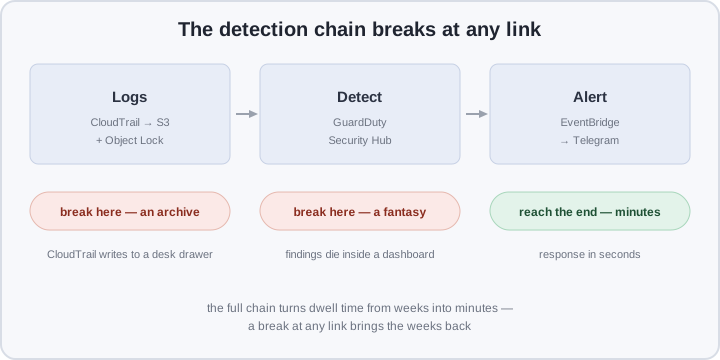
- Logs — who called what, when and from where, in every account. No logs — the investigation starts with guesses and ends with “no way to tell”.
- Detection — automatically matching events and behavior against known patterns: crypto-mining, anomalous IAM, a public bucket. No detection — logs are written into the void.
- Alert — a finding that reaches a human in seconds, over a channel they actually read. No alert — detection exists only in the quarterly report.
The metric that orders priorities is dwell time: how long the attacker stays undetected. Industry-wide it still measures in days and weeks; this part aims for minutes — without hiring a SOC or running three shifts.
Organization CloudTrail: one trail for the whole organization
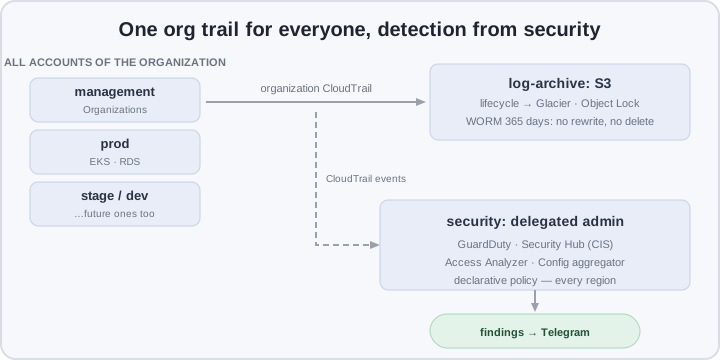
A trail per account is an anti-pattern that multiplies with your account count: N configurations, N buckets, N places where somebody forgot to enable the important bit. An organization trail closes the question with one switch:
- One trail records API events from every account in the organization, including future ones: a new account starts being logged the moment it’s created — no “please add us to logging” ticket.
- Logs live in a dedicated log-archive account that engineers can’t touch. The account that runs workloads must not be able to wipe its own traces; the account that keeps logs must not run anything.
- S3 + lifecycle + Object Lock. Lifecycle moves old logs to Glacier — an order of magnitude cheaper storage. Object Lock in governance mode is WORM: a file can’t be rewritten or deleted even with full rights on the bucket, for the whole retention period (say, 365 days). An attacker with an admin key can do damage — but not erase the footprints.
Management events (who called which API) are free and mandatory; data events (the content of S3/Lambda calls) are paid — enable them surgically, where an investigation would genuinely need the detail. Also turn on log file validation: a signature per file that proves nothing was tampered with or cut out.
GuardDuty: what it actually catches
GuardDuty is a managed detector with no agents, rules or thresholds to write: you enable it per region, it reads CloudTrail, VPC flow logs and DNS logs, and matches them against threat intelligence and behavior models. In practice the most valuable:
- Crypto-mining on EC2 — network signatures of mining pools; the classic “a key leaked → a miner landed on spare vCPUs” story.
- IAM anomalies — a key that suddenly starts working from another country; enumeration bursts; attempts to switch off CloudTrail or change MFA; a console sign-in without MFA from Tegucigalpa.
- EKS runtime — EKS runtime monitoring sees miners and reverse shells executing inside a pod without your own IDS: the agent is a managed addon.
- S3 and RDS protection — data access from suspicious sources: replication brute-forcing, unusual download volumes.
At small scale enable everything cheap (EC2/IAM/S3 detection costs pennies relative to the value) and think twice before the voluminous sources: data events and flow logs for large networks cost noticeably more than the detections themselves.
Two honest notes. First: GuardDuty catches known patterns, not a targeted APT that has lived quietly in your infrastructure for a year — what slips through is caught by Config and review, next section. Second: until recently, org-wide enablement was a script walking regions — since October 2026 it’s a declarative policy, see the practical part.
Security Hub, Config and Access Analyzer: compliance and drift
- Security Hub — one findings dashboard: CIS AWS Foundations Benchmark as the starting point (MFA on root, public RDS snapshots, CloudTrail enabled), next to findings from GuardDuty, Config and Access Analyzer in one format. Central configuration pushes the standard to every account from one place, and the noisy controls you deliberately skip get disabled there too. The 2026 multicloud expansion is tomorrow’s story; today CIS is what matters.
- AWS Config — configuration drift as a signal. An organization aggregator pulls configurations from all accounts into the security account; a conformance pack (for example, based on an AWS best-practices template) returns the list of offenders org-wide in one query: “where is port 22 open to the world”.
- IAM Access Analyzer — the strictest of the three: it mathematically finds external access you never granted (a public bucket policy, a role trusting a foreign account), because it knows your zone of trust — the list of accounts in the organization. The analyzer from part 2 already watches this; what’s left is wiring its findings into the alerts.
Comparison in one table
| Per-account trails “as it happened” | Org trail + detection | |
|---|---|---|
| Logs | N configurations, N buckets | one trail, new accounts covered |
| Storage | plain S3, admin can delete | lifecycle + Object Lock (WORM) |
| Detection | grepping logs after an incident | GuardDuty: mining, IAM, runtime |
| Compliance | an audit once a year | Security Hub CIS, continuously |
| Drift | discovered during an incident | Config rules + aggregator |
| External access | “pretty sure we never granted it” | Access Analyzer findings |
| Reaction | a ticket “please check the logs” | EventBridge → Telegram, seconds |
What you need to assemble the chain in one evening
Prerequisites: parts 1–2 done (organization, accounts, Identity Center), with a dedicated security account (222233334444 — runs detection) and log-archive (333344445555 — stores logs), plus the Telegram bot from part 2, step 3.
1. Organization trail into log-archive. The bucket must be created with Object Lock up front — you cannot enable it on an existing one:
aws s3api create-bucket --bucket hogin-org-trail-logs \
  --object-lock-enabled-for-bucket
aws s3api put-object-lock-configuration --bucket hogin-org-trail-logs \
  --object-lock-configuration '{"ObjectLockEnabled":"Enabled",
    "Rule":{"DefaultRetention":{"Mode":"GOVERNANCE","Days":365}}}'
The trail — in the management account, with file validation on (the bucket policy must allow writes from cloudtrail.amazonaws.com for the organization, otherwise the trail silently writes nothing):
aws cloudtrail create-trail \
  --name org-trail --is-organization-trail --is-multi-region-trail \
  --s3-bucket-name hogin-org-trail-logs --enable-log-file-validation
2. GuardDuty for the whole organization. The classic way — a delegated admin in the security account:
aws guardduty enable-organization-admin-account \
  --admin-account-id 222233334444
aws securityhub enable-organization-admin-account \
  --admin-account-id 222233334444
Since October 2026 the same is done declaratively: one policy enables the detector in every account and region, future ones included, and pins the feature set:
aws organizations create-policy --name guardduty-org \
  --type DECLARATIVE_POLICY --content file://gd.json \
  --targets '[{"Type":"ROOT","Id":"r-xxxx"}]'
{
"services": {
"guardduty": {
"detector": {
"enabled": true,
"features": [
{ "name": "S3_PROTECTION", "status": "ENABLED" },
{ "name": "EKS_RUNTIME_MONITORING", "status": "ENABLED" }
]
}
}
}
}In the delegated account, enable Security Hub with a central configuration policy on the CIS AWS Foundations Benchmark applied to the OU — not per account by hand.
3. The alert pipeline. An EventBridge rule catches GuardDuty findings with severity ≥ 7 (the scale is 0.1–8.9; 7+ is high/critical) and invokes the same Lambda that sent the break-glass alert in part 2 — only the event parsing changes:
aws events put-rule --name guardduty-high \
  --event-pattern '{"source":["aws.guardduty"],
    "detail-type":["GuardDuty Finding"],
    "detail":{"severity":[{"numeric":[">=",7]}]}}'
def handler(event, _):
f = event["detail"]
text = (f"🚨 GuardDuty {f['type']} sev={f['severity']} "
f"in {f['region']}: {f['title']}")
send_tg(text)MEDIUM (4–6.9) doesn’t wake anyone: a Lambda on an EventBridge Scheduler rate compiles a morning digest overnight, LOW goes into a weekly review. Security Hub findings attach via a second rule on Security Hub Findings - Imported into the same Lambda.
4. Config and Access Analyzer. The org aggregator and a conformance pack:
aws configservice put-configuration-aggregator \
  --configuration-aggregator-name org \
  --organization-aggregation-source \
  '{"RoleArn":"arn:aws:iam::222233334444:role/ConfigAggregator","AllAwsRegions":true}'
Access Analyzer has been running since part 2 — external access surfaces as findings in Security Hub. Wire them into the same pipeline: a public bucket policy is the same category of event as a miner.
CloudTrail Lake: “who created this resource” in one minute
A normal investigation over S3 logs means Athena: Glue tables, partitions, a circus of SQL. CloudTrail Lake removes the acrobatics: an event data store with retention up to 10 years and SQL on top:
SELECT eventtime, useridentity.arn, sourceipaddress
FROM 1a2b3c4d-5678-90ab-cdef-EXAMPLE
WHERE eventname = 'CreateSecurityGroup'
  AND requestparameters.groupid = 'sg-0abc123'
ORDER BY eventtime DESC
The answer takes seconds, no infrastructure. You pay for ingestion and scanning, so start with management events only; data events — once a real investigative need shows up.
How to verify
Each item is one command:
# the trail is logging and valid
aws cloudtrail get-trail-status --name org-trail

# GuardDuty detectors exist in every region
for r in eu-central-1 eu-west-1 us-east-1; do
  aws guardduty list-detectors --region "$r" --query 'DetectorIds'
done

# Object Lock actually holds
aws s3api delete-object --bucket hogin-org-trail-logs \
  --key "AWSLogs/o-xxxx/2026/11/20/some.log.gz"  # → AccessDenied
And the main end-to-end check: generate a sample finding — aws guardduty create-sample-findings --detector-id <id> --finding-types "UnauthorizedAccess:IAMUser/ConsoleLogin" — and watch it travel the whole path: detector → EventBridge → Lambda → Telegram. The message arrived in seconds — the chain is closed; it didn’t — fix it now, not on the night of an incident.
Pitfalls
- Object Lock can’t be enabled on an existing bucket. Only at creation. Migration means a new bucket and a copy; tune retention before the logs hold anything valuable.
- The org trail stays silent because of the bucket policy. If the policy doesn’t allow writes from the organization’s CloudTrail, the trail looks healthy while writing nothing. Watch for files to appear, not for the trail status.
- GuardDuty missing in some regions. The detector is per-region: forget a region and there’s no detection there. A declarative policy covers future regions too.
- Every alert wakes the night shift. In two weeks the on-call mutes everything, including what matters. Severity routing isn’t comfort — it’s the survival condition for the signal.
- Security Hub without noise filtering. Enable CIS as-is and you get thousands of findings on day one and a trained reflex to ignore the dashboard. Disable the controls you deliberately skip; work through the rest on a schedule.
- Config recording everything everywhere. Without selectors the recorders inflate the bill. Record only what you have rules for.
Where the series goes next
Part 4 — infrastructure protection: VPC isolation, KMS keys (the one that will sign the logs), Backup. Part 5 — the workload: EKS and RDS on a secured baseline, including the IRSA from part 2 and the runtime detections from this one.
Bottom line
Logs without detection are an archive; detection without an alert in the on-call’s pocket is a fantasy: only the whole chain matters — the organization trail with Object Lock as memory, GuardDuty and Security Hub as the eyes, EventBridge → Telegram as the voice. The trade: GuardDuty plus Config on a small organization costs a few percent of the infrastructure bill; in return, dwell time drops from weeks to minutes, and “who created this resource” is answered by a single SQL query. Next part — protecting the infrastructure itself: VPC, KMS and Backup.