

A reader sent over a reference diagram of a serverless app on AWS — Route 53, CloudFront, S3, API Gateway, Lambda, DynamoDB, SQS, Cognito, CloudWatch — with a request to explain it “on a budget, in plain terms”. The good news: you don’t read a diagram like this by memorizing service names, you read it by one rule — a user’s request has two paths, one static and one dynamic, and everything else is support plumbing around them. We’ll walk the diagram layer by layer and rebuild a smaller copy of it with a single CloudFormation template; in part 2 of the series we’ll assemble the same architecture self-hosted on a plain VM.
Table of contents
Open Table of contents
- How to read any cloud diagram
- The statics path: Route 53 → CloudFront → S3
- The dynamics path: API Gateway → Lambda → DynamoDB
- Background jobs: Lambda → SQS → Worker
- The plumbing: Cognito and CloudWatch
- A serverless stack vs “everything on one VM”
- What you need to assemble the diagram in an evening
- How to verify it all works
- What it costs per month
- Bottom line
How to read any cloud diagram
The classic self-hosted app is a server: nginx, your code, PostgreSQL, and cron on one VM. Half the internet runs this way and there is no shame in it, but the shape has four pains that attention does not cure:
- the meter runs 24/7 — the VM bills for itself at peak hour and at 4 a.m. when there is no traffic;
- scaling is manual — load grows: buy a bigger VM, move everything over, verify;
- a failure is yours — disk fills up, memory leaks, a certificate expires: whoever the monitoring points at fixes it;
- patching is yours — OS, libraries, TLS certificates: somebody’s Tuesday, usually yours.
The cloud diagram of the same app is not “complexity for fashion” — it’s the same server taken apart into managed services: every rectangle closes one of those pains, and for each of them somebody else keeps an on-call engineer. The reference to aim at is AWS Well-Architected.
The rule for reading any cloud diagram: find the user and trace two paths from them — where the statics come from and who answers API requests. Everything that missed those paths is plumbing: the queue, authentication, logs. Let’s walk exactly those two paths.
The statics path: Route 53 → CloudFront → S3
The first path is what the browser loads before any of your code runs: HTML, JS, CSS, images.
- Route 53 — DNS: turns
app.example.cominto the address the browser should go to. A managed zone at $0.50/month resolves without your involvement and never goes down together with your server. The pain it removes: running your own DNS server and the recurring “why won’t it open for us”. - CloudFront — a CDN: keeps a copy of the statics at a point near the user (hundreds of edge locations), serves it in milliseconds, terminates TLS, and shields the front with the built-in AWS Shield. The pain: files travel from one data center halfway around the world, and every visit to the app pays for it in latency.
- S3 — object storage: the statics sit in a bucket as plain files, without a single process of yours. Hosting in S3 costs cents per month, with 11 nines of durability.
The path in one line: index.html is served from an edge node next to the user, and not one of your processes is busy doing it.
The dynamics path: API Gateway → Lambda → DynamoDB
The second path switches on when the user clicks a button and your code is needed.
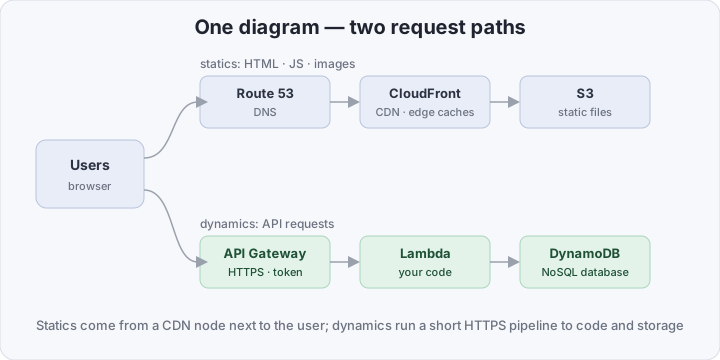
- API Gateway — the front door of the API: an HTTPS endpoint, routing, rate limits and — key part — token validation before the request ever reaches your code. One public address with a pipeline behind it.
- Lambda — your code in the cloud without servers: upload a function, an HTTP event invokes it, it runs — you pay for the milliseconds of work. It scales by itself from zero to thousands of concurrent invocations: one user or a Hacker News wave is a difference only in the bill. The trade is cold starts: the first invocation after a pause spends hundreds of milliseconds initializing, then the function stays warm.
- DynamoDB — the only database in the diagram: serverless NoSQL with no servers, connections, or connection pools — just HTTPS calls by key. Why one is enough: the app is stateless, responses land in single-digit milliseconds, and billing is on-demand, per actual request. What you pay with: the access model is rigid — partition key and sort key instead of SQL, no JOINs or aggregations; you design the query patterns before the code, not after.
Background jobs: Lambda → SQS → Worker
Not everything that starts with a click has to finish inside the same request. Sending an email, resizing an image, generating a report — seconds of work the user has no reason to wait for: they want the answer, not the email.
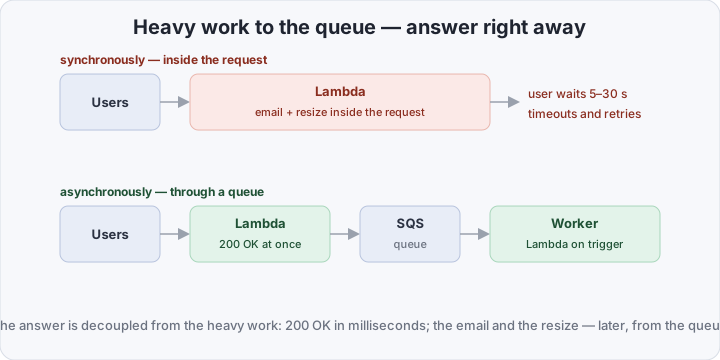
- SQS — a distributed queue: the handler drops a message into it and immediately replies 200 OK; the message survives a worker restart and returns to the queue on failure. The pain it removes: lost emails and cron crutches like “poll the table every five minutes”.
- Worker — the same Lambda, only its trigger is not HTTP but queue messages: messages arrive — it processes them; the queue is empty — it doesn’t exist and costs nothing.
The user’s answer is decoupled from the heavy work: the interface lives in milliseconds, the email arrives when it arrives.
The plumbing: Cognito and CloudWatch
- Cognito — sign-up, login, tokens: a ready user pool with a hosted login screen, password recovery, and a JWT that API Gateway validates at the door. There is no auth code in your app at all: no token, no request.
- CloudWatch — logs and metrics for the whole stack in one line: every Lambda writes to its own log group, and API Gateway, DynamoDB, and SQS ship invocation, error, and latency metrics out of the box. You don’t hunt for “where do we write logs” — they are already written; the only question is looking at them.
A serverless stack vs “everything on one VM”
| Everything on one VM | AWS serverless stack | |
|---|---|---|
| What you maintain | OS, patches, nginx, the DB, TLS | nothing — only code and the template |
| Scaling | manual, mostly vertical | automatic, from 0 to thousands of concurrent calls |
| Bill at idle | full, 24/7 | near zero: no invocations, nothing to pay for |
| A 3 a.m. failure | yours: disk, memory, process | theirs: AWS fixes it, you watch the metrics |
| Database | PostgreSQL/MySQL over connections | DynamoDB over HTTPS, no connections |
| Deploy | SSH and “hope I didn’t forget” scripts | one template.yaml, a stack update |
| Entry bar | low: everyone knows Linux | you must learn the services and their limits |
What you need to assemble the diagram in an evening
First, the moral of the whole diagram: there is not a single server, container, or CI pipeline on it. The entire stack is one CloudFormation template: deploy = a stack update, rollback = the previous stack version, and the answer to “how is prod set up” = a file in the repository.
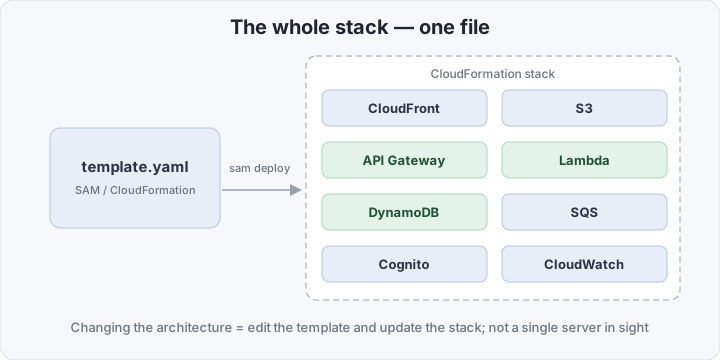
You need an AWS account, the SAM CLI, and the AWS CLI. The minimal project is two files:
minimal-app/
├── template.yaml
└── src/
    └── index.mjs
src/index.mjs — the entire business logic of the demo: write a row to DynamoDB and return a counter:
import { DynamoDBClient, PutItemCommand, ScanCommand } from "@aws-sdk/client-dynamodb";

const ddb = new DynamoDBClient({});
const table = process.env.TABLE_NAME;

export const handler = async () => {
  const at = new Date().toISOString();
  await ddb.send(new PutItemCommand({
    TableName: table,
    Item: { id: { S: crypto.randomUUID() }, at: { S: at } },
  }));
  const { Count } = await ddb.send(new ScanCommand({ TableName: table, Select: "COUNT" }));
  return { statusCode: 200, body: JSON.stringify({ ok: true, visits: Count, at }) };
};
template.yaml — an HTTP API with Cognito token validation, a Lambda, a table, a user pool:
AWSTemplateFormatVersion: "2010-09-09"
Transform: AWS::Serverless-2016-10-31

Resources:
  Table:
    Type: AWS::Serverless::SimpleTable       # DynamoDB, partition key = id
    Properties:
      PrimaryKey:
        Name: id
        Type: String

  UserPool:
    Type: AWS::Cognito::UserPool
    Properties:
      UsernameAttributes: ["email"]
      AutoVerifiedAttributes: ["email"]

  UserPoolClient:
    Type: AWS::Cognito::UserPoolClient
    Properties:
      UserPoolId: !Ref UserPool
      ExplicitAuthFlows:
        - ALLOW_ADMIN_USER_PASSWORD_AUTH
        - ALLOW_REFRESH_TOKEN_AUTH

  HttpApi:
    Type: AWS::Serverless::HttpApi
    Properties:
      Auth:                                   # no valid token — no request
        DefaultAuthorizer: CognitoJwt
        Authorizers:
          CognitoJwt:
            IdentitySource: "$request.header.Authorization"
            JwtConfiguration:
              Issuer: !Sub "https://cognito-idp.${AWS::Region}.amazonaws.com/${UserPool}"
              Audience:
                - !Ref UserPoolClient

  Function:
    Type: AWS::Serverless::Function
    Properties:
      Runtime: nodejs20.x
      Handler: index.handler
      CodeUri: src/
      Environment:
        Variables:
          TABLE_NAME: !Ref Table
      Policies:
        - DynamoDBCrudPolicy:
            TableName: !Ref Table
      Events:
        Visit:
          Type: HttpApi
          Properties:
            ApiId: !Ref HttpApi

Outputs:
  ApiUrl:
    Value: !Sub "https://${HttpApi}.execute-api.${AWS::Region}.amazonaws.com/"
  UserPoolId:
    Value: !Ref UserPool
  UserPoolClientId:
    Value: !Ref UserPoolClient
  TableName:
    Value: !Ref Table
Deploy is two commands the first time and one ever after:
sam build
sam deploy --guided     # first run: region, stack name, "save to config"
sam deploy              # every run after
If you’d rather skip SAM: nearly the same file is understood by aws cloudformation package + aws cloudformation deploy — SAM’s meta-types expand into “real” resources at packaging time. The statics from the first path (S3 + CloudFront) are added to the template the same way — two more entries under Resources.
How to verify it all works
The first check is authorization, one line and no token:
API=$(aws cloudformation describe-stacks --stack-name minimal-app \
  --query "Stacks[0].Outputs[?OutputKey=='ApiUrl'].OutputValue" --output text)
curl -i "$API"     # 401 — the gateway refused: token validation works
The second is the full loop: a user, a token, a request, data. The variables come from the stack Outputs:
POOL_ID=$(aws cloudformation describe-stacks --stack-name minimal-app \
  --query "Stacks[0].Outputs[?OutputKey=='UserPoolId'].OutputValue" --output text)
CLIENT_ID=$(aws cloudformation describe-stacks --stack-name minimal-app \
  --query "Stacks[0].Outputs[?OutputKey=='UserPoolClientId'].OutputValue" --output text)

aws cognito-idp admin-create-user --user-pool-id $POOL_ID \
  --username [email protected] \
  --user-attributes Name=email,[email protected] Name=email_verified,Value=true
aws cognito-idp admin-set-user-password --user-pool-id $POOL_ID \
  --username [email protected] --password "Demo-pass-1!" --permanent

TOKEN=$(aws cognito-idp admin-initiate-auth --user-pool-id $POOL_ID \
  --client-id $CLIENT_ID --auth-flow ADMIN_NO_SRP_AUTH \
  --auth-parameters [email protected],PASSWORD="Demo-pass-1!" \
  --query "AuthenticationResult.IdToken" --output text)

curl -H "Authorization: $TOKEN" "$API"     # {"ok":true,"visits":1,...}
curl -H "Authorization: $TOKEN" "$API"     # visits:2 — every call writes a row
The third is that the data and logs are already there, with zero setup:
TABLE=$(aws cloudformation describe-stacks --stack-name minimal-app \
  --query "Stacks[0].Outputs[?OutputKey=='TableName'].OutputValue" --output text)
aws dynamodb scan --table-name $TABLE --select COUNT
sam logs --stack-name minimal-app --tail
Four checks, zero configuration: the gateway rejects anonymous callers, the token opens the door, the Lambda writes a row, the logs sit in CloudWatch — the diagram is alive.
What it costs per month
- Free forever — not a 12-month trial but always free: Lambda — 1 million requests and 400,000 GB·s every month; DynamoDB — 25 GB of storage and 25 million requests. A demo or an internal tool fits inside these limits entirely.
- Pocket change: a Route 53 hosted zone — $0.50/month; S3 and CloudFront — cents at modest traffic; API Gateway HTTP API — $1 per million requests (a hundred thousand requests a month is $0.10).
- The total: a small working project lives within $1–2/month, and the shape of the bill matters more than the number — it grows with invocations, not with the calendar: no traffic, almost nothing to pay.
Bottom line
There is nothing on this diagram that needs maintaining: every invocation is paid for and restored after a failure by somebody else — you pay not for servers but for milliseconds of someone else’s work, and the whole architecture fits in one file. This is not “servers are evil”: serverless changes the nature of the work — instead of an operating system you learn someone else’s limits, cold starts, and DynamoDB’s rigid model, and you leave some flexibility on the table. But for a product that must work tomorrow, while monitoring and on-call duty don’t exist yet, it is the cheapest-to-operate option there is — and its neighbor in the “on a budget” series, a WAF on a budget, protects exactly these apps. In part 2 we’ll assemble the same architecture self-hosted — on our own VM for $0/month — and see what refusing someone else’s work really costs.