

A static site can only serve files: nobody is around to handle a POST. This week a live contact form shipped on hogin.pro: Turnstile against bots, server-side token verification, a D1 archive and an instant Telegram push. The whole “backend” is one TypeScript file in a functions/ directory, the site stayed static, the Cloudflare bill stayed at zero. Step by step below, including two traps that cost more than all the code.
Table of contents
Open Table of contents
- The problem: static has nothing to answer a POST with
- The whole server side is one file in functions/
- Three layers of bot protection
- D1 is the source of truth, Telegram is best-effort
- A Cloudflare form against the usual options
- What you need to assemble the form in one evening
- The traps we caught for you
- How to verify it all works
- Bottom line
The problem: static has nothing to answer a POST with
A built Astro blog is just files in dist/: nobody to process a POST. The usual options:
- a SaaS form (Formspree and friends) — fast, but the free tier is a few dozen submissions a month, then a subscription, and messages sit with a third party;
- a dedicated VPS with nginx + php — a whole server for one form: OS, patches, TLS, monitoring — all for a script appending a line to a file.
A form must accept a POST, tell a bot from a human, store the message, ping the author. Cloudflare’s free tier covers it all: 100,000 Functions requests/day, D1 and Turnstile free.
The whole server side is one file in functions/
Pages has an underrated feature: the functions/ directory next to the static assets deploys as Workers. The file functions/api/contact.ts becomes the route POST /api/contact — no own router, no Astro SSR adapter, no separate deploy. The site stays static, the “backend” is a file in the repo.
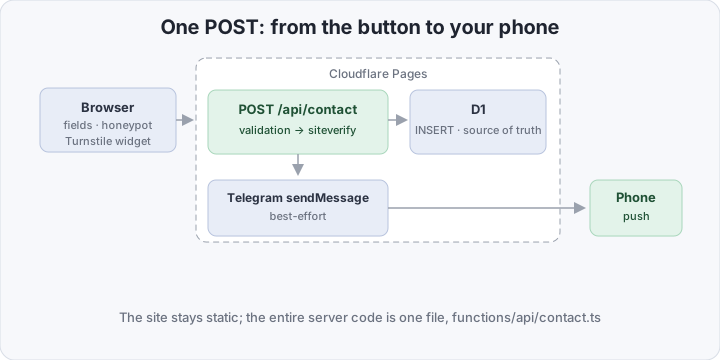
- the page — an ordinary Astro page: fields, a honeypot and a Turnstile widget in Managed mode — Cloudflare decides whether a human sees a checkbox;
- POST /api/contact — a Pages Function: field validation → server-side token check via
siteverify→ INSERT into D1 → sendMessage to Telegram; - D1 and Telegram — stored, then pushed to your phone in seconds.
Three layers of bot protection
An open form lives for hours: bots find the endpoint, the spam flood starts. A request passes three filters before the database.
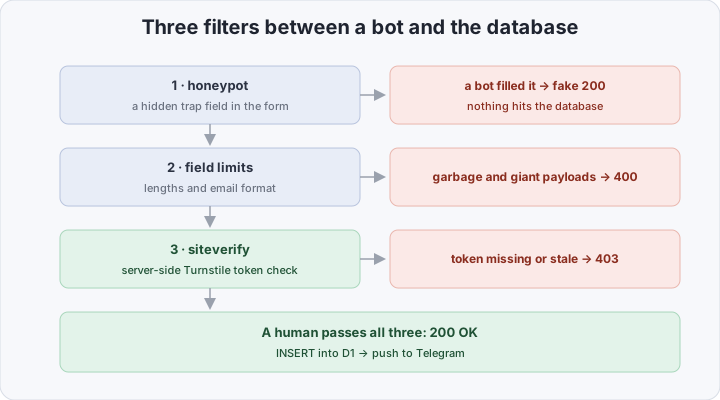
- a honeypot with a fake success — a field hidden from humans; a bot that auto-fills everything fills it too — and gets a sincere 200 OK “sent”, never learning it never arrived. Fake success beats rejection: a bot cannot tell refusal from delivery;
- field limits — lengths and formats, 5000 characters max — a cheap filter throwing out garbage before any external call;
- siteverify — the server-side token check. The sitekey is public and baked into the build, but HTML is not the source of truth: the token is verified at
siteverifywith a server-only secret. Tokens are single-use — the form callsturnstile.reset()after each one.
D1 is the source of truth, Telegram is best-effort
D1 is mandatory: if the INSERT fails, the client gets a 500 and the user retries. Telegram is a notification on top: if sendMessage fails, a warning goes to the log, but the client still gets a 200 OK — the message is already in the database, the push can be retried by hand.
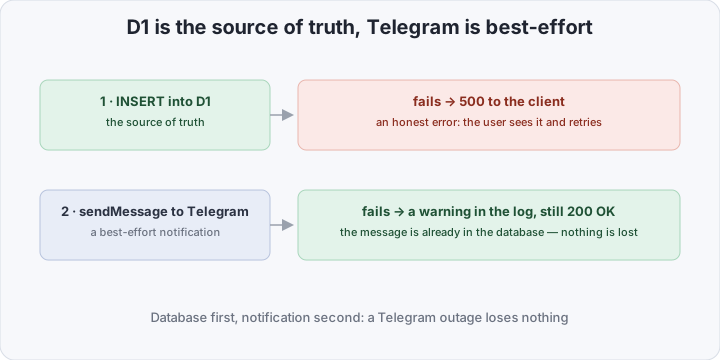
This split kills “Telegram is down, so a reader could not write in”: a notification must never have the right to lose a message.
A Cloudflare form against the usual options
| Formspree & SaaS | VPS + nginx + php | Pages + D1 + Telegram | |
|---|---|---|---|
| Price | dozens of submissions/mo, then ~$20 | $4–6/mo + patching time | $0: everything in the free tier |
| You maintain | nothing, but the form is someone else’s | OS, TLS, PHP, monitoring | nothing: the code is in the repo |
| Bot protection | the service’s filter | install your own | honeypot + Turnstile + siteverify |
| Messages | in the SaaS cabinet | in your DB | in your D1, one SQL query away |
What you need to assemble the form in one evening
You need an Astro site on Pages and wrangler (npm i -g wrangler). The order:
1. The Turnstile widget. Dashboard: Turnstile → Add site → Managed. You get a sitekey (public) and a secret.
2. A Telegram bot. @BotFather — /newbot, a token like 123456789:AA…. Your numeric ID comes from @userinfobot; press /start on your bot — until the dialogue has begun, Telegram forbids the bot from writing first.
3. The D1 database and a table:
wrangler d1 create hogin-forms # note the database_id-- migrations/0001_init.sql
CREATE TABLE IF NOT EXISTS messages (
id TEXT PRIMARY KEY,
name TEXT NOT NULL,
email TEXT NOT NULL,
message TEXT NOT NULL,
created_at TEXT NOT NULL DEFAULT (datetime('now'))
);wrangler d1 execute hogin-forms --remote --file migrations/0001_init.sql4. The form on an Astro page — fields, honeypot and widget:
---
const siteKey = import.meta.env.PUBLIC_TURNSTILE_SITE_KEY;
---
<form id="contact-form" method="post" action="/api/contact">
  <input type="text" name="name" maxlength="100" required>
  <input type="email" name="email" maxlength="200" required>
  <textarea name="message" maxlength="5000" required></textarea>

  <!-- honeypot: hidden from humans, visible to bots -->
  <input type="text" name="website" tabindex="-1" autocomplete="off"
         class="hp" aria-hidden="true">

  <div class="cf-turnstile" data-sitekey={siteKey}></div>
  <button type="submit">Send</button>
</form>

<script is:inline src="https://challenges.cloudflare.com/turnstile/v0/api.js" async defer></script>
<script>
  document.getElementById("contact-form")?.addEventListener("submit", async (e) => {
    e.preventDefault();
    const form = e.currentTarget as HTMLFormElement;
    const { ok } = await (await fetch(form.action, {
      method: "POST", body: new FormData(form),
    })).json();
    form.reset();
    (window as any).turnstile?.reset();   // tokens are single-use — ask for a new one
  });
</script>
5. The entire “backend” — functions/api/contact.ts:
interface Env {
  DB: D1Database;
  TURNSTILE_SECRET: string;
  TG_BOT_TOKEN: string;
  TG_CHAT_ID: string;
}

export const onRequestPost: PagesFunction<Env> = async ({ request, env }) => {
  const form = await request.formData();
  const name = String(form.get("name") ?? "").trim();
  const email = String(form.get("email") ?? "").trim();
  const message = String(form.get("message") ?? "").trim();
  const honeypot = String(form.get("website") ?? "");
  const token = String(form.get("cf-turnstile-response") ?? "");

  // filter 1: honeypot filled — fake success, nothing stored
  if (honeypot) return Response.json({ ok: true });

  // filter 2: length limits, email format
  if (!name || name.length > 100)
    return Response.json({ ok: false, error: "name" }, { status: 400 });
  if (!/^[^@\s]+@[^@\s]+\.[^@\s]+$/.test(email) || email.length > 200)
    return Response.json({ ok: false, error: "email" }, { status: 400 });
  if (message.length < 5 || message.length > 5000)
    return Response.json({ ok: false, error: "message" }, { status: 400 });

  // filter 3: server-side Turnstile token check
  const verify = new URLSearchParams({ secret: env.TURNSTILE_SECRET, response: token });
  const check = await fetch("https://challenges.cloudflare.com/turnstile/v0/siteverify",
    { method: "POST", body: verify });
  const { success } = await check.json<{ success: boolean }>();
  if (!success)
    return Response.json({ ok: false, error: "captcha" }, { status: 403 });

  // D1 is the source of truth: failure here = honest client error
  await env.DB.prepare(
    `INSERT INTO messages (id, name, email, message) VALUES (?1, ?2, ?3, ?4)`,
  ).bind(crypto.randomUUID(), name, email, message).run();

  // Telegram is best-effort: failure loses nothing, never bothers the user
  try {
    await fetch(`https://api.telegram.org/bot${env.TG_BOT_TOKEN}/sendMessage`, {
      method: "POST",
      headers: { "content-type": "application/json" },
      body: JSON.stringify({
        chat_id: env.TG_CHAT_ID,
        text: `📩 ${name} <${email}>\n\n${message}`,
      }),
    });
  } catch (e) {
    console.warn("telegram send failed:", e);
  }

  return Response.json({ ok: true });
};
6. Variables in Pages (Settings → Variables and Secrets):
| Variable | Type | Why |
|---|---|---|
PUBLIC_TURNSTILE_SITE_KEY | Plain text | into the build, public |
TURNSTILE_SECRET | Secret | siteverify at runtime |
TG_BOT_TOKEN | Secret | sending to Telegram |
TG_CHAT_ID | Plain text | your ID, not a secret |
Plus Settings → Functions → D1 bindings: DB → hogin-forms (Production). A push to main ships static site and function in one deploy.
The traps we caught for you
Trap 1: a secret never reaches the build. Astro needs PUBLIC_TURNSTILE_SITE_KEY at build time; Secrets only reach the function runtime. Declare the sitekey as a Secret and the build silently substitutes nothing: the widget hangs with a “testing only” plaque, submissions fail siteverify. Cure: Plain text plus a Redeploy.
Trap 2: chat_id is not the bot. In a token 123456789:AA… the number before the colon is the bot’s own ID; put it into chat_id and you get 403 Forbidden: the bot can't send messages to the bot. The correct chat_id is your numeric ID; the bot must be “started” via /start (step 2).
Hunting blind is pointless — live logs save the day:
wrangler pages deployment tail <deployment-id> # real-time deployment logsBoth were found with this exact command: the empty sitekey with a failing siteverify, and Telegram’s 403 with an exhaustive message. For history, enable Observability — Pages keeps logs even when nobody listens.
How to verify it all works
Locally — a smoke test without real keys: Turnstile ships test sitekeys (1x000…AA passes, 2x000… fails) and matching secrets:
pnpm build && wrangler pages dev dist # function and static site on localhost:8788A control submission:
# 1. without a Turnstile token — refused
curl -s -o /dev/null -w '%{http_code}\n' -X POST https://example.com/api/contact \
  -d 'name=Test&[email protected]&message=hello world'    # 403

# 2. the message — in the database
wrangler d1 execute hogin-forms --remote \
  --command "SELECT id, name, email, created_at FROM messages ORDER BY created_at DESC LIMIT 5;"

# 3. the push hit the phone
Bottom line
A static blog needs no backend to hear from a reader: all the server logic is one file in functions/, execution and storage are free. The main discovery: the hard parts were in configuration, not code — the variable type (secret vs plain) and the bot’s chat_id cost more time than the entire form. The code takes an hour; read what Cloudflare writes in the logs. Since a form opens yet another entrance, a WAF beside it does not hurt — we covered a self-hosted option separately.