

In part 1 we took the serverless AWS diagram apart layer by layer and rebuilt a smaller copy of it with a single CloudFormation template. The same illustration cycle that produced the first diagram has a twin: a grid of nine services on one ubuntu-vm with a “$0/mo” badge — Docker, Kong, Node.js, PostgreSQL, MinIO, NGINX, Prometheus, Keycloak, RabbitMQ. It is the same architecture, assembled at home: we’ll walk the boxes one by one, mark honestly where “the same thing” stops being the same, and assemble the whole stack with one docker-compose.yml.
Table of contents
Open Table of contents
- Recap: what part 1 gave us
- The translator: AWS → self-hosted
- Why the diagram has both NGINX and Kong
- “The same architecture” ≠ “the same code”
- Backups and updates — the layer the diagram doesn’t have
- What “$0/mo” really costs
- What you need to rebuild the diagram in one evening
- How to verify it works
- Bottom line
Recap: what part 1 gave us
The AWS diagram read by one rule: a request has two paths — statics (Route 53 → CloudFront → S3) and dynamics (API Gateway → Lambda → DynamoDB), and everything else is plumbing: SQS with a worker for the heavy lifting, Cognito for tokens, CloudWatch for logs and metrics. Deploying that diagram is one template.yaml: update the stack — production is updated.
The twin diagram promises the same, but on your own VM: nine rectangles with familiar roles — only instead of managed AWS services, mature open-source projects. The roles match so closely that the diagram can be assembled with a translator, line by line.
The translator: AWS → self-hosted
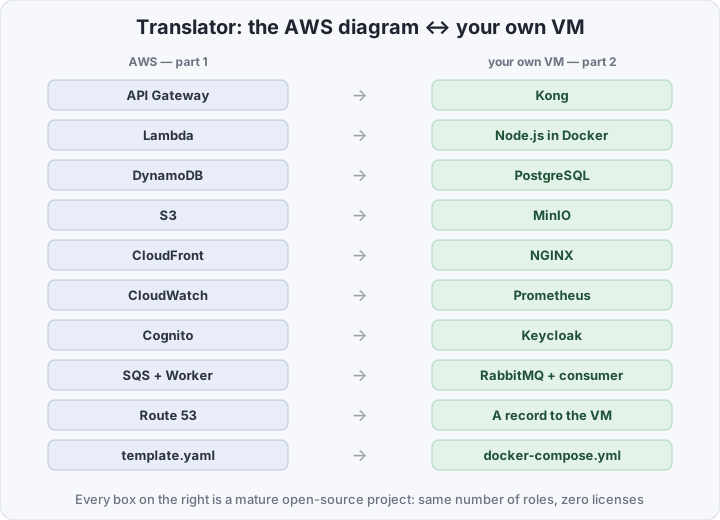
| In the cloud diagram | Role | On your own VM |
|---|---|---|
| API Gateway | API entry, tokens, limits | Kong |
| Lambda | your code | a Node.js container |
| DynamoDB | the database | PostgreSQL |
| S3 | files | MinIO |
| CloudFront | statics, TLS, compression | NGINX |
| CloudWatch | logs and metrics | Prometheus |
| Cognito | sign-up, login, tokens | Keycloak |
| SQS + Worker | background jobs | RabbitMQ + a Node.js consumer |
| Route 53 | DNS | an A record to the VM |
CloudFormation template.yaml | the whole stack in one file | docker-compose.yml |
Every row on the right is a project with a decade of production behind it: Kong — an API gateway with declarative configuration, RabbitMQ — queues with delivery acknowledgement, MinIO — S3-compatible storage, Keycloak — an IAM server speaking OpenID Connect. An honest swap: same number of roles, zero licenses.
Why the diagram has both NGINX and Kong
In the cloud diagram, two gates stood in front of the code: CloudFront (TLS, statics, compression) and API Gateway (routing, token checks, limits). The self-hosted version repeats the pair: NGINX up front — terminates TLS on a free Let’s Encrypt certificate, serves the frontend statics from a volume, and compresses responses; Kong behind it — accepts only /api, verifies the JWT from Keycloak, applies rate limits, and routes to the app.
“Why two, when NGINX has proxy_pass?” — it does. But then routing, limits, and token checks move into the NGINX config and into application code. Kong keeps that work exactly where it lived in the cloud diagram, is configured by a declarative file — the analog of template.yaml — and never faces the internet: the only open ports on the VM are 80 and 443 on NGINX.
“The same architecture” ≠ “the same code”
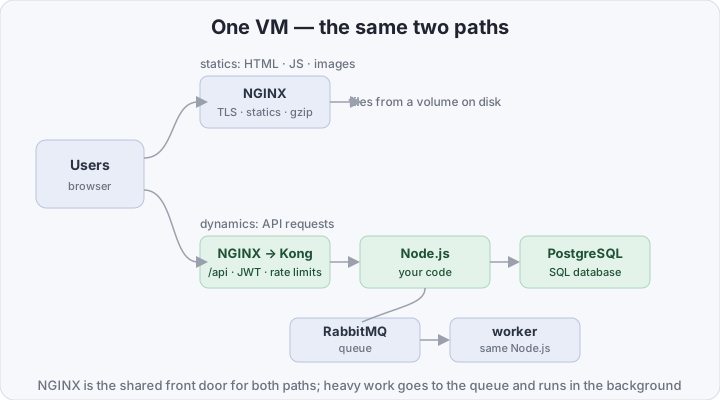
The diagram carries over; the code does not, all of it. Three places where swapping the box changes the nature of the work:
- Lambda is not “a process that is always running”. The Node.js container lives on the VM permanently: no cold starts, but you pay for the whole VM, idle time included. There is no autoscaling by request count either: load grows — latency grows, and scaling it is your job (a second instance, a load balancer, a bigger VM), not the platform’s.
- DynamoDB → PostgreSQL is a data-model change, not a connection-string change. Instead of a partition key and sort key you get tables, JOINs, and migrations; the data-access code is rewritten. On the plus side — SQL, transactions, and integrity enforced by the database; on the minus side — connection pools and migration schemas become yours.
- Cognito → Keycloak — stronger and heavier. Keycloak is a full IAM on OpenID Connect: ready-made login screens, MFA, social providers, an admin console. But it is one more service that eats memory, needs updates, and goes into backups with everything else.
Monitoring repeats the same logic: Prometheus collects metrics from all nine services — what CloudWatch did in AWS. The difference is that CloudWatch turned itself on, while the exporters for Postgres, NGINX, and RabbitMQ are yours to set up.
Backups and updates — the layer the diagram doesn’t have
The AWS diagram had no “backup” box at all — and that’s not an omission: the service replicates DynamoDB and S3. On the VM it’s the opposite: nine containers, and each one’s data lives on a disk that dies with the disk. The minimum layer:
- pg_dump on cron — once a day, the archive goes to MinIO or off the VM entirely. Keycloak’s configuration also lives in Postgres, so it rides the same dump.
- periodic restore drills — a backup that has never been restored is not a backup, it’s an assumption.
- updates — once a month,
docker compose pull && docker compose up -d; skipping it for six months is already security debt, not savings.
Without this layer, self-hosted becomes a lottery — with the odds not in your favor.
What “$0/mo” really costs
The badge on the reference, broken into honest lines:
- software — truly $0: all nine services are open source;
- hardware — no longer $0: a 2 vCPU / 4 GB VM (Keycloak dislikes smaller) is $6–15/mo for a VPS, or your own Raspberry Pi / old laptop plus electricity;
- the domain — around $10/year, TLS — Let’s Encrypt, free.
So the real bill starts at ~$7/mo, not zero. But the part-1 serverless stack also costs nearly nothing at hobby load: the AWS free tier gives a million Lambda requests and 25 GB of DynamoDB per month, free, forever. At small load both options are almost free — which means the choice between them isn’t about money:
| Serverless on AWS | Self-hosted on your VM | |
|---|---|---|
| Software bill | per request | $0 — all open source |
| Hardware bill | inside the per-request bill | the whole VM, 24/7, idle included |
| At hobby load | ≈ $0 (free tier) | ≈ $7–15/mo (VM + domain) |
| Under constant load | grows with every request | fixed by the VM size |
| A Hacker News wave | scales on its own | hits the VM ceiling, scaling is yours |
| Updates and patches | theirs | yours: docker compose pull |
| Backups | the service’s | yours: pg_dump + restore drills |
| Where the data lives | with the provider | entirely with you |
| Entry barrier | learning AWS services and limits | Linux, Docker, and compose |
The break-even line reads straight off the table: constant, predictable load — the fixed price of a VM eventually beats the per-request bill, and self-hosted becomes cheaper; rare spikes, or no load yet — serverless holds the zero and requires no on-call. One more reason to move to your own VM isn’t about money at all: data that must not sit with a provider.
What you need to rebuild the diagram in one evening
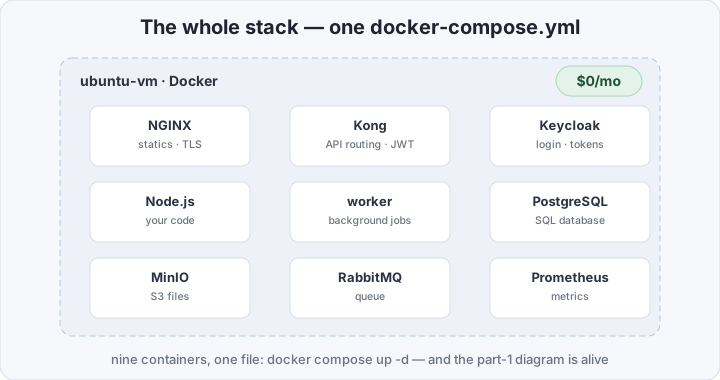
You need a VM with Ubuntu, Docker with the compose plugin, and a domain whose A record points at the VM. The project is five files and two folders:
selfhosted-app/
├── docker-compose.yml
├── nginx.conf
├── kong.yml
├── prometheus.yml
├── site/            # the built frontend
└── app/             # Node.js: server.js + worker.js
docker-compose.yml — the whole stack, the analog of part 1’s template.yaml:
services:
  nginx:
    image: nginx:1.27
    ports: ["80:80", "443:443"]
    volumes:
      - ./nginx.conf:/etc/nginx/conf.d/default.conf:ro
      - ./site:/var/www/site:ro
      - /etc/letsencrypt:/etc/letsencrypt:ro
    depends_on: [kong]

  kong:
    image: kong:3.7
    environment:
      KONG_DATABASE: "off"                      # DB-less: config from a file
      KONG_DECLARATIVE_CONFIG: /kong/kong.yml
    volumes:
      - ./kong.yml:/kong/kong.yml:ro

  app:                                          # the dynamics path
    build: ./app
    environment: &app_env
      DATABASE_URL: postgres://app:secret@postgres:5432/app
      AMQP_URL: amqp://app:secret@rabbitmq:5672/
    depends_on: [postgres, rabbitmq]

  worker:                                      # the queue consumer
    build: ./app
    command: node worker.js
    environment: *app_env
    depends_on: [postgres, rabbitmq]

  postgres:
    image: postgres:17
    environment:
      POSTGRES_USER: app
      POSTGRES_PASSWORD: secret
      POSTGRES_DB: app
    volumes: [pgdata:/var/lib/postgresql/data]

  rabbitmq:
    image: rabbitmq:4-management

  minio:
    image: minio/minio
    command: server /data --console-address ":9001"
    environment:
      MINIO_ROOT_USER: app
      MINIO_ROOT_PASSWORD: secret
    volumes: [miniodata:/data]

  prometheus:
    image: prom/prometheus
    volumes: [./prometheus.yml:/etc/prometheus/prometheus.yml:ro]

  keycloak:
    image: quay.io/keycloak/keycloak:26
    command: start --proxy-headers=xforwarded --hostname=auth.example.com
    environment:
      KC_BOOTSTRAP_ADMIN_USERNAME: admin
      KC_BOOTSTRAP_ADMIN_PASSWORD: secret
      KC_DB: postgres
      KC_DB_URL: jdbc:postgresql://postgres:5432/app
    depends_on: [postgres]

volumes:
  pgdata: {}
  miniodata: {}
kong.yml — the same API gate, declaratively:
_format_version: "3.0"
services:
  - name: app
    url: http://app:3000
    routes:
      - name: api
        paths: ["/api"]
    plugins:
      - name: jwt                  # the Keycloak JWT; openid-connect is Kong Enterprise
      - name: rate-limiting
        config:
          minute: 60
nginx.conf — the CloudFront + S3 pair in one file:
server {
    listen 443 ssl;
    server_name app.example.com;

    ssl_certificate     /etc/letsencrypt/live/app.example.com/fullchain.pem;
    ssl_certificate_key /etc/letsencrypt/live/app.example.com/privkey.pem;
    gzip on;

    location / {                    # statics — from a volume on disk
        root /var/www/site;
        try_files $uri /index.html;
    }

    location /api {                 # dynamics — onward to Kong
        proxy_pass http://kong:8000;
        proxy_set_header Host $host;
    }
}
app/server.js — what Lambda did in part 1 is now just an HTTP server:
import express from "express";
import pg from "pg";

const db = new pg.Pool({ connectionString: process.env.DATABASE_URL });
const app = express();

app.get("/api/visits", async (_req, res) => {
  await db.query("insert into visits(at) values (now())");
  const { rows } = await db.query("select count(*)::int as n from visits");
  res.json({ ok: true, visits: rows[0].n });
});

app.listen(3000);
app/worker.js — what SQS used to trigger:
import amqp from "amqplib";
import pg from "pg";

const db = new pg.Pool({ connectionString: process.env.DATABASE_URL });
const ch = await (await amqp.connect(process.env.AMQP_URL)).createChannel();
await ch.assertQueue("jobs");

ch.consume("jobs", async (msg) => {
  await db.query("insert into jobs_log(payload) values ($1)", [msg.content.toString()]);
  ch.ack(msg);                      // no ack — the message returns to the queue
});
Backups — one cron line, shipping into the same MinIO:
# /etc/cron.d/app-backup
30 3 * * * cd /srv/app && docker compose exec -T postgres pg_dump -U app app | gzip \
  | docker run --rm -i minio/mc sh -c \
    'mc alias set b http://<VM-IP>:9000 app secret && mc pipe b/backups/app-$(date +\%F).sql.gz'
Deploy — one command, like sam deploy in part 1:
docker compose up -d --buildHow to verify it works
First check — all nine containers alive:
docker compose psSecond — an anonymous caller is stopped by Kong, just as API Gateway stopped them in part 1:
curl -i https://app.example.com/api/visits # 401 — no tokenThird — the full loop: a token from Keycloak, a request, the counter grows:
TOKEN=$(curl -s https://auth.example.com/realms/app/protocol/openid-connect/token \
  -d grant_type=password -d client_id=app \
  -d [email protected] -d password='Demo-pass-1!' | jq -r .access_token)

curl -H "Authorization: Bearer $TOKEN" https://app.example.com/api/visits
# {"ok":true,"visits":1,...}
Fourth — monitoring and backups: all Prometheus targets alive, the dump restores:
curl -s localhost:9090/api/v1/query?query=up | jq '.data.result[].metric.job'

zcat backups/app-2026-10-20.sql.gz | \
  docker compose exec -T postgres psql -U app -d app_check   # restore drill
Four checks — and the reference diagram is alive: the gate stops anonymous callers, the token opens the door, the code writes a row, metrics and backups are in place.
Bottom line
The diagram really is the same: two request paths, a queue for the heavy work, IAM for tokens, metrics so you can sleep at night — and the whole stack in one file, only template.yaml became docker-compose.yml. What changed is the owner of the boxes: updates, health, backups, and the 3 a.m. restart are now yours, and the “$0/mo” badge means $0 for software, not $0 for operations. So the honest choice between this diagram and part-1 serverless is not between two prices but between control over every byte and zero operations to run; under constant load and with data that must stay yours, the own VM wins, and under rare spikes and “ship by Friday”, serverless does. And if the VM is already standing, the natural next box is a WAF on a budget, which installs right in front of this NGINX.