

Until now, the only way to change CPU or memory on a running pod was to edit requests/limits in the controller’s spec, wait for Kubernetes to delete the old pod and create a new one, and hope it landed on the same node with the same data locality. Kubernetes 1.35 closes that chapter: In-Place Pod Resize (KEP-1287) has gone stable, and kubectl patch pod --subresource resize changes a container’s resources while it keeps running. Let’s break down what actually became stable, what still forces a restart, and how it ties into VPA, the scheduler, and the cluster autoscaler.
Table of contents
Open Table of contents
- Why this used to hurt
- What exactly went stable in 1.35
- What still forces a container restart
- A live example: resizing a running pod
- Integrating with the Vertical Pod Autoscaler
- What this changes for the scheduler and the cluster autoscaler
- Comparison: before / after
- What it takes to turn this on
- How to verify a resize actually happened in place
- Bottom line
Why this used to hurt
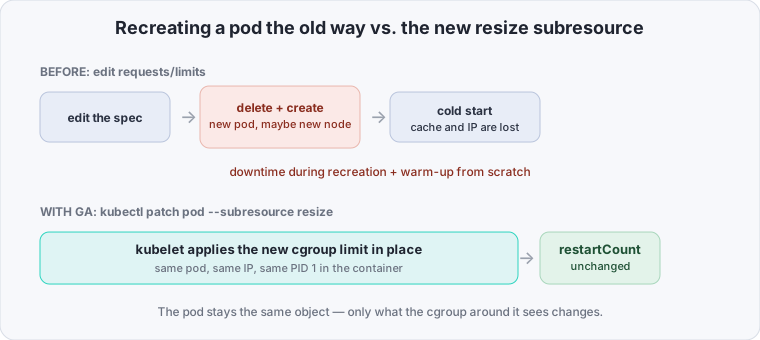
A pod in Kubernetes isn’t just a set of containers — it’s also requests/limits, fixed at creation time and nailed to the Pod object for good. The spec.containers[].resources field was immutable: trying to change it via kubectl edit or kubectl apply was rejected by the API server outright. The only legal path was recreating the whole pod.
For a stateless service behind a Deployment, that’s just an extra rolling restart. For everything else, it was a real cost:
- A stateful pod with local disk or a long warm-up (databases, search indexes, a JVM with horizontal warm-up) loses minutes or tens of minutes of cold start on every recreation.
- A batch job with one long-running step that hits OOM restarts from scratch instead of simply getting more memory on the fly.
- VPA in
Recreatemode — the only mode that actually worked before this feature — effectively turned vertical autoscaling into managed pod churn: it helped with the resource profile, but paid for it in availability and cold-start latency.
The Kubernetes API worked around this the crude way: people over-provisioned requests “just in case,” padded limits “to be safe,” and accepted that VPA couldn’t be turned on for anything restart-sensitive. In-place resize removes the reason for that trade-off entirely — the pod stays the same pod, same IP, same PID 1 in the container, just with a different cgroup limit around it.
What exactly went stable in 1.35
GA in 1.35 “Timbernetes” locks in three things that previously lived behind the InPlacePodVerticalScaling feature gate (alpha in 1.27, beta in 1.33):
- The
pods/resizesubresource. A dedicated RBAC entry point for changing a container’sresourceswithout a fullPATCHon the pod itself — the same separationpods/statusorpods/execalready have. That means a CI pipeline or a VPA controller can be granted the right to resize resources without also getting the right to change the image, command, or volumes. - Container-level
resizePolicy. A newspec.containers[].resizePolicyfield: a list ofresourceName(cpuormemory) paired withrestartPolicyset toNotRequired(apply live) orRestartContainer(recreate the container inside the same pod, without touching the pod itself). The default forcpuis alwaysNotRequired: a CPU quota in a cgroup is a soft limit, the kernel just schedules more or less CPU time — no restart needed for that. - Status reflecting what’s actually applied.
status.containerStatuses[].resourcesshows what’s currently in effect in the cgroup right now, whilestatus.containerStatuses[].allocatedResourcesshows what the kubelet counted toward the node’s available capacity. Plusstatus.conditionswith typesPodResizePending/PodResizeInProgressand reasonsDeferred(not enough room on the node right now, waiting) orInfeasible(will never fit — the request exceeds the node’s allocatable).
What still forces a container restart
In-place resize isn’t “any resource change, free of charge.” A container restart (not the whole pod — the pod and its IP survive this restart) is still required in a few cases:
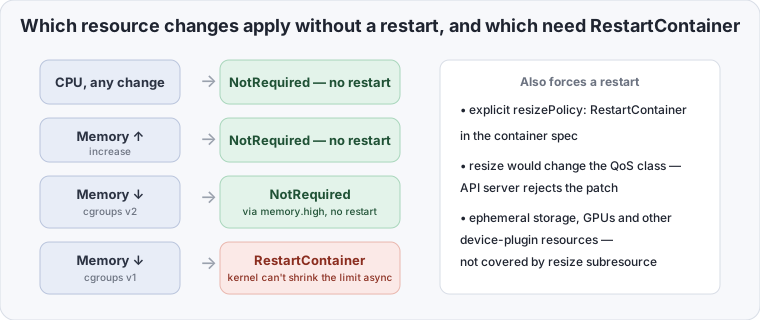
- Decreasing a memory limit on cgroups v1. cgroups v1 can’t asynchronously shrink
memory.limit_in_bytesbelow current usage — the kernel either immediately invokes the OOM killer on the difference, or the operation simply fails. cgroups v2 withmemory.highas a soft threshold handles this correctly: the kubelet can lower the limit, give the cgroup time to reclaim pages, and only then pin down the hardmemory.max. On v1, the only safe way to shrink memory isRestartContainer. - An explicit
RestartContainerin the policy for a given resource. If you setresizePolicywithrestartPolicy: RestartContainerformemoryyourself (a sensible default for apps that don’t release memory without a process restart — say, ones with their own monotonically growing memory pool), the kubelet restarts the container on any change to that resource, even an increase. - A change that would flip the pod’s QoS class. QoS (
Guaranteed/Burstable/BestEffort) is computed from therequests-to-limitsratio at pod creation and locked in after that. A resize that would, say, turn aGuaranteedpod intoBurstable(by makingrequests != limits) is rejected by the API server at the door — that’s not “needs a restart,” it fails validation entirely. - Resources outside CPU/memory. Ephemeral storage, extended resources, GPUs, and other device-plugin resources aren’t covered by the resize subresource — as before, the only way to change those is recreating the pod.
A live example: resizing a running pod
Patching memory on a container that’s already running, with zero restarts — on cgroups v2 with resizePolicy: NotRequired:
kubectl get pod worker-0 -o jsonpath='{.status.containerStatuses[0].restartCount}{"\n"}'
# 0

kubectl patch pod worker-0 --subresource resize --patch \
  '{"spec":{"containers":[{"name":"worker","resources":{"requests":{"memory":"512Mi","cpu":"250m"},"limits":{"memory":"1Gi","cpu":"1"}}}]}}'
# pod/worker-0 patched

kubectl get pod worker-0 -o jsonpath='{.status.containerStatuses[0].restartCount}{"\n"}'
# 0

kubectl get pod worker-0 -o jsonpath='{.status.containerStatuses[0].resources}{"\n"}'
# {"limits":{"cpu":"1","memory":"1Gi"},"requests":{"cpu":"250m","memory":"512Mi"}}
restartCount didn’t move — meaning this really was an in-place resize, not a fast restart that’s easy to mistake for one when eyeballing logs. If the node physically didn’t have room for the new request, status.conditions would show PodResizePending with reason: Deferred instead of applying instantly — the kubelet holds the desired value in spec but doesn’t touch the cgroup until room frees up (or until the resize is reversed with another patch).
Integrating with the Vertical Pod Autoscaler
VPA got a third update mode — updateMode: InPlaceOrRecreate — which tries the resize subresource first and only falls back to the old behavior on failure:
apiVersion: autoscaling.k8s.io/v1
kind: VerticalPodAutoscaler
metadata:
  name: worker-vpa
spec:
  targetRef:
    apiVersion: apps/v1
    kind: Deployment
    name: worker
  updatePolicy:
    updateMode: InPlaceOrRecreate
  resourcePolicy:
    containerPolicies:
      - containerName: worker
        minAllowed:
          cpu: 100m
          memory: 256Mi
        maxAllowed:
          cpu: 2
          memory: 4Gi
The sequence VPA follows under this mode:
- The recommender computes a new target — it tries
pods/resizeon the current pod first. - The kubelet accepts it: applied in place,
restartCountdoesn’t grow, the pod never leaves the node. - The kubelet rejects it as
Infeasible(the new request physically doesn’t fit on the current node) or theresizePolicyrequires a container restart and the gap is too large — VPA falls back to the old behavior: evict the pod and recreate it with the new values, exactly likeupdateMode: Recreateused to.
For an operator, that means InPlaceOrRecreate is almost always safer than plain Recreate — but it doesn’t remove the occasional need to accept a recreation on an overcommitted node.
What this changes for the scheduler and the cluster autoscaler
The subtlest effect of GA isn’t the resize itself — it’s what happens to an already-made scheduling decision once requests change after the fact:
- The scheduler makes its placement decision once, at pod creation, based on the original
requests. In-place resize doesn’t reopen that decision — a larger request doesn’t trigger a re-schedule. Instead, the kubelet on that specific node checks the new request against locally available capacity (allocatable minus what’s already claimed by other pods) and either applies it immediately or setsPodResizePendingwithDeferred. - The Cluster Autoscaler reacts not to the resize itself but to its consequences: if a pod is stuck waiting for room because of
Deferred, CA sees it as an ordinary unschedulable signal (here, “doesn’t fit on any existing node”) and tries to bring up a new node. But CA needs to know the currentrequests, not whatever they were at the last scaling decision — versions of CA synced to this GA readspec.containers[].resourcesdirectly rather than caching the values from pod creation. - Bin-packing degrades over time without a controller. If a lot of pods shrink themselves down via resize but stay on nodes they were originally scheduled for at a larger request, the cluster gradually loses packing density — freed-up room doesn’t trigger descheduling on its own. A descheduler (
deschedulerwith theLowNodeUtilizationpolicy) remains a separate mechanism worth keeping around if VPA is actively shrinking pods in place.
Comparison: before / after
| Dimension | Before in-place resize (≤1.26, no feature gate) | With GA in-place resize (1.35+) |
|---|---|---|
| Changing CPU on a running pod | full pod recreation | resize subresource, no container restart |
| Raising the memory limit (cgroups v2) | full pod recreation | resize subresource, no container restart |
| Lowering the memory limit (cgroups v1) | full pod recreation | still requires RestartContainer |
| Pod IP / process-local cache | lost on recreation | preserved — the pod never leaves the node |
| VPA update mode | Off / Initial / Recreate | + InPlaceOrRecreate with a recreate fallback |
| Resize changing the QoS class | impossible (the whole pod is recreated with a new class) | still impossible — the API server rejects the patch |
| Effect on the scheduler | a new scheduling decision on every change | none — the kubelet checks feasibility locally |
What it takes to turn this on
- Kubernetes 1.35+ on the control plane and kubelets — GA means the
InPlacePodVerticalScalingfeature gate is on by default; no manual enabling needed. - cgroups v2 on every node where you plan to shrink
memory.limit. This is the main practical checklist item: if the cluster still has cgroups v1 nodes left (old images, a legacycgroupDriver), resizing memory down on them will forcibly restart the container — the feature won’t break, it’ll just quietly fall back to the old behavior exactly where you weren’t expecting it. - A CRI runtime that supports restart-free resize — containerd 1.7+/2.x and current CRI-O versions handle this; on older runtimes, the kubelet is forced through
RestartContainerregardless ofresizePolicy. resizePolicyin the container spec, where the default behavior doesn’t fit — for example, explicitly settingRestartContainerfor memory on processes with their own allocator that doesn’t hand memory back to the OS on its own.- RBAC on
pods/resizeseparate frompods— if resizing will be driven by VPA or an external controller rather than a human runningkubectl, grant that right explicitly in itsClusterRole.
How to verify a resize actually happened in place
kubectl get pod worker-0 -o jsonpath='{.status.containerStatuses[0].restartCount}{"\n"}'
# unchanged restartCount means the resize applied without recreating the container

kubectl get pod worker-0 -o jsonpath='{.status.conditions[?(@.type=="PodResizePending")]}{"\n"}'
# empty if the resize applied immediately; {"reason":"Deferred",...} if the pod is waiting for room

kubectl get pod worker-0 -o jsonpath='{.status.containerStatuses[0].resources}{"\n"}'
# the actual cpu/memory limits and requests currently in effect in the cgroup
If restartCount jumps right after the patch, the resize went through RestartContainer rather than applying silently in place — check the container’s resizePolicy and which cgroup driver that node is running.
Bottom line
In-Place Pod Resize closes off a whole class of unnecessary pod churn — but only where you’ve already confirmed cgroups v2 and a current CRI are actually underneath it, not a legacy node that will quietly fall back to a restart exactly when it goes unnoticed. If your stack leans on a container restart as a side-effect way to reclaim leaked memory, VPA’s InPlaceOrRecreate won’t respect that habit — it’ll simply stop triggering it unnecessarily. Before turning resize on everywhere, decide explicitly where resizePolicy should stay RestartContainer rather than silently inheriting the default.