

Count the login forms in your internal hosting: kubectl — client certificates, Argo CD — a built-in admin, Grafana — its own database, and every second internal service — Basic Auth from a ConfigMap. Separate passwords, separate “forgot password” flows, MFA nowhere. The reason to sort this out now is Keycloak 26.8.1, released October 13, 2026: it closed 23 CVEs, including masked client secrets leaking through the Admin REST API (CVE-2026-15943) and forged logout tokens (CVE-2026-18569). The 26.x line is actively moving — 26.7 brought a new client registration REST API — so it’s a good moment to get current and collapse the whole zoo into one OIDC provider.
Table of contents
Open Table of contents
Five admin panels — five passwords
The zoo grows quietly. First the cluster — access via a client certificate issued for a year and copied who-knows-where. Then Argo CD with its built-in admin and a password in a secret. Then Grafana, where every dashboard viewer gets an account in SQLite. Intermediate services get Basic Auth, because “it’s faster”.
Every point is a separate authentication surface with its own rules:
- passwords live wherever — in a secret, in a ConfigMap, in someone’s head; complexity and rotation policy — nowhere;
- offboarding — N separate operations, you’ll forget one and never notice;
- no MFA — a client certificate on a laptop and an
admin/adminpassword don’t count; - no audit — who logged into Grafana on Saturday night stays unknown;
- onboarding a new admin — an hour of granting access in five places.
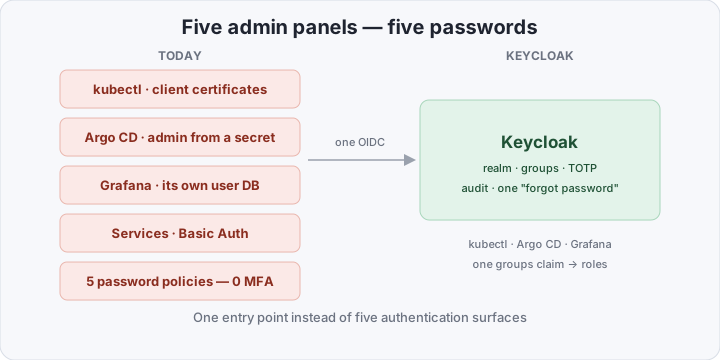
The problem isn’t “weak passwords” — it’s that there are five authentication surfaces, and each needs its own ops.
What a single OIDC provider changes
Keycloak is an open source IAM server: realms (isolated user domains), clients (applications), groups and roles, built-in TOTP/WebAuthn, audit events. Anything that speaks OIDC plugs into it over the standard flow — authorization code + PKCE.
Concretely:
- one login — the browser, kubectl, Argo CD and Grafana all authenticate against one provider: sign in once, the session is shared;
- groups instead of hand-granted access — the realm group
adminsarrives in the token as thegroupsclaim, and applications map it to their roles:cluster-adminat the apiserver,role:adminin Argo CD,Adminin Grafana; - MFA in one place — enable TOTP/WebAuthn once for the realm, it applies everywhere;
- audit — events record who logged in and when; disabling a user is one operation, and every application immediately rejects their tokens;
- kube-apiserver too — Kubernetes speaks OIDC natively:
--oidc-issuer-url/--oidc-client-idflags, andkubectlgoes through the same Keycloak.
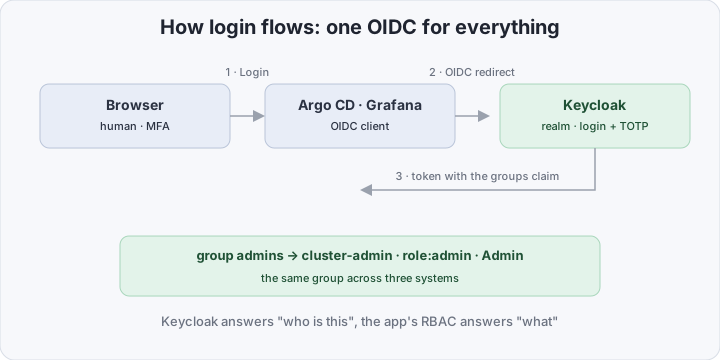
Important: OIDC does not replace RBAC. The application (or apiserver) still decides what the admins role may do — Keycloak only answers “who is this”.
The zoo vs Keycloak
| Basic Auth + local accounts | Dex + external IdP | Keycloak | |
|---|---|---|---|
| User storage | none / in ConfigMap | none, needs upstream | realm: users, groups, policies |
| Password policy and rotation | no | upstream’s problem | built in |
| MFA (TOTP/WebAuthn) | no | no (or external) | built in |
| kubectl without client certs | no | yes | yes |
| Disable one person | N operations | 1 (in upstream) | 1 |
| Login audit | no | partial | realm events |
| Components in cluster | 0 | 1 small + LDAP/IdP | 1 JVM + Postgres |
| RAM for the stack | ~0 | ~100 MB + upstream | ~1–2 GB |
Dex is honest about being a connector — “OIDC in front, LDAP/Google/GitHub behind” — but it stores no users of its own: passwords and MFA live somewhere else anyway. Keycloak covers the whole chain by itself.
What you need to stand up SSO on your own cluster
Assumptions: your own cluster (kubeadm/Cluster-API/VMs — somewhere you can edit kube-apiserver flags), an ingress with TLS, the domain sso.example.com. We work in the keycloak namespace with the quay.io/keycloak/keycloak:26.8.1 image.
1. Postgres on CloudNativePG. Keycloak in production mode requires an external database; the dev-mode H2 is not for production. If CloudNativePG isn’t installed yet — covered in an earlier post; two instances are enough for SSO:
apiVersion: postgresql.cnpg.io/v1
kind: Cluster
metadata:
  name: keycloak-db
  namespace: keycloak
spec:
  instances: 2
  storage:
    size: 10Gi
  bootstrap:
    initdb:
      database: keycloak
      owner: keycloak
2. Keycloak via the helm chart. The core values (secrets come from External Secrets, as described here):
production: true            # start --optimized, strict hostname
replicaCount: 2
image:
  tag: "26.8.1"
auth:
  adminUser: admin
  existingSecret: keycloak-admin
externalDatabase:
  host: keycloak-db-rw.keycloak.svc.cluster.local
  port: 5432
  database: keycloak
  user: keycloak
  existingSecret: keycloak-db-app
  existingSecretPasswordKey: password
postgresql:
  enabled: false            # the database is CNPG, not the nested chart
proxy: edge                 # TLS terminates at the ingress
ingress:
  enabled: true
  hostname: sso.example.com
  ingressClassName: nginx
  tls: true
helm upgrade --install keycloak oci://registry-1.io/bitnami/keycloak \
--namespace keycloak --create-namespace -f values.yamlAfter startup, create the homelab realm and enable the built-in groups client scope on your clients — without it the groups claim never lands in the token and group mapping fails silently. That’s the classic trap.
3. kube-apiserver. Flags on the control plane (kubeadm — /etc/kubernetes/manifests/kube-apiserver.yaml):
- --oidc-issuer-url=https://sso.example.com/realms/homelab
- --oidc-client-id=kubectl
- --oidc-username-claim=preferred_username
- --oidc-username-prefix=oidc:
- --oidc-groups-claim=groups
- --oidc-groups-prefix=oidc:
The oidc: prefixes prevent a realm group from impersonating system:masters. The apiserver must reach the issuer over TLS with a certificate it trusts; for a private CA add --oidc-ca-file. On managed clusters (EKS/GKE) these flags aren’t directly available — EKS has its own associate-identity-provider-config API — but this post is about your own iron. Worth noting: the classic --oidc-* flags are in maintenance mode; the new path is structured authentication (--authentication-config with a JWT authenticator), same fields.
The client in Keycloak: kubectl, public, redirect URI http://localhost:8000/* — that’s where kubelogin lands.
4. kubeconfig with kubelogin. The plugin opens a browser, you log into Keycloak (with MFA), tokens refresh on their own:
kubectl krew install oidc-login# kubeconfig fragment
users:
- name: oidc
user:
exec:
apiVersion: client.authentication.k8s.io/v1
command: kubectl
interactiveMode: IfAvailable
args:
- oidc-login
- gettoken
- --oidc-issuer-url=https://sso.example.com/realms/homelab
- --oidc-client-id=kubectl
- --oidc-extra-scope=email
- --oidc-extra-scope=groupsThe role is plain RBAC, the subject a prefixed group:
apiVersion: rbac.authorization.k8s.io/v1
kind: ClusterRoleBinding
metadata:
  name: oidc-admins
roleRef:
  apiGroup: rbac.authorization.k8s.io
  kind: ClusterRole
  name: cluster-admin
subjects:
  - kind: Group
    name: oidc:admins
    apiGroup: rbac.authorization.k8s.io
5. Argo CD. In the argo/argo-cd chart values:
configs:
  cm:
    oidc.config: |
      name: Keycloak
      issuer: https://sso.example.com/realms/homelab
      clientID: argocd
      clientSecret: $oidc.keycloak.clientSecret
      requestedScopes: ["openid", "profile", "email", "groups"]
  secret:
    extra:
      oidc.keycloak.clientSecret: "<from Keycloak>"
  rbac:
    policy.csv: |
      g, admins, role:admin
      g, viewers, role:readonly
The g, admins, role:admin line takes the group from the groups claim — the same realm groups as kubectl.
6. Grafana. Make the grafana client in Keycloak confidential (client id + secret). The grafana.ini section:
[auth.generic_oauth]
enabled = true
name = Keycloak
client_id = grafana
client_secret = $__env{GRAFANA_CLIENT_SECRET}
scopes = openid profile email groups
auth_url = https://sso.example.com/realms/homelab/protocol/openid-connect/auth
token_url = https://sso.example.com/realms/homelab/protocol/openid-connect/token
api_url = https://sso.example.com/realms/homelab/protocol/openid-connect/userinfo
role_attribute_path = contains(groups[*], 'admins') && 'Admin' || 'Viewer'
allow_sign_up = true
The same admins group grants cluster-admin in kubectl and Admin in Grafana — because the source is one.
Realm as code
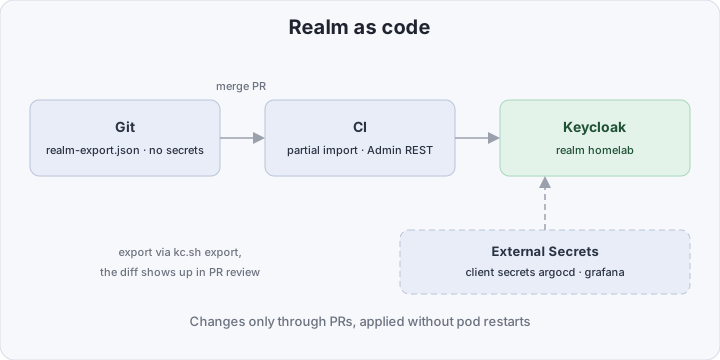
Realm settings created by hand in the admin console are drift, same as kubectl edit. The fix is export:
kubectl -n keycloak exec keycloak-0 -- \
  /opt/keycloak/bin/kc.sh export --realm homelab \
  --dir /tmp/export --users realm_file
The file goes into git next to the helm values; changes land through a PR: initial bootstrap — mount a ConfigMap at /opt/keycloak/data/import and start with --import-realm, later from CI — partial import via the Admin REST API (policy SKIP/OVERWRITE), no pod restarts. Strip secrets from the export and keep them in External Secrets — git holds only references. The core of the file:
{
  "realm": "homelab",
  "enabled": true,
  "clients": [
    {
      "clientId": "kubectl",
      "publicClient": true,
      "redirectUris": ["http://localhost:8000/*"],
      "defaultClientScopes": ["profile", "email", "groups"]
    },
    {
      "clientId": "argocd",
      "secret": "${ARGOCD_CLIENT_SECRET}",
      "redirectUris": ["https://argocd.example.com/auth/callback"],
      "defaultClientScopes": ["profile", "email", "groups"]
    },
    {
      "clientId": "grafana",
      "secret": "${GRAFANA_CLIENT_SECRET}",
      "redirectUris": ["https://grafana.example.com/login/generic_oauth"],
      "defaultClientScopes": ["profile", "email", "groups"]
    }
  ],
  "groups": [
    { "name": "admins", "path": "/admins" },
    { "name": "viewers", "path": "/viewers" }
  ]
}
The bill: JVM and memory
Honest accounting: Keycloak is a JVM. A replica with ~512 MiB heap for a realm of dozens of users and a few hundred clients is normal; budget a request of ~768 MiB and a limit of ~1.5 GiB per pod, two replicas for availability. Plus two CNPG Postgres pods at ~256 MiB each. The whole SSO stack is on the order of 2–3 GB RAM.
Why it’s still cheaper than the zoo: Basic Auth costs zero RAM, but every account, rotation and “forgot password” is a manual operation — times five systems in a row. Dex itself is ~100 MB, but it stores no users — you need an upstream: Google/GitHub (your data leaves) or self-hosted LDAP, which means OpenLDAP, its ops, and a separate MFA mechanism. One Keycloak covers the directory, password policies, TOTP/WebAuthn, brokering to external IdPs and audit — a single binary with one upgrade path.
How to verify it works
curl -s https://sso.example.com/realms/homelab/.well-known/openid-configuration | jq -r .issuer
kubectl auth whoami- apiserver:
kubectl auth whoamiafter logging in via kubelogin showsUsername: oidc:aliceandGroups: [oidc:admins …]— claims and prefixes are in place; - Argo CD: log in via “Login via Keycloak”; a user from
viewersmust not see the Sync button; - Grafana: after login the user profile shows
Admin/Viewerfromrole_attribute_path; - token:
kubectl oidc-login gettoken --oidc-issuer-url=… --oidc-client-id=kubectland decode the payload at jwt.io — it should containgroups: ["admins"]. Ifgroupsis missing — back to thegroupsclient scope step.
Bottom line
One Keycloak for the whole internal panel means fewer authentication surfaces than any Basic-Auth-plus-Dex-shim combo: one provider answers “who is this”, kubectl/Argo CD/Grafana map the same admins group to their own roles, MFA and audit get enabled in one place, and the realm lives in git. The price is two JVM pods and an honest Postgres underneath — ~2–3 GB of RAM: cheap insurance against “the Grafana password was sitting in a ConfigMap”. If you haven’t stood up Postgres under Keycloak yet — the starter CloudNativePG setup is covered here.