

For years GPUs in Kubernetes were allocated by a single number: nvidia.com/gpu: 1 in resources.limits — and the node agent handed the pod whatever card it grabbed. In Kubernetes 1.34 Dynamic Resource Allocation (DRA) went GA, in 1.35+ the feature gate is locked on for good, and NVIDIA moved its device plugin to maintenance mode: new capabilities land only in the DRA driver. Here is how to ask for a GPU now — by attributes (“memory ≥ 16 GB”) instead of a counter — and what breaks along the way.
Table of contents
Open Table of contents
- Device plugins: why the counter is a dead end
- The three DRA objects: ResourceSlice, ResourceClaim, DeviceClass
- A pod with a ResourceClaim: how to ask for a GPU now
- What you need to move a cluster to DRA
- DRA vs device plugins
- What breaks during migration
- When DRA actually pays off
- How to verify it works
- Bottom line
Device plugins: why the counter is a dead end
The Device Plugin API dates back to 2017, when “a GPU in a pod” meant “one whole accelerator”. The scheme is simple: a daemon on the node lists the cards over a gRPC socket, kubelet publishes them as the extended resource nvidia.com/gpu, and the scheduler sees a number — nothing more. Only the node agent “knows” about the devices — it also mounts them into the container via NVIDIA_VISIBLE_DEVICES and toolkit hooks. The cluster API holds no object and no attributes for accelerators: nothing to ask — kubectl get on GPUs has nothing to return.
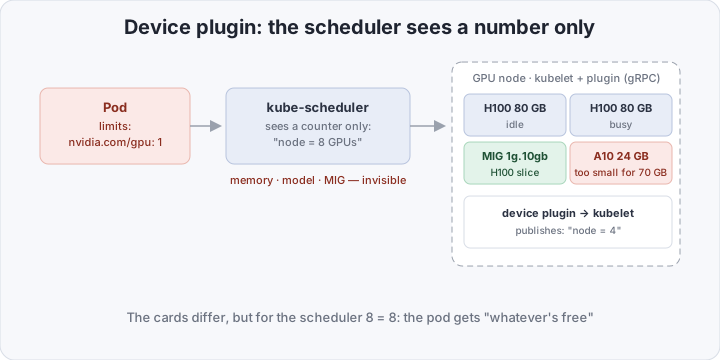
Trouble starts the moment GPUs stop being identical:
- MIG — one H100 is carved into 1g.10gb/2g.20gb slices; a new partitioning must be re-published, and classic races live between re-partitioning and the counter updating;
- time-slicing — several pods on one card look to kubelet like N “independent devices”: the scheduler reserves 100% for each, and the real oversubscription is invisible;
- fragmentation — the agent hands out devices by index, “top to bottom”: a node counts as full when the counter runs out, even though individual cards idle at random;
- attributes — memory size, model, driver version. A pod with a 70 GB model does not care about “one GPU”: it needs an 80 GB card but gets a 16 GB one — the failure arrives at runtime as a CUDA OOM while the right cards sit idle.
An extended resource cannot express anything but an integer — an architectural ceiling, not a bug anyone will fix.
The three DRA objects: ResourceSlice, ResourceClaim, DeviceClass
DRA (API group resource.k8s.io/v1) flips the model: instead of a per-node counter, the cluster API holds an inventory with attributes, and kube-scheduler plans against it.
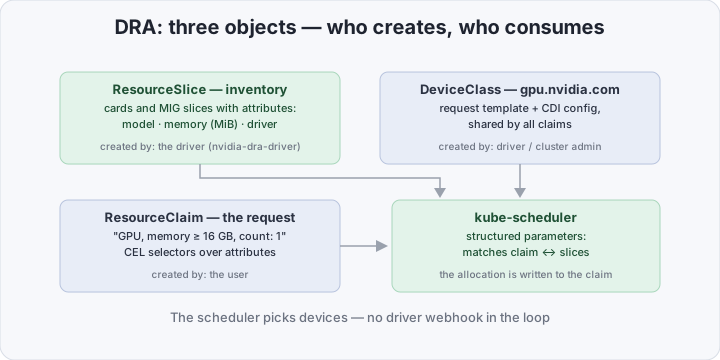
- ResourceSlice — created by the driver (NVIDIA’s nvidia-dra-driver). A catalog of devices: every card or MIG slice is a device with attributes (model, memory in MiB, driver version). Several slices per cluster are the norm; updates are atomic;
- DeviceClass — created by the driver or cluster admin. A request template: which devices qualify as
gpu.nvidia.com, plus config shared by all claims (CDI edits for the container, say); - ResourceClaim — created by the user. A readable statement of work: “one device from class gpu.nvidia.com with memory ≥ 16 000 MiB”. The scheduler matches it against slices and writes the decision back: which exact devices, on which node.
The key difference from early DRA prototypes: kube-scheduler decides from structured parameters, with no synchronous calls into an external driver webhook — that webhook is exactly what delayed GA. The DRA driver takes no part in scheduling: it publishes the inventory and prepares devices once allocated.
A claim’s lifecycle is human-readable: created → the scheduler writes the devices into status.allocation → the pod starts on the chosen node. Devices in a claim are reserved for it — two pods never share a card by accident — and the claim is a full-fledged API object: inspectable, quotable in tickets, cleanable with kubectl. Priorities work too: when devices run short, a pod with a higher PriorityClass evicts someone else’s claim — the scheduler’s usual preemption. The mechanism is not NVIDIA-specific: NICs, FPGAs, and licenses plug in through the same slices and classes.
A pod with a ResourceClaim: how to ask for a GPU now
Instead of resources.limits: a separate object, referenced from the pod spec.
# gpu-claim.yaml — "a card with 16+ GB", not "a unit of GPU"
apiVersion: resource.k8s.io/v1
kind: ResourceClaim
metadata:
  name: gpu-16gb
spec:
  devices:
    requests:
      - name: gpu
        exactly:
          deviceClassName: gpu.nvidia.com
          allocationMode: Count
          count: 1
          selectors:                        # attributes instead of a counter
            - cel:
                expression: "device.attributes['gpu.nvidia.com'].memory >= 16000"
# gpu-pod.yaml
apiVersion: v1
kind: Pod
metadata:
name: vectoradd
spec:
runtimeClassName: nvidia
containers:
- name: cuda
image: nvcr.io/nvidia/k8s/cuda-sample:vectoradd-cuda12.5.1
command: ["./vectorAdd"]
resourceClaims: # ← what replaced nvidia.com/gpu
- name: gpu
source:
resourceClaimName: gpu-16gb
resources:
claims:
- name: gpu # the device is available to containersThe CEL selector combines conditions: model (productName), memory, driver version. For Jobs and other multi-pod workloads, don’t create claims by hand — generate them from a template, and every pod gets its own:
# claim-template.yaml — a per-pod claim generated from a template
apiVersion: resource.k8s.io/v1
kind: ResourceClaimTemplate
metadata:
  name: gpu-16gb-tpl
spec:
  spec:
    devices:
      requests:
        - name: gpu
          exactly:
            deviceClassName: gpu.nvidia.com
            allocationMode: Count
            count: 1
            selectors:
              - cel:
                  expression: "device.attributes['gpu.nvidia.com'].memory >= 16000"
In the pod, resourceClaimName becomes resourceClaimTemplateName: gpu-16gb-tpl: the controller creates a uniquely named claim and deletes it with the pod. A standalone shared claim (as above) fits when several pods legitimately share one GPU.
What you need to move a cluster to DRA
You need Kubernetes ≥ 1.34, the NVIDIA GPU Operator, and the DRA driver. Before you start, check three things: the control plane version (kubectl version), a containerd or CRI-O runtime (device delivery rides on CDI), and nothing in your stack hard-requiring nvidia.com/gpu in pod limits — older Kubeflow and platform controllers sometimes validate exactly that. On managed clusters, confirm the control plane is already upgraded: providers upgrade on their own schedule. The order:
1. GPU Operator without the device plugin — the GPU driver, toolkit, and DCGM exporter install as usual; the plugin we turn off:
helm upgrade --install gpu-operator nvidia/gpu-operator \
  --namespace gpu-operator --create-namespace \
  --set driver.enabled=true \
  --set devicePlugin.enabled=false
2. The NVIDIA DRA driver — publishes the ResourceSlice and DeviceClass, generates CDI specs:
helm repo add nvidia https://helm.ngc.nvidia.com/nvidia --force-update
helm upgrade --install nvidia-dra-driver nvidia/k8s-dra-driver \
  --namespace nvidia-dra-driver --create-namespace \
  --set runtimeClassName=nvidia
Recent GPU Operator releases can deploy the DRA driver from the same chart — if yours does, skip step 2.
3. CDI in the container runtime. Devices reach the container through CDI: the driver writes a spec with the exact list (nvidia.com/gpu=2), and containerd/CRI-O mount exactly that. Requires containerd ≥ 1.7 with enable_cdi = true (on by default in 2.0). A quick readiness check: crictl info | grep -i cdi.
No node drain required: existing pods with nvidia.com/gpu keep working the old way until you migrate them — the Device Plugin API is still there.
DRA vs device plugins
| Device plugin | DRA | |
|---|---|---|
| What the pod asks for | nvidia.com/gpu: 1 — a number | a ResourceClaim with attributes |
| Who picks the device | the node agent, “whatever it grabs” | kube-scheduler against the inventory |
| MIG | re-publishing and races | slices are devices with attributes |
| Sharing | invisible oversubscription | honest fractions for the scheduler |
| Quotas and monitoring | extended resource in kubelet | ResourceSlice/claim in the cluster API |
| Cluster requirements | any Kubernetes version | ≥ 1.34, containerd/CRI-O with CDI |
| Status | maintenance mode at NVIDIA | GA in 1.34, gate locked in 1.35+ |
What breaks during migration
The move itself is gentle — old pods keep running — but everything built around the counters refuses to come along.
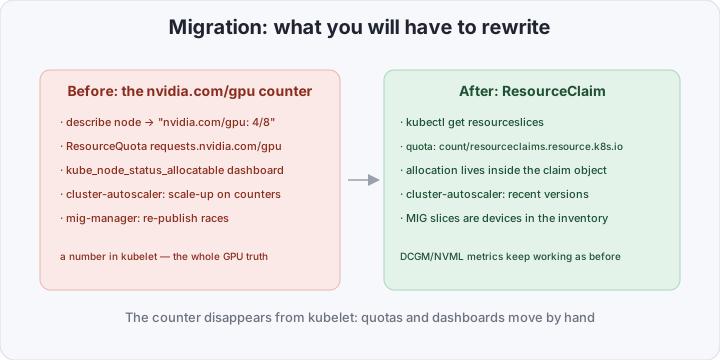
- quotas — a ResourceQuota with
requests.nvidia.com/gpusilently stops working: a claim is not part of the pod’s requests. The workable approach today is an object counter per namespace. Coarser (devices are very different), but it caps spend:
apiVersion: v1
kind: ResourceQuota
metadata:
  name: gpu-claims
spec:
  hard:
count/resourceclaims.resource.k8s.io: "4"- dashboards —
kubectl describe nodeno longer showsnvidia.com/gpu: 4/8, andkube_node_status_allocatable{resource="nvidia_com_gpu"}drops to zero. The DCGM exporter works as before: it reads cards through NVML and knows nothing about the allocation path —DCGM_FI_DEV_GPU_UTILand memory metrics stay alive; - autoscaling — check your stack before migrating: recent cluster-autoscaler versions see Pending pods with claims and add nodes; older releases and some proprietary scalers ignore them — the pod hangs forever. Kueue counts claims in its quotas;
- CLI habits — “how many GPUs are free” is now
kubectl get resourceslices, notdescribe node.
When DRA actually pays off
If all your cards are identical and each pod owns a whole card, DRA brings nothing revolutionary — only standards compliance. The payoff is on heterogeneous hardware:
- MIG — a slice is requested by profile (“1g.10gb on an A100”); re-partitioning is just an inventory change, no races between mig-manager and the counter;
- sharing — time-slicing looks like several devices of one GPU: each fraction is reserved, two pods on a card is a scheduler decision, not silent oversubscription;
- attributes — “memory ≥ 70 GB for the model”, “an H100 for inference”: heavy jobs stop dying with CUDA OOM on a small card while a big one sits idle. Inference and training on one cluster stop negotiating over “just take any free card”:
productName.startsWith('NVIDIA H100')in one claim,memory >= 70000in another — the scheduler keeps them apart; - capacity on devices — not just discrete units: NICs and licenses can be sliced with the same mechanism.
How to verify it works
After installing the driver:
kubectl get resourceslices                      # inventory published
kubectl describe deviceclass gpu.nvidia.com     # which attributes you can select on
kubectl apply -f gpu-claim.yaml
kubectl get resourceclaim gpu-16gb              # allocation: the exact card
kubectl get pod vectoradd -w                    # Pending → Running
kubectl exec vectoradd -- nvidia-smi -L         # the pod sees exactly what was claimed
kubectl describe resourceclaim gpu-16gb         # attributes and the allocated device
If the pod hangs in Pending, run kubectl describe pod: the events hold the reason — say, “no devices match selector”: your selector is stricter than the inventory. And if kubectl get resourceslices is empty, check the nvidia-dra-driver pods: no driver, no inventory.
Bottom line
Device plugins for GPUs are legacy: NVIDIA invests only in the DRA driver, and in 1.35+ the feature gate is locked on. The price of the move is rewriting a couple of quotas and dashboards; the payoff is a scheduler that sees MIG, sharing, and memory size instead of a “whatever’s free” lottery. Migrate now, while both paths run in parallel: run the DRA driver next to the plugin, move non-critical Jobs, rewrite the quotas and dashboards — and only then turn the device plugin off, namespace by namespace. If an observability stack already lives on your cluster, see Kubernetes audit logs in Wazuh.