

Monday, 07:00. The cluster won’t come up after a node failure, you open the list of backups — and realize not one of them has ever been restored. A green list of backups is not a recovery plan; it’s a list of things you’ve never tried to bring up. Velero closes both halves of the equation: scheduled cluster backups to S3, and a cheap way to rehearse a restore in a clean namespace — every month if you like.
Why now: Velero 1.18 is the current 2026 release line, AWS refreshed its official EKS guides (May 2026), and fresh hands-on S3 setup writeups have appeared. Below is the minimal loop worth building: daily backups with TTL, CSI snapshots, and a restore rehearsal with an alert.
Table of contents
Open Table of contents
What “backing up a cluster” even means
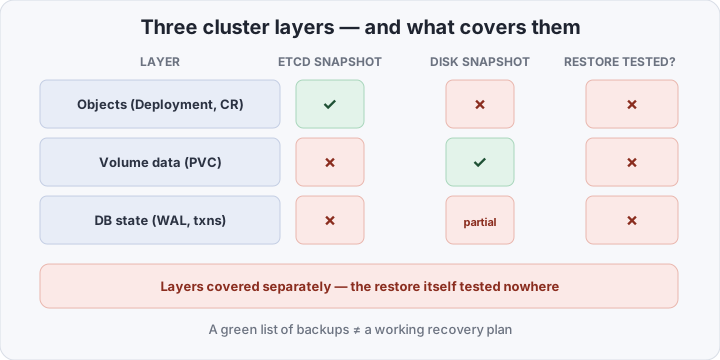
There are three layers in a cluster, and each needs a different backup:
- Cluster objects — Deployments, Services, ConfigMaps, Custom Resources. YAML living in etcd.
- Volume data — what sits inside PersistentVolumeClaims: files, uploads, embedded SQLite databases.
- Database state — Postgres WAL, in-flight transactions. A separate universe with its own tooling.
The classic approaches cover the layers separately — and never cover the main question: will all of it come up together somewhere new.
Walk through the familiar tools:
etcdctl snapshot save— an honest backup of objects, but only objects: it never looks at volume data, and recovery means restoring the whole cluster at once on a stopped control plane.- Provider disk snapshots — volume data yes, objects no: you’d restore files into a world where the Deployments and Services no longer exist.
kubectl get -o yamlon cron — a digest of objects without volume data, without history, and with no guarantee any of it even applies.- Restic on hosts — great for files outside the cluster, but it knows nothing about PVCs or pod startup order.
Each tool is right in its own way. The problem isn’t the tools — it’s that “backing up a cluster” is three tasks solved in coordination, plus the one nobody likes: verifying the result actually boots. In coordination is key: layers captured at different times assemble, on restore, into a cluster that never existed — half the pods pointing at yesterday’s secrets, the other half at the day before’s volumes, and tracing which piece is from when eats your night.
What Velero changes
Velero is a controller that turns backup and restore into ordinary cluster Custom Resources. Concretely:
- Objects and volume data through one mechanism. Manifests of the selected namespaces go into a tarball; PVC data takes one of two routes.
- CSI VolumeSnapshot — a snapshot by the storage class: fast and atomic, but the copy lives in the same storage system as prod.
- node-agent (Kopia) — a DaemonSet that reads the volume at the file level and writes the copy to S3. The copy lives outside the cluster and survives the storage system dying entirely.
- Schedule with TTL — backup rotation without an external cron or cleanup scripts: the controller deletes the expired ones itself.
- Restore is also a CR. The CLI just posts the resource; the server does the work. Restore can rename namespaces and swap configs on the fly.
- Granularity. Back up the whole cluster, one namespace, or objects by label selector — no hand-pruning ReplicaSets.
- Observability. Backups and restores are visible via
kubectl get backups.velero.io, each with a phase (InProgress→Completed/Failed) and its own log. A backup stops being a black box in a node’s cron.
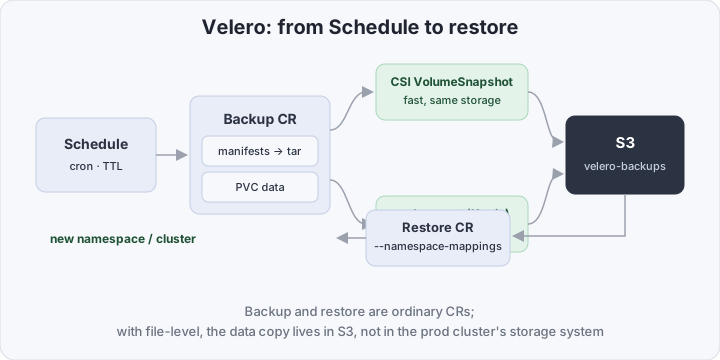
The key shift isn’t “yet another backup tool” — it’s that restore became a cluster-level operation a script can trigger. Which means a schedule can trigger it too.
| etcd-snapshot + scripts | Velero | |
|---|---|---|
| Cluster objects | yes, but the whole cluster at once | yes, per-namespace selectively |
| PVC data | no | yes: CSI snapshot or Kopia to S3 |
| Schedule and TTL | your own cron and cleanup scripts | Schedule CR, TTL out of the box |
| Restore into another namespace | no | --namespace-mappings |
| Independence from the storage cluster | not applicable | file-level copy lives in S3 |
| Restore verification | manual, “someday” | restore is a CR, run by a scheduled Job |
| What runs in the cluster | cron scripts on nodes | Deployment + DaemonSet |
What it takes to get Velero backups running
A minimal path of four steps — from an empty cluster to the first restored namespace.
1. A bucket and credentials. A dedicated bucket in S3 or MinIO, and a dedicated key with rights to that bucket only:
[default]
aws_access_key_id=AKIA...
aws_secret_access_key=...
2. Install. One CLI call deploys everything: the controller, the locations, and — with --use-node-agent — the DaemonSet for file-level backups:
velero install \
  --provider aws \
  --plugins velero/velero-plugin-for-aws:v1.14.0 \
  --bucket velero-backups \
  --backup-location-config region=ru-central1,s3Url=https://s3.example.internal,s3ForcePathStyle=true \
  --snapshot-location-config region=ru-central1 \
  --use-node-agent \
  --features=EnableCSI \
  --secret-file ./credentials-velero
Fine print: for MinIO, s3Url and s3ForcePathStyle=true are mandatory; check the plugin version against your Velero version — compatibility breaks across majors; the --features=EnableCSI flag requires the VolumeSnapshot CRDs and a running snapshot-controller in the cluster.
3. Schedule. The schedule lives in the cluster as a CR — a daily backup at 03:00 with a one-week TTL:
apiVersion: velero.io/v1
kind: Schedule
metadata:
  name: daily
  namespace: velero
spec:
  schedule: "0 3 * * *"
  ttl: 168h0m0s
  template:
    includedNamespaces: ["app", "infra"]
    defaultVolumesToFsBackup: true
    snapshotVolumes: false
defaultVolumesToFsBackup: true is the key flag: every PVC without an explicit exclusion goes to S3 via node-agent. snapshotVolumes: false is deliberate: for a small cluster one consistent scheme is cheaper than two. A TTL of 168h0m0s is exactly 7 days; after that the controller cleans up on its own.
How long to keep — count from the worst case: you don’t notice a silent breakage (a stale token, a drifted config) right away. Seven daily copies is enough when problems surface in a day or two; if not, add a second weekly Schedule with a 720h TTL (a month) and schedule: "0 4 * * 0" — insurance against “we’ve been backing up the broken thing for a week” at the cost of four extra copies. And note: by default Velero pulls objects only from the listed namespaces — cluster-scoped resources (CRDs, ClusterRoles) enter the backup with --include-cluster-resources and get recreated alongside the namespaces on restore.
4. First restore — by hand, immediately. While there are only a couple of backups, run the recovery yourself:
velero restore create restore-test \
  --from-backup daily-2026-11-03 \
  --namespace-mappings app:app-test
velero restore describe restore-test --details
Restore creates the backed-up objects in the app-test namespace and returns PVC data into fresh volumes — make sure the cluster has a storage class that binds them dynamically. --namespace-mappings is exactly the prod→staging bridge: neither prod nor its namespace is touched.
A restore rehearsal on a schedule
One manual restore proves the backup works — today. Six months later the configs, versions, and storage class will have drifted, and the proof is stale. So the rehearsal must repeat itself, and the result must be reported somewhere.
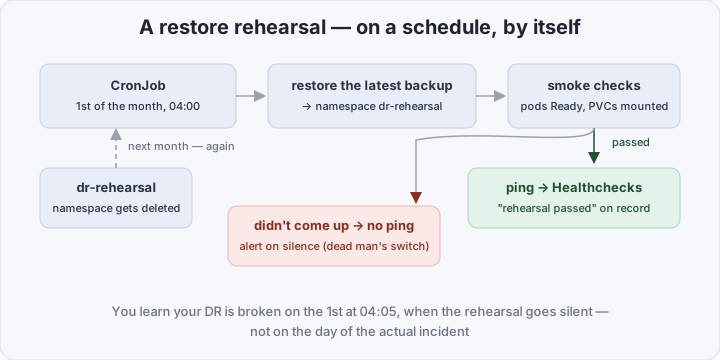
Once a month a CronJob takes the newest backup, restores it into a scratch namespace, and runs smoke checks:
set -eu
B=$(velero backup get -o name | tail -1)
NS=dr-rehearsal
velero restore create "rehearsal-$(date +%F)" \
  --from-backup "${B##*/}" \
  --namespace-mappings "app:${NS}"

until [ "$(velero restore get "rehearsal-$(date +%F)" -o jsonpath='{.status.phase}')" = "Completed" ]; do
  sleep 20
done

kubectl -n "$NS" wait --for=condition=Ready pod --all --timeout=300s
curl -fsS "https://hc-ping.com/<uuid>"   # signal: rehearsal passed
kubectl delete ns "$NS"                  # clean up after yourself
If something breaks, the script never reaches curl, no ping goes out, and Healthchecks.io alerts on the silence. That’s a dead man’s switch — the same trick as for file backups in the restic and Healthchecks post: monitor not the existence of backups, but the fact of a successful restore.
The Job needs its own ServiceAccount with narrow rights: get/list on backups, create/get on restores, create/delete on namespaces, list on pods. Nothing more.
Three practical notes. The first rehearsal is by hand only: automation makes sense once you’ve seen a successful restore — otherwise you’re debugging the Job and the backup at once. Smoke-check depth matches incident depth: kubectl wait on Ready is enough for an MVP; next step, an HTTP probe at a real endpoint — a pod can be Ready while the app inside isn’t. Cleanup is mandatory: the dr-rehearsal namespace is deleted at the end even when the script fails (via trap), or PVCs pile up and the next rehearsal restores on top of the debris.
The boundary: Postgres backs itself up
A volume snapshot of a live Postgres is “almost”: some WAL sits in the page cache, and the snapshot may land between checkpoints. For files and single-disk apps a file-level backup is sufficient; for a database it is not.
So the boundary runs like this: Postgres is backed up by its own tooling — pgbackrest, Barman, or the native backup of the CloudNativePG operator with WAL archiving to S3. Velero stays around the database: the cluster manifest, secrets, ConfigMaps — everything needed to stand the database itself up somewhere new and load the backup onto it. A crash-consistent database restore from a volume is an emergency fallback, not the plan.
If the database is simpler — single-instance MySQL or SQLite in a PVC — the pipeline can still run on Velero: backups support pre/post-hooks, commands run in the container before and after the volume copy (FLUSH TABLES WITH READ LOCK before, unlock after; fsfreeze for file stores). Slower and fussier than a native mysqldump, but snapshot integrity stops being a lottery.
How to verify it all works
- Backup:
velero backup describe daily-2026-11-03 --details— phaseCompleted, and the volumes section shows how many PVCs went via node-agent and how many errors there were. - Restore:
velero restore describe <name> --details— distinguishCompletedfromCompletedWithWarnings: the latter means partially skipped objects, already worth investigating. - Schedule:
kubectl -n velero get schedulesandvelero backup get— fresh backups appear without your involvement. - Metrics: the Velero deployment serves
/metrics—velero_backup_last_successful_timestampand the failure counters slot neatly into a dashboard and alerts.
Bottom line
A recovery plan that has never been rehearsed does not exist — what exists is a document with optimistic assumptions. Velero makes the rehearsal cheap: once a month a Job restores the newest backup into a clean namespace, runs smoke checks, and reports a ping — so you learn your DR is broken on rehearsal morning, not incident morning. The price: a controller with a DaemonSet in the cluster, a bucket in S3, and honesty about databases going through their own backup mechanisms. For a cluster worth less than a week of recovery work, it’s the cheapest Day-2 insurance on the market.